

Zyxel GS1300-10HP Manual
PDF manual · 32 Pages
English



Quick check
Incorrect answer, please try again.
Chat with your Zyxel GS1300-10HP manual using AI
Get instant AI answers from your Zyxel GS1300-10HP manual
Ask anything about the Zyxel GS1300-10HP. Answers come from this manual, with the pages they are based on.
Ask a Question
Do you recommend GS1300-10HP?
Yes NoFrequently Asked Questions
It is designed as an unmanaged Layer-2 switch. That means it focuses on straightforward plug-and-play connectivity using Ethernet auto-negotiation and auto-MDIX, plus PoE power delivery and link status LEDs, rather than advanced configuration or traffic management features.
Is this answer helpful?
The switch supports IEEE 802.3af (PoE) and IEEE 802.3at (PoE+). Power per port is determined by the connected device requirements, while total power budget limits how many PDs can be powered at the same time.
Is this answer helpful?
Extended Range lets you connect a powered device up to 250 m using at least Cat.5e cable, configured via DIP switches. The maximum data speed becomes 10 Mbps, and the maximum PoE power available to the PD at 250 m is 15 W.
Is this answer helpful?
Yes. The switch provides SFP slots, but it does not include transceivers. Use SFP transceivers compliant with the SFP Multi-Source Agreement (MSA). You can replace transceivers while the switch is operating, and then verify LEDs for correct link status.
Is this answer helpful?
The Gigabit Ethernet ports use auto-negotiating settings by default, allowing the switch to determine the best speed (10/100/1000 Mbps) and duplex mode with the connected device. If auto-negotiation is off, you must ensure the peer matches the configured speed and duplex.
Is this answer helpful?
PoE-related LEDs show whether PoE is being delivered to each port and which standard is met. The indicators distinguish between IEEE 802.3at power (PoE+) versus IEEE 802.3af power (PoE), and also reflect whether power is currently supplied and whether the PoE budget is nearing its limit.
Is this answer helpful?
Advantages and Disadvantages
Advantages

- PoE+ support (IEEE 802.3af and 802.3at) to power common IP devices like cameras and phones.
- SFP uplink ports for long-range Layer-2 backbone connections to other switches.
- Extended Range can reach up to 250 m using Cat.5e, with DIP-switch control.
- Auto-negotiation and auto-MDIX help links establish with correct speed and crossover handling.
- Status LEDs make it easier to confirm power, link/activity, and PoE mode.
Disadvantages

- Extended Range limits performance to 10 Mbps and 15 W PoE at 250 m.
- Total PoE power budget may restrict how many PDs can be powered simultaneously.
- An SFP transceiver is required and is not included with the switch.
- As an unmanaged switch, advanced management and policy control are not included.
Product Specification
Function
Switch
Type
Standalone, Rackmount (via mounting brackets)
Network ports
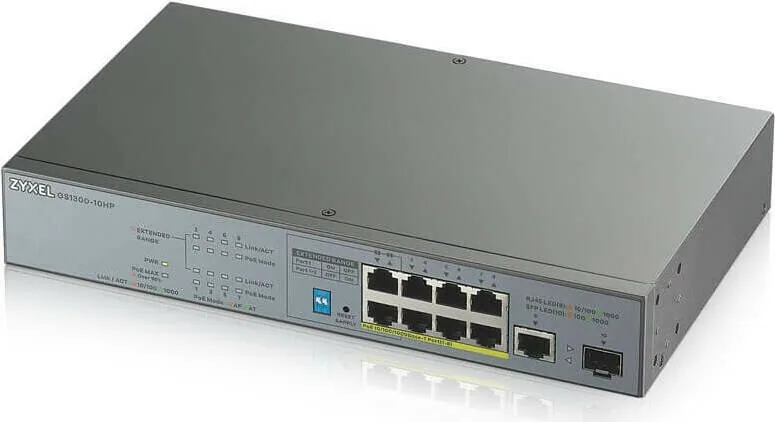
9x RJ-45, 1x SFP
Speeds
9x RJ-45 (10/100/1000Base-T), 1x SFP (1Gb/s)
PoE
8x RJ-45 PoE+ (8x 30W) or 6x RJ-45 PoE+ (6x 30W) and 2x RJ-45 PoLRE (2x 15W), total: 130W
Backplane
20Gb/s, 14.8Mp/s, 9KB Jumboframes, 0.5MB packet buffer, 8K Mac addresses
Officially supported standards
802.1p, 802.3, 802.3ab, 802.3af, 802.3at, 802.3az, 802.3u, 802.3x, 802.3z
Configuration
unmanaged
Cooling
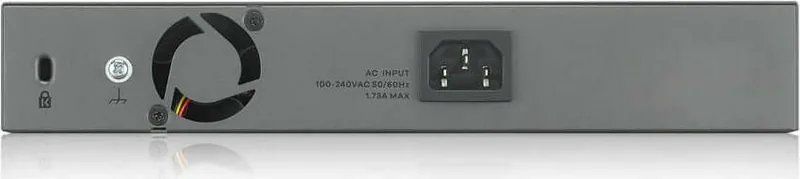
active, 1x fan
Dimensions (WxHxD)
10.51x1.73x6.38in, 1U
Weight
3.64lb
Color
grey
Special features
Metal casing, removable mounting brackets, extended operating range (Temperature: -4 degrees F to 122 degrees F, Humidity: 5% to 95%), Theft protection (Kensington Lock), Long-range mode (10Mb/s with 2x RJ-45 PoLRE (2x 15.4W) at 820.21ft distance), Overvoltage protection (4kV)
Manufacturer's warranty
five years
Product Description
ZyXEL GS1300 Desktop Gigabit Switch with PoE+ and SFP Uplink
The ZyXEL GS1300 Desktop Gigabit Switch, 9x RJ-45, 1x SFP, PoLRE/PoE+ Manual is built for small-to-growing networks that need reliable Gigabit connectivity plus Power over Ethernet for devices that are far from wall outlets. As part of the GS1300 Series, it is an unmanaged Layer-2 switch design focused on fast setup and dependable daily operation.
With auto-negotiating, auto-crossover (auto-MDIX) Gigabit Ethernet ports, the switch adapts to connected devices for speed and duplex without requiring complex configuration. It also includes SFP-based fiber uplink support, enabling long-range connections to other Layer-2 switches and helping reduce bottlenecks when you expand your network.
PoE+ is a key strength of the GS1300 Series. The switch acts as a Power Sourcing Equipment (PSE), delivering power to Powered Devices (PDs) such as IP cameras, wireless access points, IP phones, outdoor routers, and ceiling-mounted equipment. Support for IEEE 802.3af and IEEE 802.3at means you can run standard PoE and higher-power PoE+ loads based on your deployment needs. Power is prioritized by port numbering, so when the budget approaches its limit, lower-priority ports may be affected first.
To extend reach, the switch offers Extended Range using DIP switch configuration. You can connect compatible PDs up to 250 m away while using at least Cat.5e cable. The tradeoff is clear: extended range caps throughput at 10 Mbps and limits available PoE power to 15 W per far-end device.
Top results (performance outcomes)
- Gigabit auto-negotiation and auto-MDIX simplify installs and help maintain stable links.
- SFP uplinks support long-range backbone bridging to keep traffic flowing as you grow.
- PoE+ powers cameras and access points without adding local AC power.
- Extended Range enables distant deployments up to 250 m at reduced speed.
Pros
- PoE+ support (IEEE 802.3af/802.3at) for common IP devices.
- SFP fiber uplink for long-range Layer-2 connections.
- Extended Range up to 250 m with Cat.5e (10 Mbps max).
- Helpful LEDs for power, PoE status, link/activity, and uplink visibility.
- Auto-negotiating and auto-MDIX reduce setup effort.
Cons
- Extended Range lowers data speed to 10 Mbps and PoE to 15 W per PD at 250 m.
- PoE is limited by a total power budget, so too many powered devices can exceed capacity.
- The switch requires an appropriate SFP transceiver (it does not ship with one).
- Unmanaged behavior means features like advanced traffic policies are not a focus.
Notes
- For best safety, ensure proper grounding and follow indoor-use guidance.
- Keep ventilation clear and check LEDs after powering on.
Search for 67,732 Manuals online


Type-in Brand or Model