


Zyxel GS1100 Series Manual
PDF manual · 48 Pages
English



Quick check
Incorrect answer, please try again.
Chat with your Zyxel GS1100 Series manual using AI
Get instant AI answers from your Zyxel GS1100 Series manual
Ask anything about the Zyxel GS1100 Series. Answers come from this manual, with the pages they are based on.
Ask a Question
Do you recommend GS1100 Series?
Yes NoFrequently Asked Questions
PoE+ (IEEE 802.3at) is available on PoE-capable GS1100 models (like GS1100-10HP variants). These ports can supply up to 30W per port; the overall number of powered devices is limited by the switch’s total PoE budget, so check the specific model’s total wattage.
Is this answer helpful?
Yes. The GS1100 supports hot‑swapping SFP transceivers; take ESD precautions, remove dust plugs, and avoid looking into active fiber connectors. The switch will auto-detect the transceiver and indicate link/activity via LEDs.
Is this answer helpful?
No. The GS1100 series is an unmanaged switch focused on plug-and-play operation. It supports auto-negotiation, auto-MDIX, basic 802.1p CoS, and energy-saving features but does not provide VLAN configuration or a management interface.
Is this answer helpful?
Depending on the model, the switch supports desktop placement with rubber feet, wall mounting using two M4 screws (observe model-specific hole spacing), or rack mounting on 19" EIA racks with supplied brackets and screws for rackable models.
Is this answer helpful?
LEDs indicate power presence (PWR), link/activity and speed per port (green for 1 Gbps, amber for 10/100 Mbps depending on model), and a PoE MAX amber LED lights when PoE consumption reaches ~95% of the budget. Consult the LED table for model-specific behavior.
Is this answer helpful?
Use standard UTP/STP cables: Cat3–5 for 10 Mbps, Cat5 for 100 Mbps, and Cat5e/Cat6 for 1000 Mbps. Segment lengths for copper Ethernet should not exceed 100 meters to maintain signal integrity.
Is this answer helpful?
Ensure proper grounding, maintain clearance for ventilation, avoid stacking fanless units, use correct power adapters/cables, follow ESD handling for transceivers, and do not install or service during thunderstorms. Adhere to local electrical codes and product safety warnings.
Is this answer helpful?
Advantages and Disadvantages
Advantages

- 8 Gigabit RJ-45 ports plus 2 SFP uplinks provide flexible connection and backbone options.
- PoE+ support (up to 30W per port on PoE models) powers cameras, APs, and IP phones without separate power.
- Fanless desktop models reduce noise; rack versions offer mounting kits and higher port counts.
- Energy Efficient Ethernet (IEEE 802.3az) reduces power usage during idle periods.
- Plug-and-play unmanaged design simplifies deployment for small businesses and edge networks.
Disadvantages

- Unmanaged feature set lacks VLAN, QoS configuration beyond basic 802.1p, and no advanced management tools.
- Total PoE power budget can limit the number of high-power PDs supported simultaneously.
- Some models require external power adapters or cords; check model-specific power type before purchase.
- Limited warranty and support procedures require contacting regional vendors for service.
- Fanless models need proper clearance and ventilation; stacking can lead to overheating.
Product Specification
Function
Switch
Type
Standalone
Network ports
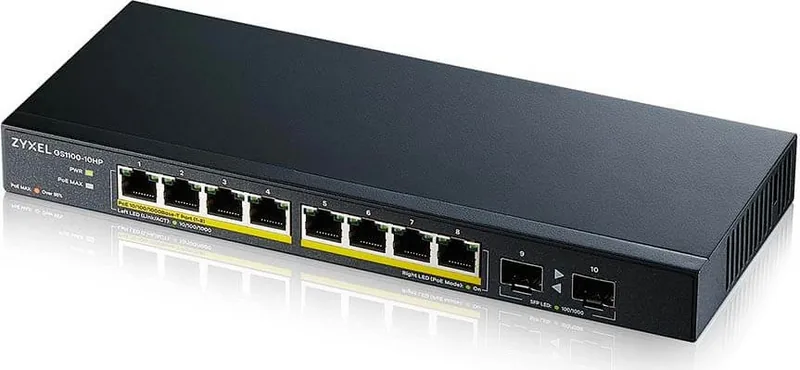
8x RJ-45, 2x SFP
Speeds
8x RJ-45 (10/100/1000Base-T), 2x SFP (1Gb/s)
PoE
8x RJ-45 PoE+, total: 130W
Backplane
20Gb/s, 14.88Mp/s, 9KB Jumboframes, 256kB packet buffer, 8K MAC addresses
Officially supported standards
802.1p, 802.3, 802.3ab, 802.3af, 802.3at, 802.3az, 802.3u, 802.3x, 802.3z
Configuration
unmanaged
Cooling
passive
Dimensions (WxHxD)
9.84x1.06x4.09in
Weight
1.61 lb
Color
anthracite
Special features
Metal housing, external power supply
Manufacturer warranty
lifetime (10 years in AT/DE) + five years
Product Description
ZyXEL GS1100 Desktop Gigabit Switch, 8x RJ-45, 2x SFP, PoE+, V2
The ZyXEL GS1100 Desktop Gigabit Switch, 8x RJ-45, 2x SFP, PoE+, V2 is a compact, fanless unmanaged switch designed for small business and workgroup deployments. It combines eight auto‑negotiating Gigabit RJ‑45 ports with two SFP uplink slots and robust PoE+ (802.3at) support on applicable models, enabling both high-speed data and power delivery over Ethernet to devices such as IP cameras, access points, and VoIP phones. The unit emphasizes straightforward plug-and-play operation, energy efficiency via IEEE 802.3az EEE, and flexible mounting options including desktop, wall, and rack configurations depending on the model variant.
Key capabilities and use cases
This switch supports full wire-speed forwarding, store-and-forward switching, automatic MAC learning (8K entries), and 802.1p CoS for basic traffic prioritization. SFP slots provide fiber or copper uplink flexibility for backbone connections, while PoE+ ports deliver up to 30W per port (model-dependent) with a centralized total PoE budget suitable for powering multiple PDs. Typical deployments include powering surveillance cameras and wireless APs in locations without nearby AC outlets, serving as a high-speed departmental aggregation switch, or providing fiber uplinks between floors or buildings.
Installation and hardware notes
The GS1100 series offers simple installation: attach rubber feet for desktop placement, use M4 screws for wall mounting (with specified hole centers per model), or fit into a standard 19" rack with mounting brackets on rackable models. Follow grounding, ventilation, and clearance guidelines to avoid overheating, and observe ESD precautions when handling SFP transceivers. LEDs on the front and uplink indicators provide real-time status for power, link/activity, speed, and PoE budget warnings.
Performance and reliability
Built to IEEE 802.3/802.3u/802.3ab standards, the switch supports auto-MDIX, auto speed/duplex negotiation, and Energy Efficient Ethernet to reduce power when links are idle. Fanless designs minimize noise for office or sensitive environments; rack models include fans where required. The product offers vendor support channels and regional warranty policies, and complies with relevant EMC and safety regulations for commercial deployment.
Final thoughts
The ZyXEL GS1100 V2 is ideal for small networks that need reliable gigabit switching with the convenience of PoE+ and flexible uplink options. Its unmanaged simplicity minimizes setup time while SFP support and PoE budgeting allow practical expansion and device deployment across varied environments.
Notes
- Ensure proper grounding and follow local electrical codes when installing.
- Verify the model’s PoE budget before connecting multiple high-power PDs.
- Use compatible SFP transceivers and avoid looking into active fiber connectors.
Search for 67,732 Manuals online


Type-in Brand or Model