


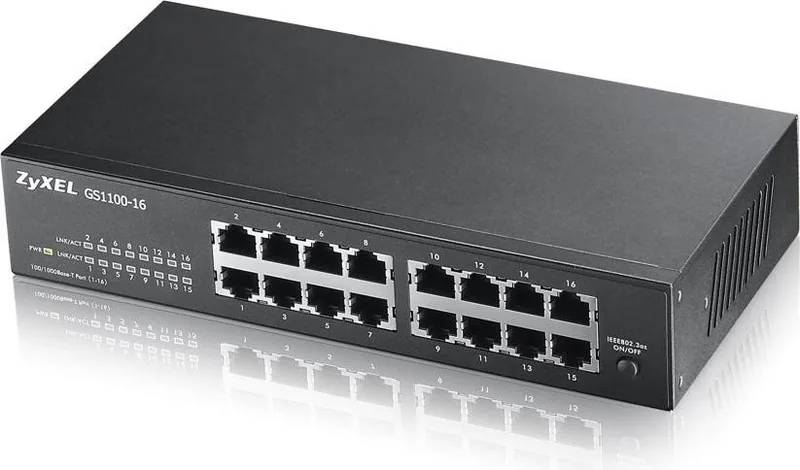
Zyxel GS1100-16 Manual
PDF manual · 30 Pages
English



Quick check
Incorrect answer, please try again.
Chat with your Zyxel GS1100-16 manual using AI
Get instant AI answers from your Zyxel GS1100-16 manual
Ask anything about the Zyxel GS1100-16. Answers come from this manual, with the pages they are based on.
Ask a Question
Do you recommend GS1100-16?
Yes NoFrequently Asked Questions
It is an unmanaged Gigabit Ethernet switch designed for small to medium workgroups. It connects computers, printers, and servers to provide high-speed local area network access without complex setup.
Is this answer helpful?
Yes, specific models like the GS1100-8HP and 10HP support IEEE 802.3at PoE. They can supply power to connected devices such as IP phones and wireless access points directly through the Ethernet cable.
Is this answer helpful?
Yes. The unit offers versatile installation options including desktop placement, wall mounting, and 19-inch rack mounting. Specific kits and screws are required for rack or wall installation.
Is this answer helpful?
Check the front panel LEDs for power and link status. Verify that cables are Category 5e or higher and under 100 meters. Ensure connected devices are powered on and properly connected.
Is this answer helpful?
Use Category 5e, 6, or higher UTP or STP cables for Gigabit speeds. Standard network cables work for lower speeds, but higher categories ensure performance at 1000 Mbps.
Is this answer helpful?
Yes, the GS1100 series is fanless designed. This eliminates noise from cooling fans, making it suitable for quiet office environments and reducing maintenance requirements due to fewer moving parts.
Is this answer helpful?
Some models like the GS1100-24 and 10HP include two SFP slots for fiber or copper uplinks. These allow expansion to backbone switches using compatible SFP transceivers.
Is this answer helpful?
Advantages and Disadvantages
Advantages

- Fanless design ensures silent operation in office environments.
- Supports Energy Efficient Ethernet to reduce power consumption.
- Auto-negotiating ports adapt to devices for optimal speed.
- Flexible mounting includes desktop, wall, and 19-inch rack.
- Store-and-forward switching guarantees data accuracy.
Disadvantages

- Unmanaged switches lack advanced configuration options like VLANs.
- Power budgets on PoE models limit the number of powered devices.
- SFP transceivers are not included and must be purchased separately.
- Installation requires specific mounting hardware for rack or wall setups.
- Troubleshooting relies on physical LED indicators rather than software.
Product Specification
Function
Switch
Type
Standalone, Rackmount (via mounting bracket)
Network Connections
16x RJ-45
Speeds
16x RJ-45 (10/100/1000Base-T)
PoE
N/A
Backplane
32Gb/s, 23.8Mb/s, 9KB Jumboframes, 256kB Packet Buffer, 8K MAC Addresses
Officially Supported Standards
802.1p, 802.3, 802.3ab, 802.3az, 802.3u, 802.3x, 802.3z
Configuration
unmanaged
Cooling
passive
Dimensions (WxHxD)
8.46x1.65x5.24 inches, 1U
Weight
2.03 lbs
Color
anthracite
Features
Metal housing, removable mounting brackets
Manufacturer Warranty
lifetime (10 years in AT/DE) + five years
Product Description
Enhance Your Network with the ZyXEL GS1100 Series
In today's fast-paced digital environment, having a reliable network backbone is essential for small business productivity and growth. The ZyXEL GS1100 Series offers an unmanaged solution that simplifies connectivity without sacrificing performance or requiring complex configuration. Whether you are expanding a remote workgroup or bridging network segments in an enterprise, this switch delivers consistent speed and efficiency. The specific configuration found in the ZyXEL GS1100 Desktop Gigabit Switch, 16x RJ-45 Manual serves as a great reference point for understanding the robust capabilities offered by this hardware platform.
Key Features and Capabilities
This device supports 10/100/1000 Mbps Gigabit Ethernet speeds across all ports. Auto-negotiation ensures optimal connection settings with minimal user intervention required. Energy Efficient Ethernet technology reduces power consumption when links are idle, contributing to greener and more cost-effective operations over time. For models like the 16-port configuration, you gain ample port density for connecting desktops, printers, and wireless access points without needing additional infrastructure expansion. The fanless design ensures silent operation, making it highly suitable for office environments where noise pollution is a concern. Some variants include Power over Ethernet capabilities to supply power directly to IP phones and cameras.
Installation and Versatility
Flexibility in mounting choices allows this equipment to fit various physical spaces effectively. Users can place the unit on a standard desk, mount it securely to a wall, or install it within a professional 19-inch rack. Installation is straightforward, requiring only standard Ethernet cables and compatible power sources to get started immediately. LED indicators provide immediate visual feedback on connection status and data activity, helping administrators diagnose connectivity issues quickly without complex diagnostic tools. This visual clarity is crucial for maintaining network health in real-time scenarios.
Troubleshooting and Maintenance
Proper cabling standards are vital for peak performance and stability. Using Category 5e or higher cables ensures data integrity at Gigabit speeds over longer distances. If connectivity issues arise, checking LED states on the front panel often reveals the root cause instantly. The built-in store-and-forward switching method guarantees data accuracy before transmission occurs, protecting the network from corrupted frames and potential errors. This reliability makes it a staple for backbone computing environments aiming for high uptime and smooth daily operations.
Connectivity Options
Certain models feature small form-factor pluggable slots for fiber uplinks, enabling connections to backbone switches at different physical media. This allows for flexible network architecture designs that accommodate distance or bandwidth requirements. Ensuring compatibility with transceivers is noted in technical guides to avoid confusion during setup. Compatibility with various cable types is supported for optimal flexibility. Ultimately, the combination of power, ease of use, and expandability defines the user experience for this networking hardware.
Search for 67,732 Manuals online


Type-in Brand or Model
Thomas Weber
6 months ago
Is this switch silent enough for a quiet office and how much power does it really consume?
Manual.ly
6 months ago
Yes, this device is virtually silent, with no fans or noise during normal operation. Power consumption is minimal, with a maximum rating of 6.4W. Users confirm it draws negligible electricity even under load. It comes with mounting angles for standard 19-inch rack installation. This low energy draw and quiet performance make it reliable for continuous network distribution in homes and small offices without disturbing noise or high costs.