
Zyxel GS1100-16 V3 Manual
PDF manual · 49 Pages
English



Quick check
Incorrect answer, please try again.
Chat with your Zyxel GS1100-16 V3 manual using AI
Get instant AI answers from your Zyxel GS1100-16 V3 manual
Ask anything about the Zyxel GS1100-16 V3. Answers come from this manual, with the pages they are based on.
Ask a Question
Do you recommend GS1100-16 V3?
Yes NoDo you recommend GS1100-16 V3?
Yes NoFrequently Asked Questions
No, the GS1100-16 model does not support Power over Ethernet. Only the GS1100-10HP model in the series includes PoE capabilities for powering devices like IP phones and cameras.
Is this answer helpful?
Yes, the GS1100-16 is wall-mountable. You will need M4 screws and screw anchors if mounting on concrete or brick walls. Ensure there is enough clearance for ventilation.
Is this answer helpful?
For 1000 Mbps speeds, you should use Category 5e or Category 6 Unshielded Twisted Pair (UTP) or Shielded Twisted Pair (STP) cables. Lower categories may limit performance.
Is this answer helpful?
Yes, the GS1100-16 is a fanless device. It relies on passive cooling, so you must ensure adequate air circulation around the unit to prevent overheating during operation.
Is this answer helpful?
The switch features an embedded 8K MAC address table, allowing it to store up to 8000 MAC address entries for efficient network management.
Is this answer helpful?
Advantages and Disadvantages
Advantages

- Supports IEEE 802.3az Energy Efficient Ethernet to reduce power consumption
- Fanless design ensures silent operation and low maintenance requirements
- Versatile mounting options including desktop, wall, and rack installation
- Auto-negotiating ports support 10/100/1000 Mbps speeds automatically
- Store-and-forward switching provides low latency and high reliability
Disadvantages

- No Power over Ethernet (PoE) support on the 16-port model
- Requires careful placement to maintain airflow and prevent overheating
- Lacks advanced management features like VLAN configuration or QoS controls
- SFP slots are not available on the 16-port variant limiting fiber uplinks
- LED indicators do not show detailed traffic statistics beyond link status
Product Specification
Function
Switch
Type
Standalone, Rackmount (via mounting bracket)
Network Ports
16x RJ-45
Speeds
16x RJ-45 (10/100/1000Base-T)
PoE
N/A
Backplane
32Gb/s, 23.8 Mbps, 9KB Jumboframes, 525KB Packet Buffer, 8K MAC Addresses
Officially Supported Standards
802.1p, 802.3, 802.3ab, 802.3az, 802.3u, 802.3x, 802.3z
Configuration
unmanaged
Cooling
passive
Dimensions (WxDxH)
8.46x1.67x5.24 inches, 1HE
Weight
2.03 lbs
Color
anthracite
Features
Metal case, removable mounting brackets
Manufacturer Warranty
lifetime (10 years in AT/DE) + five years
Product Description
ZyXEL GS1100 Desktop Gigabit Switch 16x RJ-45 V3: A Powerful Networking Solution
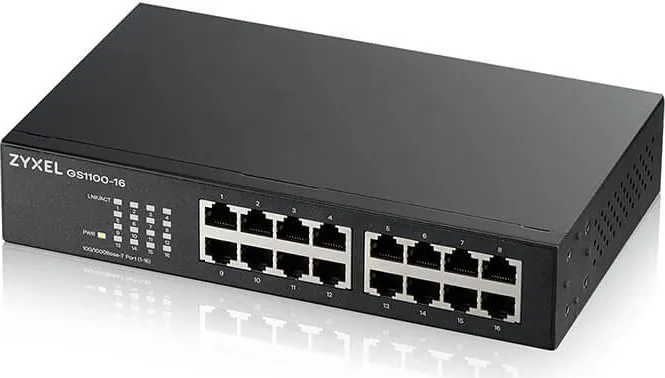
The ZyXEL GS1100 Desktop Gigabit Switch 16x RJ-45 V3 stands as a robust choice for small businesses and workgroups seeking high-performance networking without complexity. This unmanaged switch is designed to deliver fast, reliable connectivity across your local area network. With sixteen auto-negotiating Gigabit Ethernet ports, it supports data transfer speeds of up to 1000 Mbps, ensuring that bandwidth-intensive applications run smoothly. The device operates as a store-and-forward switch, which minimizes latency while maintaining data integrity.
One of the standout features of this series is its energy efficiency. The switch complies with the IEEE 802.3az Energy Efficient Ethernet standard, allowing it to reduce power consumption when links are idle or not in use. This makes it an environmentally friendly option that also helps lower operational costs. The hardware is built with a fanless design, which means it operates silently and requires no maintenance related to moving parts. However, proper ventilation is crucial; users must ensure at least two centimeters of clearance around the unit to prevent overheating.
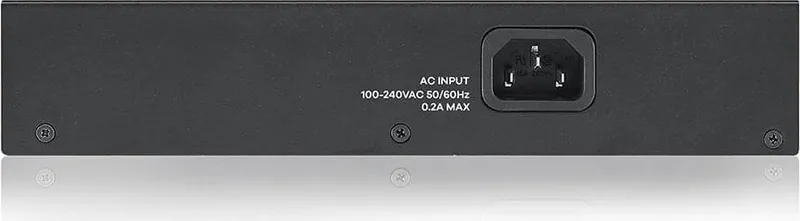
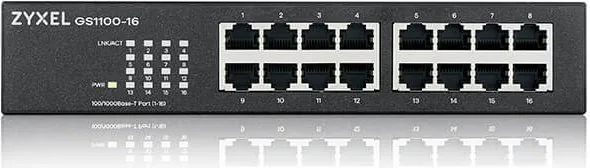
Installation flexibility is another key advantage. The GS1100-16 can be placed on a desktop using included rubber feet, mounted on a wall, or installed into a standard 19-inch rack. This versatility allows it to fit seamlessly into various office environments, from compact home offices to larger server rooms. The front panel features intuitive LED indicators that provide real-time status updates on link activity, speed, and power, making troubleshooting straightforward. Whether you are connecting computers, servers, printers, or other switches, this device simplifies network expansion and backbone connections.
Key Installation Notes
- Ensure at least 5 cm of clearance on all sides for air circulation.
- Use Category 5e or higher cables for Gigabit speeds.
- Do not stack fanless units directly on top of each other without spacers.
- Grounding is recommended for safety, especially in industrial settings.
Search for 67,732 Manuals online


Type-in Brand or Model