


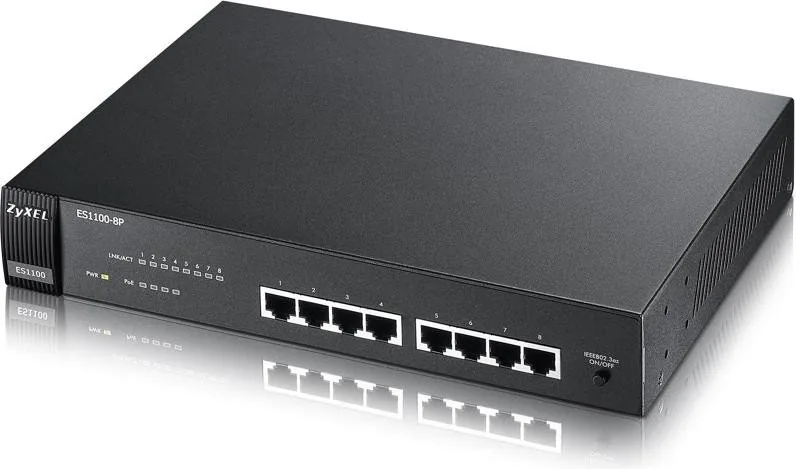
Zyxel ES1100-8P Manual
PDF manual · 24 Pages
English



Quick check
Incorrect answer, please try again.
Chat with your Zyxel ES1100-8P manual using AI
Get instant AI answers from your Zyxel ES1100-8P manual
Ask anything about the Zyxel ES1100-8P. Answers come from this manual, with the pages they are based on.
Ask a Question
Do you recommend ES1100-8P?
Yes NoFrequently Asked Questions
Yes, specific models like ES1100-8P and ES1100-16P support IEEE 802.3af PoE. They can supply up to 15.4W per Ethernet port.
Is this answer helpful?
It supports Cat 3, 4, 5 UTP/STP for 10 Mbps and Cat 5 UTP/STP for 100 Mbps. Cat 5e is recommended for Gigabit connections.
Is this answer helpful?
Yes, models like ES1100-24 and 24G can be installed in a standard 19-inch rack using the provided mounting brackets and screws.
Is this answer helpful?
All RJ-45 ports are auto-negotiating. They automatically detect the speed and duplex mode of the connected device.
Is this answer helpful?
Yes, select models support IEEE 802.3az EEE. This reduces power consumption when no data is moving through connections.
Is this answer helpful?
Most models provide an 8K MAC address entry table, while the ES1100-8P model provides 1K entries.
Is this answer helpful?
Check the LINK/ACT LED on the front panel. Green blinking indicates active data, while solid green shows a link.
Is this answer helpful?
Advantages and Disadvantages
Advantages

- Supports IEEE 802.3af PoE for powering devices like cameras without extra cables.
- Includes Energy Efficient Ethernet standard to reduce power consumption during idle times.
- Features auto-negotiation and auto-crossover for simplified cabling and speed detection.
Disadvantages

- Most models are unmanaged and lack configuration options for VLANs or QoS.
- Port speeds are limited to 100 Mbps on most ports except Gigabit versions.
- Larger 24-port models require rack mounting and do not fit easily on small desks.
Product Specification
Function
Switch
Type
Standalone, Rackmount (via mounting bracket)
Network Ports
8x RJ-45
Speeds
8x RJ-45 (10/100Base-T)
PoE
4x RJ-45 PoE (4x 15.4W)
Backplane
1.6 Gb/s, 1.2 Mpackets/s, 2 KB Jumboframes, 96 KB Packet Buffer, 1K MAC Addresses
Officially Supported Standards
802.1p, 802.3, 802.3af, 802.3az, 802.3u, 802.3x
Configuration
unmanaged
Cooling
passive
Dimensions (WxDxH)
10.31x1.61x7.24 in
Weight
3.09 lbs
Color
black
Features
Metal chassis, removable mounting brackets
Manufacturer Warranty
Lifetime (10 years in AT/DE) + 5 years
Product Description
ZyXEL ES1100 Desktop Switch Overview
The ZyXEL ES1100 Desktop Switch represents a robust solution for expanding network capabilities within small to medium-sized environments. This unmanaged Fast Ethernet switch simplifies connectivity by providing multiple 10/100 Mbps Ethernet ports designed for seamless integration into existing setups. Specific models in this series offer Power over Ethernet functionality, allowing administrators to connect devices like IP cameras and wireless access points without needing separate power adapters. By delivering data and electricity through a single Ethernet cable, installation becomes cleaner and more efficient. Users do not need to hunt for electrical outlets near every device, which saves significant time during deployment and keeps workspaces organized.
The hardware design focuses on reliability and ease of use. Users benefit from auto-negotiating ports that automatically detect the speed and duplex mode of connected devices. This eliminates configuration headaches and ensures optimal performance across various network speeds. Auto-crossover technology further simplifies cabling since users can connect any device with standard straight-through or crossover cables without worrying about port compatibility. Energy efficiency is also a priority, as selected models support the IEEE 802.3az EEE standard to reduce power consumption during idle periods. The system goes into power saving mode when no data is actively moving through specific connections.
Versatility in installation is another key advantage. The switches can be placed on a desktop, mounted on a wall, or installed in a standard 19-inch rack depending on the specific model and physical space requirements. Front panel indicator lights provide real-time status updates for power and link activity, aiding in quick troubleshooting. Whether connecting a standalone workgroup or bridging network segments in an enterprise setting, the switch ensures stable connections and high wire-speed forwarding rates. This device supports store-and-forward switching and automatic address learning. The embedded MAC address table allows the switch to efficiently manage data flow for thousands of entries.
For those requiring gigabit connectivity, specific versions include dual personality ports capable of handling 1000 Mbps speeds or fiber connections. This flexibility makes the series suitable for growing networks where bandwidth demands increase over time. Proper ventilation is required during installation, and mounting screws are available for secure attachment to walls or racks. The design ensures safety with built-in protections against overheating and power fluctuations. The unit is also compliant with various international safety and interference standards. Overall, this series stands out as a practical choice for businesses and home offices looking for dependable wired network expansion with minimal configuration effort. It is a reliable choice for wired network expansion.
Search for 67,732 Manuals online


Type-in Brand or Model