Fast Ethernet : 100 Mbps (half duplex), 200Mbps (full
duplex)
ConnecteurRJ-45 ; Auto-MDIX sur tous les ports
Adresse MACTable d'adresses 1K Mac
Tampon mémoireES-105A: 64 KB
ES-108A: 96 KB
Câble réseau
(Jusqu'à 100m ou 328
pieds)
10BASE-T : 100Ω 2-paires UTP/STP Cat. 3, 4, 5
100BASE-TX : 100Ω 2-paires UTP/STP Cat. 5
Voyant DELPar port: LINK/ACT
Par unité: PWR
Alimentation électrique 5VDC 0.6A
Température De fonctionnement: 0º C~ 50º C (32º F ~ 122º F)
Humidité (Sans
condensation)
En fonctionnement: 10% ~ 90%
Dimensions194 x 85 x 25 mm (Long x Larg x Haut)
EMI & SécuritéFCC Class B, CE, C-Tick
ITALIANO
Non ostruire i fori per la ventilazione.
/2
%
Quick check
I'm not a robot
Incorrect answer, please try again.
Chat with your Zyxel ES-105A manual using AI
Get instant AI answers from your Zyxel ES-105A manual
Ask anything about the Zyxel ES-105A. Answers come from this manual, with the pages they are based on.
Ask a Question
0/1000
Do you recommend ES-105A?
YesNo
0
Lukas Wagner
10 months ago
I saw reviews saying the included power adapters fail within about a year and that the switch only supports 10/100 Mbps. Is this expected, and what should I do to prevent adapter issues?
0
Manual.ly
10 months ago
The unit is a 10/100 Mbps (Fast Ethernet) switch, so it does not support Gigabit speeds. Regarding the power adapter: adapter failure is the most reported concern, so we recommend using the original adapter (or a correctly rated equivalent with matching DC voltage and current), placing the switch where it has good airflow, and keeping the ambient temperature within the product specification (avoid heat sources like radiators or enclosed spaces). If your adapter fails, please contact support with your order details and a short description (and photos if possible). If it is within the warranty period, we can arrange a replacement or the appropriate remedy.
M: OA-GPT-5-NAN
M: OA-GPT-5-NAN
Frequently Asked
Questions
A
The ES-10 includes five 10Base-T/100Base-TX RJ-45 ports that are auto-negotiating and support Auto-MDI/MDIX, allowing connection with straight or crossover cables and automatic speed/duplex detection.
Is this answer helpful?
A
The ES-10 is plug-and-play with no configuration required. Connect devices with Ethernet cables, attach the supplied 5V DC power adapter, and the switch will auto-negotiate speeds and link status.
Is this answer helpful?
A
Yes. The switch provides QoS prioritization to favor bandwidth-sensitive traffic such as VoIP and real-time video; connect those devices to labeled QoS-capable ports for prioritized handling.
Is this answer helpful?
A
Place the unit on a clean, level, ventilated surface. Keep cable runs under 100 meters (328 feet). Operating temperature is 0–50°C and humidity 10–90% non-condensing. Do not block ventilation openings.
Is this answer helpful?
A
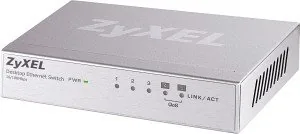
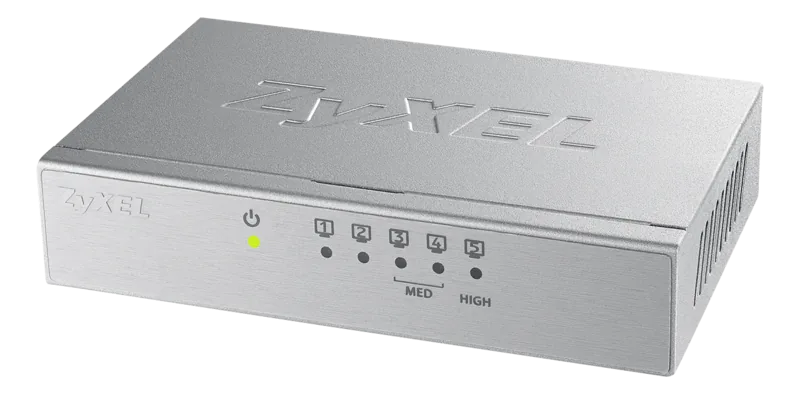
The front panel includes a PWR LED to show power status and LINK/ACT LEDs per port indicating link presence and network activity (steady for link, blinking for transmit/receive).
Is this answer helpful?
A
No. The ES-10 supports Fast Ethernet only (10/100 Mbps). For gigabit speeds, consider a switch with 10/100/1000 Mbps ports.
Is this answer helpful?
A
The product carries ZyXEL limited warranty terms (typically up to two years) and complies with FCC Class B, CE, and C-Tick regulations. Warranty service generally requires proof of purchase and RMA processing.
Is this answer helpful?
M: OA-GPT-5-NAN
Advantagesand
Disadvantages
Advantages
Five auto-negotiating 10/100 Mbps RJ-45 ports with Auto-MDI/MDIX simplify connections.
Compact desktop form factor suitable for SOHO environments with simple installation.
QoS support prioritizes bandwidth-sensitive traffic like VoIP and streaming video.
Store-and-forward architecture and non-blocking wire-speed forwarding reduce latency.
Front-panel LEDs and low power 5V adapter make status monitoring and deployment easy.
VS
Disadvantages
No advanced management features (VLANs, SNMP) for larger or complex networks.
Limited to Fast Ethernet (100 Mbps) — not suitable for gigabit network backbones.
Modest buffer and MAC table sizes may limit performance under heavy loads.
Fixed five-port design offers no uplink port with higher bandwidth options.
Basic warranty/repair process requires RMA and proof of purchase for service.
M: OA-GPT-5-NAN
Product
Specification
Function
Switch
Type
Standalone
Network ports
5x RJ-45
Speeds
5x RJ-45 (10/100Base-T)
PoE
N/A
Backplane
1.0Gb/s, 9KB Jumboframes, 56KB Packet buffer, 1K MAC addresses
Officially supported standards
802.3, 802.3az, 802.3u, 802.3x
Configuration
unmanaged
Cooling
passive
Dimensions (WxHxD)
4.76x1.02x2.95in
Weight
0.49lb
Color
silver
Special features
Metal housing, external power supply
Manufacturer's warranty
five years
M: OA-GPT-54-NAN
Product
Description
ZyXEL ES-10 Desktop Switch, 5x RJ-45, V3 Manual
The ZyXEL ES-10 Desktop Switch (5x RJ-45, V3) is a compact, plug-and-play Fast Ethernet switch designed for small offices, home offices, and simple workgroups. With five auto-negotiating 10/100 Mbps RJ-45 ports and Auto-MDI/MDIX support, the ES-10 makes it easy to connect computers, printers, and other network devices without worrying about crossover cables or manual speed settings. Its store-and-forward switching architecture helps reduce latency and improves overall network responsiveness for typical SOHO traffic.
Physically small and desktop-friendly, the ES-10 fits neatly on a desk or shelf. The unit is powered by a supplied 5V DC adapter and shows status via front-panel LEDs: a power indicator and per-port LINK/ACT indicators that reflect connectivity and activity. The switch supports QoS prioritization for bandwidth-sensitive traffic such as VoIP and streaming video, helping ensure smoother performance for real-time services. Built-in flow-control and broadcast storm protection add resilience in congested scenarios.
Performance-wise, the ES-10 offers non-blocking wire-speed forwarding suitable for light to moderate network loads. Its MAC address table and onboard buffer memory help manage traffic efficiently; environmental specs and compliance ratings (FCC Class B, CE, C-Tick) make it suitable for typical office deployments. Installation is straightforward: place the unit in a clean, ventilated area, connect devices with Cat5/Cat5e cables (keeping runs under 100 meters), and plug in the power adapter.
This model emphasizes ease of use and reliability over advanced management features. It’s ideal for users who need a simple, low-cost network expansion solution: small teams, home networks, or isolated groups of devices that require dependable wired connectivity with minimal setup.
Notes
Keep ventilation openings unobstructed and maintain cable runs under 100 meters.
Use the supplied power adapter (5V DC, 0.6A).
QoS ports are recommended for VoIP phones and STBs to prioritize real-time traffic.
LEDs indicate PWR (power) and LINK/ACT (per-port connectivity/activity).




Lukas Wagner
10 months ago
I saw reviews saying the included power adapters fail within about a year and that the switch only supports 10/100 Mbps. Is this expected, and what should I do to prevent adapter issues?
Manual.ly
10 months ago
The unit is a 10/100 Mbps (Fast Ethernet) switch, so it does not support Gigabit speeds. Regarding the power adapter: adapter failure is the most reported concern, so we recommend using the original adapter (or a correctly rated equivalent with matching DC voltage and current), placing the switch where it has good airflow, and keeping the ambient temperature within the product specification (avoid heat sources like radiators or enclosed spaces). If your adapter fails, please contact support with your order details and a short description (and photos if possible). If it is within the warranty period, we can arrange a replacement or the appropriate remedy.