
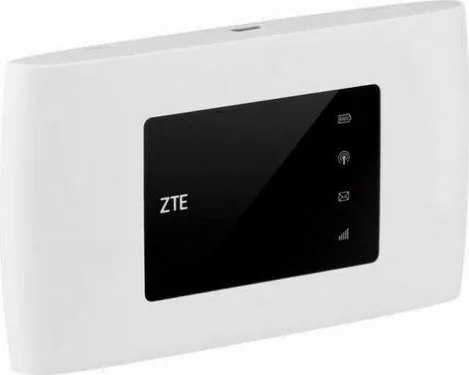
ZTE MF920V Manual
PDF manual · 23 Pages
English



Quick check
Incorrect answer, please try again.
Chat with your ZTE MF920V manual using AI
Get instant AI answers from your ZTE MF920V manual
Ask anything about the ZTE MF920V. Answers come from this manual, with the pages they are based on.
Ask a Question
Do you recommend MF920V?
Yes NoDo you recommend MF920V?
Yes NoFrequently Asked Questions
The device is designed to work with micro SIM cards. It does not support nano SIM cards without physical modification which is not recommended. Using third party adaptors can damage the unit and void the warranty. Please ensure you have the correct form factor before inserting.
Is this answer helpful?
To reset the device power it on then open the back cover. Locate the reset button and press it firmly with a thin object like a paperclip for about 5 seconds. The LEDs will flash indicating the reboot process. All passwords and settings will return to default values.
Is this answer helpful?
Yes you can use it overseas if the SIM is from that country or you have roaming enabled. Ensure you check with your carrier plan to avoid high data charges. The device supports 4G bands used in many regions including 700 and 2600 MHz.
Is this answer helpful?
The default setting allows up to five devices to connect via Wi-Fi concurrently. You can configure this limit to go as high as ten users through the web interface settings. Higher numbers may impact battery life and data throughput performance.
Is this answer helpful?
Under normal conditions the internal battery can last up to eight hours of operation. Heavy usage such as video streaming or continuous downloads will drain it faster. Keep the device away from extreme heat to maintain battery health.
Is this answer helpful?
The device supports Windows including versions 7 8 10 and XP. It also works with MAC OS X 10.5 and above and Linux systems. Installation is generally driverless for plug and play convenience on these platforms.
Is this answer helpful?
Open a web browser and enter the address 192.168.0.1 in the URL bar. The default login password is admin. You can connect via Wi-Fi or USB cable to reach this page for configuration and monitoring.
Is this answer helpful?
Advantages and Disadvantages
Advantages

- Supports high speed 4G LTE connections up to 150Mbps download speeds for fast internet access.
- Allows up to five devices to connect simultaneously via Wi-Fi for group sharing.
- Driverless USB installation works automatically on Windows, Mac, and Linux systems.
- Portable design weighs about 100 grams and fits easily in pockets or bags.
- Advanced security settings including firewall and port filtering for network safety.
Disadvantages

- Battery life reduces significantly when streaming high data traffic or in low signal areas.
- Device gets hot and stops charging if temperature exceeds 45 degrees Celsius.
- Supports only micro SIM cards so nano SIM adaptors are not supported or recommended.
- Initially network locked to specific carrier requiring unlocking for other providers.
- Wi-Fi range is limited and signal quality degrades in enclosed metal structures.
Product Specification
Modem
GSM, UMTS, LTE
Network Standards
EDGE, GPRS, HSDPA, HSUPA, HSPA+
Bandwidth
150 Mbps/50 Mbps (LTE), 42 Mbps/5.76 Mbps (UMTS)
Interfaces
Wi-Fi 4 (WLAN 802.11b/g/n)
Dimensions
4.23 x 2.51 x 0.58 in
Weight
0.26 lbs
Power Supply
Battery powered (2000mAh)
Features
Hotspot (8 devices)
Product Description
Experience Seamless Connectivity with the ZTE MF920V
Staying connected on the go is absolutely essential in today's fast paced world for professionals and students alike. The ZTE MF920V offers a reliable solution for users needing consistent internet access without relying on expensive or limited wired connections. This hotspot device provides robust 4G LTE speeds allowing up to multiple devices to share a single data connection simultaneously in any location. Whether you are working remotely from a cafe or managing a temporary office network, this gadget ensures stability and performance for your online tasks.
Users often seek detailed guidance to maximize device potential during the initial setup phase. This is where finding the ZTE MF920V Manual becomes crucial for understanding configuration options and troubleshooting steps. The interface is intuitive and easily accessible via any standard web browser using a default address. Login credentials are simple with administrative access requiring only basic steps to enter your network settings. Network selection can be automatic or manual depending on user preference and local signal strength conditions.
Power management is a key feature with an internal battery supporting up to eight hours of continuous operation under ideal conditions. However, heavy usage like streaming video or downloading large files may reduce this duration significantly over time. Safety guidelines advise keeping the device temperature below 45 C threshold during charging to protect the lithium-ion battery from heat damage. The hardware supports micro SIM cards exclusively so users must avoid nano adaptors to prevent physical damage to the internal slot. Security features include advanced firewall settings and port filtering for enhanced control over incoming and outgoing network traffic.
Connectivity options extend beyond standard Wi-Fi to a USB tethered connection supporting Windows and Mac operating systems including Linux. Installation drives are pre loaded and driverless on multiple platforms ensuring true plug and play functionality for immediate use. Up to five devices can connect via the wireless network making it ideal for small groups or solo travelers moving across regions. The device is compact measuring roughly one hundred grams fitting easily into pockets or backpacks without adding bulk.
Troubleshooting is straightforward through the embedded user interface accessible at all times. If connection issues arise resetting the unit to factory defaults restores original settings found on the provided sticker. Coverage varies by location so moving to higher ground often improves signal strength significantly when indoors. Roaming options exist globally but data charges may apply when crossing international borders frequently. Always consult carrier plans to avoid unexpected fees while traveling abroad for work or leisure.
Overall reliability is high though performance depends heavily on local network infrastructure and distance from cell towers. Maintaining firmware updates ensures security patches are applied correctly to protect against vulnerabilities. Technical specifications highlight compatibility with standard GSM and UMTS networks globally. Band support includes 700 and 2600 MHz for 4G ensuring coverage in many areas. Users should store the device in a cool dry place to avoid moisture damage which can ruin electronics. Avoid using the hotspot in enclosed metal structures like lifts as signal quality degrades without proper transmission. Always handle the unit with care to prevent dropping which could crack the casing internally.
The ZTE MF920V remains a strong choice for mobile broadband needs balancing speed and portability effectively for modern users requiring reliable data access anywhere they go without hassle.
Search for 67,732 Manuals online


Type-in Brand or Model