
ZTE MF823 Manual
PDF manual · 2 Pages
English



Quick check
Incorrect answer, please try again.
Chat with your ZTE MF823 manual using AI
Get instant AI answers from your ZTE MF823 manual
Ask anything about the ZTE MF823. Answers come from this manual, with the pages they are based on.
Ask a Question
Do you recommend MF823?
Yes NoFrequently Asked Questions
The ZTE MF823 is a USB modem designed to provide mobile internet through a computer. It supports data connections and SMS services, making it useful for users who need portable connectivity while working, traveling, or moving between locations.
Is this answer helpful?
It works across several mobile network standards, including LTE, HSPA+, HSUPA, HSDPA, WCDMA, EDGE, GPRS, and GSM. This wide support helps improve compatibility in many regions and with different carrier conditions.
Is this answer helpful?
Open the front cover, insert the SIM card, optionally add a microSDHC card, close the cover, and plug the modem into a USB port. Most computers should detect it automatically and launch the installation process.
Is this answer helpful?
Yes. In addition to internet access, the device can handle SMS services through the mobile network. That makes it more versatile than a modem that only provides data.
Is this answer helpful?
Yes. It should be kept away from medical devices, aircraft, petrol stations, and explosive environments. It should also not be handled roughly or exposed to moisture, and it should be used according to the recommended temperature and humidity limits.
Is this answer helpful?
ZTE provides support by email, website, and hotline. The contact details listed include [email protected], the ztedevice.com website, and a service hotline for assistance with device-related questions.
Is this answer helpful?
Advantages and Disadvantages
Advantages

- Supports multiple network types, including LTE and older mobile standards, for broader compatibility.
- Simple USB plug-in setup makes it easy to use with most laptops and desktop computers.
- Includes SMS support, adding messaging capability beyond basic internet access.
- microSDHC slot adds small storage flexibility in a compact portable device.
Disadvantages

- Not waterproof, so it must be kept dry and handled carefully in daily use.
- Performance may be affected by shielding, metallic structures, or electromagnetic interference.
- Unauthorized repairs or accessories can damage the device and may void support coverage.
- Restricted use in aircraft, hospitals, petrol stations, and explosive environments limits where it can be used.
Product Specification
Modem
GSM (850/900/1800/1900), UMTS (900/2100), LTE (B3/B7/B8/B20)
Network Standards
GPRS, EDGE, HSDPA, HSUPA, HSPA+
Bandwidth
100Mbps/50Mbps (LTE), 42Mbps/5.76Mbps (UMTS)
Interfaces
USB 2.0
Dimensions
3.54x1.12x0.51in
SIM Form Factor
Mini-SIM
Special Features
microSD slot, Antenna connector (mobile)
Product Description
ZTE MF823 Manual: LTE USB Modem for Everyday Connectivity
The ZTE MF823 Manual introduces a compact USB modem built for users who need mobile internet in a simple, portable form. The ZTE MF823 supports a wide range of networks, including LTE, HSPA+, HSUPA, HSDPA, WCDMA, EDGE, GPRS, and GSM, making it a flexible choice for everyday browsing, messaging, and basic on-the-go connectivity. By plugging directly into a laptop or desktop through USB, it combines data access with SMS support in one lightweight device.
A practical modem for work and travel
One of the strongest points of the MF823 is its convenience. There is no complex setup experience required beyond inserting a SIM card, optionally adding a microSDHC card, and connecting the modem to a computer. The operating system usually recognizes the hardware automatically and begins installation. That makes it suitable for users who want quick access to mobile data without relying on a larger router or hotspot.
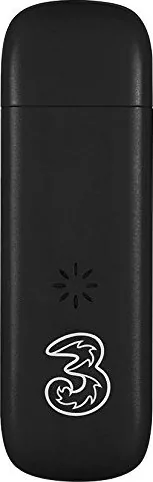
The device also includes a front cover, indicator light, SIM card slot, microSDHC slot, and USB connector. While the design is simple, it is focused on portability and daily use. The additional storage slot can be useful for users who want a small amount of removable memory alongside connectivity.
Safety, care, and responsible use
The guidance around the modem emphasizes safe use in sensitive environments. It should be kept away from medical equipment, aircraft, petrol stations, and explosive areas. The text also recommends avoiding rough handling, moisture, sudden temperature changes, and unauthorized repairs. These notes reflect the need to protect both the device and the user.
For long-term reliability, the modem should be used with original or authorized accessories only. It is also best kept within the suggested operating range of -10°C to +55°C and 5% to 95% humidity. Proper care helps maintain signal performance and hardware durability.
Notes
- The MF823 is best suited for users who need dependable mobile internet in a compact USB form.
- It supports both data and SMS features, making it more versatile than a basic dongle.
- Warranty coverage is limited and does not apply to misuse, unauthorized repairs, or external damage.
- Help is available through email, web support, and hotline contact details provided by ZTE.
Search for 67,732 Manuals online


Type-in Brand or Model