
ZTE MC801A Manual
PDF manual · 10 Pages
English



Quick check
Incorrect answer, please try again.
Chat with your ZTE MC801A manual using AI
Get instant AI answers from your ZTE MC801A manual
Ask anything about the ZTE MC801A. Answers come from this manual, with the pages they are based on.
Ask a Question
Do you recommend MC801A?
Yes No
Sarah Mitchell
6 months ago
Are there known firmware issues causing the router to drop 5G connections after a year?
Frequently Asked Questions
You can connect wirelessly by selecting the device SSID and entering the password, or use a network cable to plug directly into the RJ45 port for a wired connection.
Is this answer helpful?
A steady blue light indicates that the device has successfully registered or connected to a 3G or LTE network.
Is this answer helpful?
Slow speeds are usually due to weak signal strength or the current network type. Check the signal indicator lights and ensure the device is placed where reception is strong.
Is this answer helpful?
Press and hold the reset hole for about 3 seconds to restore the device to its original factory settings, including the default login password.
Is this answer helpful?
Yes, the ZTE MC801A features external antenna connectors that allow you to attach additional antennas to improve signal strength and coverage.
Is this answer helpful?
Advantages and Disadvantages
Advantages

- Supports high-speed 5G networks for rapid data transfer
- Simple plug-and-play setup with clear indicator lights
- Offers both Wi-Fi and wired Ethernet connection options
- Includes external antenna ports for improved signal reception
Disadvantages

- Requires a specific Nano SIM card which may not be included
- Performance heavily depends on local 5G signal availability
- Default password changes may require a factory reset to recover
Product Specification
Modem
LTE, 5G (n1/n3/n7/n28/n38/n78)
Network Standards
5G
Bandwidth
3.45Gbps/900Mbps (5G), 2.4Gbps/225Mbps (LTE)
Interfaces
Wi-Fi 6 (WLAN 802.11a/b/g/n/ac/ax), 2x Gb LAN (1x shared), 1x Gb WAN (shared)
Dimensions
7.17x4.88x2.76 in
Weight
1.39 lbs
SIM Form Factor
Nano-SIM
Power Supply
External power adapter
Features
microSD slot, Hotspot (30 devices), Antenna connector (cellular)
Note
WLAN transfer rate: 802.11ax (2.4GHz) 2x2 40MHz 1024-QAM: 574Mbps, 802.11ax (5GHz) 2x2 80MHz 1024-QAM: 1201Mbps
Product Description
ZTE MC801A: Your Gateway to High-Speed Connectivity
The ZTE MC801A stands as a robust solution for modern connectivity needs, functioning as a powerful 5G CPE (Customer Premises Equipment). This device bridges the gap between mobile networks and your local devices, offering seamless internet access through both Wi-Fi and wired connections. Whether you are setting up a home office or require reliable internet in a location without traditional broadband infrastructure, this router-switch combination delivers exceptional performance.
Setting up the ZTE MC801A is designed for simplicity. Users simply insert a Nano SIM card into the dedicated slot and connect the power adapter. The device initializes within minutes, automatically establishing a connection to the network. For wireless users, accessing the internet involves selecting the device's SSID from mobile settings and entering the default password found on the unit. Wired users can connect directly via the RJ45 network port for stable, high-speed data transfer to computers or other hardwired equipment.
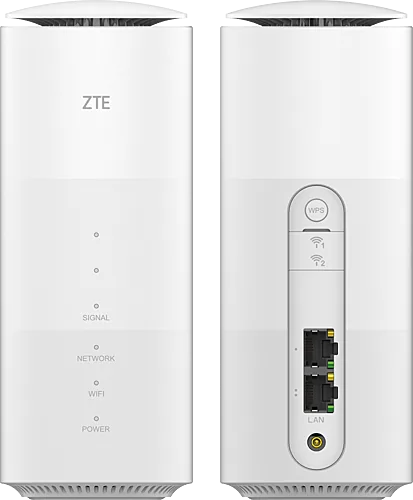
Management of the device is intuitive through a web-based interface. By entering the default IP address into a browser, users can customize settings, change passwords, and monitor network status. The indicator lights provide immediate visual feedback on signal strength and network type. A steady white light confirms a 5G connection, while red or off states indicate potential issues like missing SIM cards or weak signals. Troubleshooting common issues such as slow speeds or connection failures often involves checking these lights or ensuring the device is placed near a window for optimal reception.
Key Features and Reliability
This device supports external antennas for enhanced signal capture and includes a reset function for restoring factory defaults if configuration errors occur. It handles multiple client connections efficiently, making it suitable for households with numerous smart devices. The inclusion of WPS functionality allows for quick pairing of compatible devices without manual password entry.
Important Notes
- Always check the bottom label for default login credentials before attempting setup.
- Ensure the Nano SIM card is active and has sufficient data allowance.
- Place the device in an open area away from thick walls to maximize 5G signal strength.
Search for 67,732 Manuals online


Type-in Brand or Model
EtEsse55
7 months ago
Does the warranty cover cross-border issues if I bought a German model but live in Austria?
Manual.ly
7 months ago
Our support team has reviewed your concern regarding international warranty coverage. Typically, manufacturers require the device to be serviced within the country of purchase. In cases where a device is imported from another region, local service centers may refuse free repairs or charge a handling fee due to regional restrictions. We recommend contacting the original retailer for specific return options or verifying with ZTE directly if they offer an extended international warranty program for this model.