
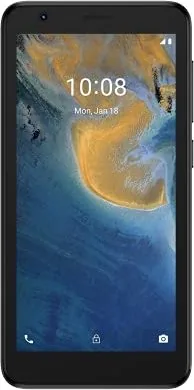
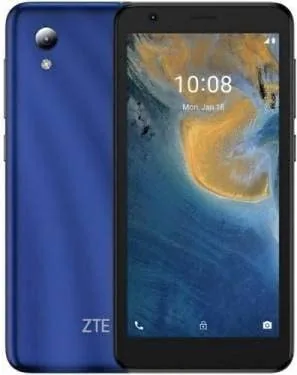
ZTE Blade A31 Lite Manual
PDF manual · 93 Pages
English



Quick check
Incorrect answer, please try again.
Chat with your ZTE Blade A31 Lite manual using AI
Get instant AI answers from your ZTE Blade A31 Lite manual
Ask anything about the ZTE Blade A31 Lite. Answers come from this manual, with the pages they are based on.
Blade A31 Lite Maintenance Schedule
Keep the screen and camera lens clean using a soft material like an eyeglass cleaning cloth. Do not use alcohol or corrosive substances.
When not using the battery for a long period, charge it about half, remove it from the device, and store it in a cool dry place.
Ask a Question
Do you recommend Blade A31 Lite?
Yes NoDo you recommend Blade A31 Lite?
Yes NoFrequently Asked Questions
Power off the phone, remove the back cover, and insert the nano-SIM card into the designated slot. Ensure the gold contacts face down and align correctly. If using a dual SIM model, you can install two cards. Reinsert the battery and replace the cover before powering on.
Is this answer helpful?
No, the FM Radio feature on this device requires a wired headset to be plugged in. The headset acts as the antenna necessary to receive radio signals effectively.
Is this answer helpful?
Open Settings, touch Features, then System navigation. You can select either Virtual navigation for on-screen buttons or Gestures for swipe-based controls. Each method offers different ways to navigate the home screen and recent apps.
Is this answer helpful?
Yes, open the Contacts app, go to Settings, and select Blocked numbers. You can add specific phone numbers to the block list or enable blocking for unidentified callers to prevent them from reaching you.
Is this answer helpful?
If the screen does not respond, try reinstalling the battery. Remove the back cover, take out the battery, wait a moment, reinsert it ensuring connectors align, and power the phone back on to reset the system.
Is this answer helpful?
Advantages and Disadvantages
Advantages

- Supports dual nano-SIM cards for flexible network usage
- Includes expandable storage via microSDXC card slot
- Offers gesture navigation and virtual key options
- Features built-in FM Radio with channel scanning
- Provides extensive security settings including app pinning
Disadvantages

- Requires wired headset for FM Radio functionality
- Battery capacity may be limited for heavy power users
- Some advanced camera modes are restricted to back camera only
- Dual SIM availability varies by country and region
- No wireless charging capability mentioned in specifications
Product Specification
Operating System
Android 11.0 (Factory / Android Go Edition)
Display
5.0", 960x480 pixels, 16 million colors, capacitive touchscreen, 215ppi
Rear Camera
5.0MP, LED flash, videos @720p/30fps
Front Camera
2.0MP
Interfaces
USB Micro-B 2.0, 3.5mm jack, Wi-Fi 4 (802.11b/g/n), Bluetooth 4.2
Sensors
Accelerometer
SoC
Unisoc SC9832E, 64-bit
CPU
4x 1.40GHz Cortex-A53
GPU
Mali-T820 MP1
RAM
1GB
Storage
32GB, microSD slot (dedicated, up to 128GB)
Navigation
A-GPS
Modem
GSM (0.2Mbps/0.1Mbps), UMTS, LTE
Frequency Bands
2G (850/900/1800/1900), 3G (B1/B5/B8), 4G (B1/B3/B5/B7/B8/B20/B38)
Battery
2000mAh, removable
Standby Time
410h/450h/500h (GSM/UMTS/LTE)
Talk Time
31h/12h/14.2h (GSM/UMTS/LTE)
SAR Value
0.90W/kg head
Form Factor
Bar
Chassis Material
Plastic (back), Plastic (frame)
SIM Form Factor
Nano-SIM
Features
Dual-SIM, FM radio, notification LED (front)
Dimensions
5.41x2.66x0.42in
Weight
5.05oz
Screen-to-Body Ratio
69.6%
Product Description
ZTE Blade A31 Lite - Read, Download & Print Free
The ZTE Blade A31 Lite is a reliable entry-level smartphone designed for users who need essential features without complexity. This device offers a straightforward interface powered by Android, making it accessible for first-time smartphone users or those seeking a secondary device for specific tasks. The manual provides comprehensive guidance on setting up the phone, managing calls, and utilizing its camera and connectivity options.
Upon unboxing, users can quickly install the nano-SIM card and microSDXC card to expand storage capabilities. The device supports dual SIM functionality in certain regions, allowing for flexible network management. Setting up the phone involves selecting a language, configuring navigation styles between virtual keys and gestures, and personalizing the home screen with wallpapers or dark themes for reduced eye strain at night.
Connectivity is robust for its class, featuring Wi-Fi for internet access, Bluetooth for pairing headphones and other peripherals, and USB tethering to share data with computers. The phone includes practical tools like Nearby Share for easy file transfers and a dedicated FM Radio app that requires a wired headset. Security features such as screen locks, app pinning, and Google Play Protect ensure user data remains safe. The camera system supports various modes including Panorama, Burst, and Pro mode for enhanced photography. With a focus on safety, the manual details proper handling, battery care, and FCC compliance information to ensure long-term usage.
Search for 67,732 Manuals online


Type-in Brand or Model