

ZAGG Slim Book Go Manual
PDF manual · 26 Pages
English



Quick check
Incorrect answer, please try again.
Chat with your ZAGG Slim Book Go manual using AI
Get instant AI answers from your ZAGG Slim Book Go manual
Ask anything about the ZAGG Slim Book Go. Answers come from this manual, with the pages they are based on.
Ask a Question
Do you recommend Slim Book Go?
Yes NoFrequently Asked Questions
Ensure Bluetooth is on your iPad. Press and hold the first or second pairing key on the keyboard for three seconds until the power button LED pulses blue. Select ZAGG Slim Book Go from your device's Bluetooth menu.
Is this answer helpful?
Yes. Simply pull the case away from the keyboard base by opening it at a 90-degree angle and pulling upwards. The magnets will disengage, allowing you to use the iPad with its on-screen keyboard.
Is this answer helpful?
The lithium polymer battery lasts up to two years of normal use, defined as one hour per day without backlighting. Using the backlight feature will require more frequent charging.
Is this answer helpful?
Try restarting your iPad, turning the keyboard off and on, or forgetting the device in Bluetooth settings and re-pairing. If issues persist, charge the keyboard fully to reset the Bluetooth module.
Is this answer helpful?
Yes, it includes a one-year manufacturer warranty. You must register the product online and keep your receipt. Purchases made directly from ZAGG.com are automatically registered.
Is this answer helpful?
Advantages and Disadvantages
Advantages

- Long-lasting battery life up to two years on normal use
- Multi-pairing allows connection to two devices at once
- Customizable RGB backlighting with seven color options
- Durable protective case with strong magnetic attachment
- Compact and lightweight design for portability
Disadvantages

- Battery indicator requires specific key combination to check
- No built-in trackpad for cursor control
- Charging cable not included in the package
- Keyboard layout may require adjustment for some users
- Backlight reduces overall battery efficiency significantly
Product Specification
Layout
DE
Compatibility
Apple iPad Pro 12.9" (2018/3rd Gen)
Type
Bluetooth Keyboard and Protective Case
Material
PC, TPU
Features
Stand function, Chiclet, backlit keyboard, integrated battery, holder for input stylus
Manufacturer Warranty
two years
Product Description
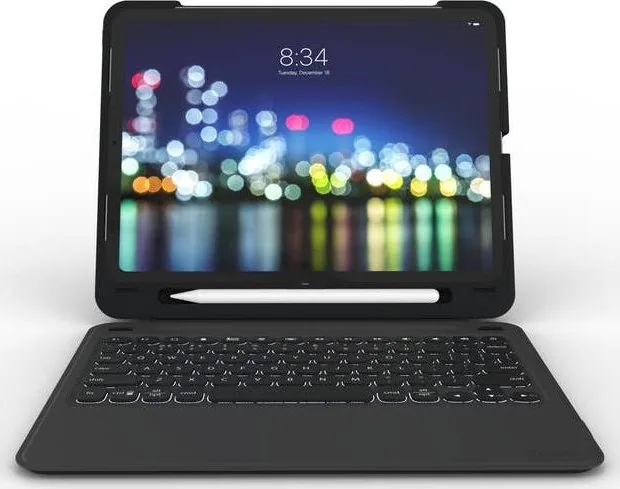
Elevate Your iPad Pro Experience with the ZAGG Slim Book Go
The ZAGG Slim Book Go for Apple iPad Pro 12.9 inches in black is a versatile accessory designed to transform your tablet into a portable workstation. This sleek device combines a protective case with a detachable Bluetooth keyboard, offering flexibility for both productivity and media consumption. The magnetic connection allows you to easily snap the case onto the keyboard base or remove it entirely when you need to use your iPad as a standalone slate.
Designed with durability in mind, the Slim Book Go features a robust construction that safeguards your expensive iPad Pro from scratches and minor impacts. The keyboard itself offers a comfortable typing experience with responsive keys that are perfect for long documents or emails. One of its standout features is the impressive battery life, which can last up to two years under normal usage conditions without backlighting. When you do need to type in low light, the customizable LED backlight provides seven different color options to suit your mood or environment.
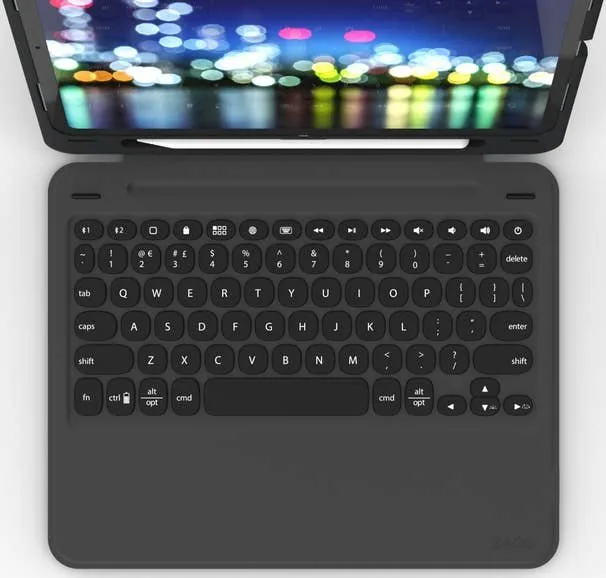
Connectivity is seamless thanks to multi-pairing capabilities. You can connect the keyboard to two devices simultaneously, making it easy to switch between your iPad and another computer or tablet with just a few button presses. The special function keys allow for quick access to home screens, app switching, volume control, and media playback, ensuring you stay in control of your digital workflow. Whether you are traveling, working from a coffee shop, or relaxing at home, the ZAGG Slim Book Go adapts to your needs effortlessly.
Search for 67,706 Manuals online


Type-in Brand or Model