

Free Yongnuo Manuals – Read, Download & Print
2 Manuals
Manuals
Categories

Yongnuo Manuals
What Yongnuo Manuals Are
Yongnuo manuals are user guides, reference documents, and setup instructions for Yongnuo products. They help photographers and creators understand how to use flashes, triggers, LED lights, lenses, cameras, and accessories more effectively. Whether you are setting up a Speedlite for the first time or troubleshooting wireless communication between devices, the manual is often the fastest way to find the right answer.
Why they matter
A Yongnuo product may look simple at first, but many of its functions are hidden behind buttons, menus, and wireless modes. Manuals explain those features clearly. They also reduce trial and error, which is especially helpful when you are working under time pressure or preparing for an important shoot.
Common Types of Yongnuo Manuals
Yongnuo makes a wide range of products, so the manuals vary by category. Each product family has its own instructions, terminology, and feature set.
Flash manuals
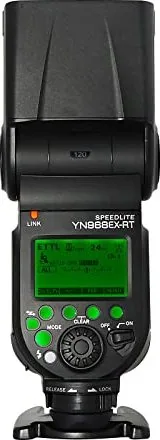
Flash manuals usually cover power levels, zoom settings, TTL support, high-speed sync, slave modes, and custom functions. They often explain how to mount the flash, install batteries, change output, and pair the unit with a camera or trigger.
Trigger manuals
Wireless trigger manuals focus on signal channels, groups, transmit and receive modes, pairing steps, and compatibility with camera brands. They may also include range notes, sync settings, and troubleshooting tips for misfires or inconsistent firing.
LED light manuals
For Yongnuo LED panels and video lights, manuals typically describe color temperature adjustment, brightness control, power options, remote operation, and display indicators. They may also explain diffusion accessories and mounting options.
Lens and camera manuals
If the product is a Yongnuo lens or camera-related accessory, the manual may cover autofocus behavior, aperture control, firmware notes, and care instructions. These manuals are especially important because third-party optics and electronics can behave differently depending on the camera body.
What You Can Learn from a Manual
A good manual does more than list buttons. It helps you understand the full behavior of the device so you can get consistent results.
Setup and installation
Most manuals begin with the basics: battery installation, mounting the device, and turning it on safely. This section helps prevent damage caused by incorrect placement, poor contact, or improper battery orientation.
Operating modes
Yongnuo devices often include several modes, such as manual, TTL, optical slave, radio control, and multi-flash functions. Manuals explain what each mode does and when to use it.
Custom settings
Some models include advanced settings like sleep timers, sync delays, group control, channel selection, or beeper settings. These options can be easy to miss without the manual.
Error handling
Manuals frequently include warning icons, error codes, and troubleshooting charts. If a flash fails to fire or a trigger does not connect, the manual can save time by listing the most likely cause and fix.
How to Find the Right Yongnuo Manual
Because Yongnuo offers many similar-looking products, it is important to match the manual to the exact model number.
Check the model name
Look for the model printed on the device, box, or battery compartment. Examples may include flash, trigger, or light model codes. Even small differences in model numbers can mean major differences in functionality.
Match the product generation
Some Yongnuo products are updated over time. A newer version may support different wireless protocols, improved displays, or updated firmware. Always try to find the manual for the exact version you own.
Use trusted sources
The best manuals usually come from the official Yongnuo website, the product packaging, or authorized retailers. If you download a manual from another source, confirm that it matches your model before relying on it.
How to Read a Yongnuo Manual Efficiently
Many users only need a few pages to solve a problem, but reading the manual strategically can make it much more useful.
Start with the quick setup section
If the goal is to begin using the product right away, focus first on installation, basic controls, and the default operating mode. This gives you immediate functionality without needing to understand every advanced feature.
Review the button layout
Study the diagrams carefully. Yongnuo devices often have multiple buttons with combined functions depending on how long they are pressed. Knowing which button changes power, groups, channels, or modes prevents confusion.
Learn the symbols and indicators
LED indicators, LCD icons, and sound alerts are commonly used in Yongnuo devices. Manuals explain what each symbol means, which is useful when the device behaves unexpectedly.
Save the troubleshooting section
If something goes wrong later, you will know exactly where to look. Troubleshooting pages are often the most practical part of the manual.
Troubleshooting with Yongnuo Manuals
One of the greatest benefits of a manual is solving common problems quickly. Many issues have simple causes that can be fixed in minutes.
Flash does not fire
The manual may suggest checking battery charge, hot shoe contact, channel settings, or camera sync mode. It may also explain whether the flash is in master, slave, or manual mode.
Wireless trigger is inconsistent
If a trigger misses shots, the manual may recommend confirming the same channel, group, and operating frequency on both units. It may also advise reducing distance or avoiding interference.
Settings reset unexpectedly
Some devices revert to default settings when batteries are removed or depleted. The manual usually notes whether settings are retained and how to protect them.
Firmware or compatibility issues
For newer models, the manual may point to firmware requirements or camera compatibility notes. This is especially useful for users working with newer DSLR or mirrorless systems.
Benefits for Photographers and Videographers
Yongnuo manuals are especially valuable in fast-paced visual work where reliability matters.
Faster setup on location
When you are shooting events, portraits, or product images, you may not have time to experiment. Manuals help you set up equipment quickly and confidently.
Better consistency
Understanding the device through its manual helps you repeat settings from one session to the next. That consistency is important for lighting balance, color temperature, and sync timing.
Safer handling
Manuals also include care instructions that protect your gear. This includes guidance on batteries, heat limits, storage, and cleaning.
Maintenance and Care Tips
Manuals often include important long-term care advice that keeps Yongnuo equipment working properly.
Battery care
Use the battery type recommended in the manual and avoid mixing old and new batteries. Remove batteries if the device will not be used for a long time.
Clean connectors gently
Flash feet, hot shoe contacts, and trigger terminals should be kept clean and free of dust. The manual may recommend a soft dry cloth rather than liquids or abrasive materials.
Store devices properly
Keep Yongnuo products in a dry, cool place away from direct sunlight. Manuals may mention safe storage temperatures or humidity limits.
Update firmware when needed
If your model supports firmware updates, the manual may provide instructions or direct you to the correct update method. Firmware updates can improve compatibility and performance.
When a Manual Is Especially Important
Some situations make it much more important to have the correct manual on hand.
First-time users
If you are new to Yongnuo products, the manual is the best way to learn the basic workflow without damaging the device or misconfiguring it.
Advanced lighting setups
When multiple flashes or triggers are used together, the manual becomes essential for understanding groups, channels, and sync behavior.
Mixed equipment systems
If you use Yongnuo gear alongside Canon, Nikon, Sony, Fujifilm, or other camera systems, the manual helps clarify compatibility and any limitations.
Final Thoughts
Yongnuo manuals are practical tools for getting better performance from your gear. They explain setup, operation, troubleshooting, maintenance, and compatibility in a way that helps both beginners and experienced users. Instead of treating a manual as an optional extra, think of it as part of the equipment itself. With the right Yongnuo manual, you can work faster, avoid mistakes, and make the most of every flash, trigger, light, or accessory you own.
Search for 67,706 Manuals online


Type-in Brand or Model