
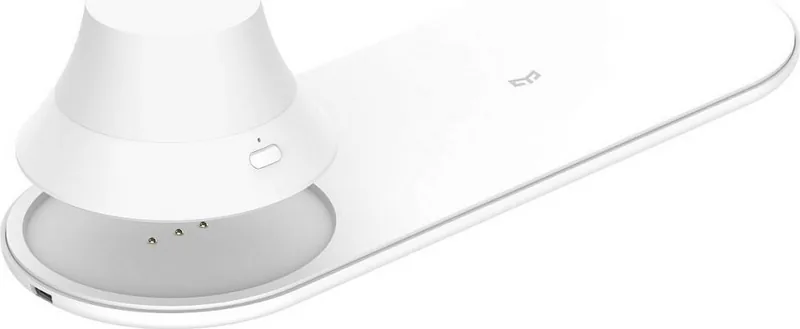
Yeelight Wireless Charging Nightlight Manual
PDF manual · 29 Pages
English



Quick check
Incorrect answer, please try again.
Chat with your Yeelight Wireless Charging Nightlight manual using AI
Get instant AI answers from your Yeelight Wireless Charging Nightlight manual
Ask anything about the Yeelight Wireless Charging Nightlight. Answers come from this manual, with the pages they are based on.
Wireless Charging Nightlight Maintenance Schedule
Charge the nightlight in time when the light is dimmed or goes out. The red indicator turns on during charging and turns off automatically when fully charged.
Check the power source before using the product to ensure it is suitable for the device.
Ask a Question
Do you recommend Wireless Charging Nightlight?
Yes NoFrequently Asked Questions
It works with any smartphone that has built-in wireless charging capabilities. Phones without this feature will not charge on the pad.
Is this answer helpful?
Press the power button once for cool white light and twice for warm white light. Pressing it a third time turns the light off completely.
Is this answer helpful?
Yes, the device supports charging through cases up to 4mm thick. Thicker cases may interfere with the charging connection.
Is this answer helpful?
Yes, the nightlight contains a built-in battery that charges via the main unit. A red indicator shows when it is charging.
Is this answer helpful?
A flashing blue light indicates no connection or overvoltage protection. Try repositioning the phone or changing the power adapter.
Is this answer helpful?
No, this product is designed strictly for indoor use. Exposure to water or extreme weather can damage the electronics.
Is this answer helpful?
Advantages and Disadvantages
Advantages

- Dual functionality combines wireless phone charging with an adjustable nightlight
- Supports phone cases up to 4mm thickness for convenient charging
- Adjustable color temperature allows switching between cool and warm white light
- Rechargeable nightlight battery provides backup illumination during power outages
- Complies with international safety standards including FCC and EU RED directives
Disadvantages

- Nightlight cannot be placed on the charging pad without losing magnetic effect
- Not suitable for outdoor use or environments with high moisture levels
- Requires specific SELV power supply for safe operation
- Battery replacement must be performed by qualified electricians only
- May cause interference with sensitive medical devices if placed too close
Product Specification
Type
Table lamp
Fixed LEDs
yes
Socket
no
Light source
LED (fixed light source), warm white (2700K)
Material
Plastic
Color
White
Design
Round
Features
Battery operated, integrated induction charging station, power supply via USB
Protection class
IP20
Insulation class
3
Dimensions
8.9x3.1x1.7 in (WxDxH)
Product Description
Discover the Yeelight LED Light USB with Wireless Charging
Transform your bedside table or desk into a hub of modern convenience with the Yeelight Wireless Charging Nightlight. This innovative device seamlessly blends functional wireless charging for your mobile devices with an ambient nightlight, offering a dual-purpose solution that saves space and enhances your daily routine. Whether you are winding down before sleep or need a soft glow to navigate at night, this product delivers both utility and style.
The unit features a sleek design equipped with a dedicated wireless charging pad capable of powering compatible smartphones up to 15 watts. A clear blue indicator light confirms when your device is actively charging, while a green power light shows the unit is ready for use. The integrated nightlight offers adjustable color temperatures, allowing you to switch between cool white for a crisp ambiance and warm white for a relaxing atmosphere with simple button presses. The nightlight itself is rechargeable, ensuring it remains available even during power outages or when unplugged from the main source.
Designed with safety and versatility in mind, the Yeelight LED Light USB supports phone cases up to 4mm thick, making it compatible with most standard protective covers. The included one-meter USB cable provides flexible placement options. However, users should be aware that the magnetic nature of the nightlight means it should not be placed directly on the charging surface to avoid losing its magnetic properties. Additionally, keeping the device away from water, fire, and strong heat sources is essential for longevity.
This smart lighting solution adheres to strict European and American safety standards, including FCC and RED compliance. It ensures minimal interference with medical devices like pacemakers when used at the recommended distance. For those seeking a reliable, multi-functional accessory, the Yeelight Wireless Charging Nightlight stands out as a top choice for integrating technology into home decor without clutter.
Important Notes
- Ensure your smartphone supports wireless charging before purchase.
- Do not place magnetic cards near the device to prevent data loss.
- Keep the nightlight charged promptly when dimming occurs.
Search for 67,706 Manuals online


Type-in Brand or Model