
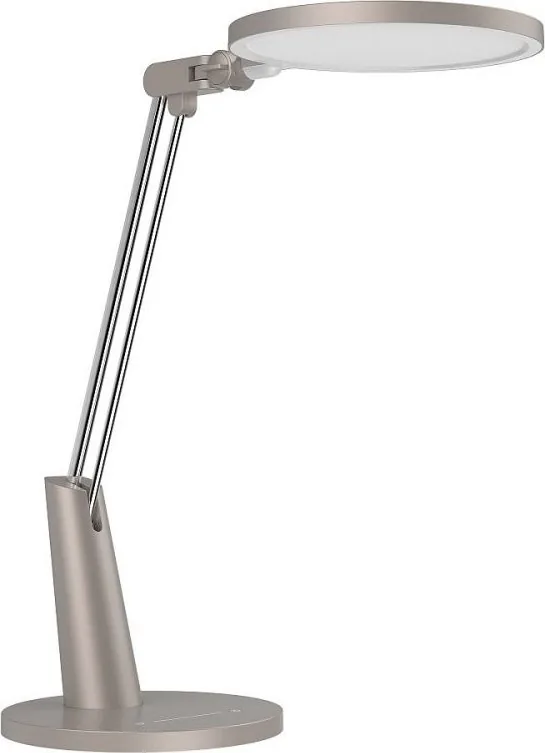
Yeelight Serene Pro Manual
PDF manual · 27 Pages
English



Quick check
Incorrect answer, please try again.
Chat with your Yeelight Serene Pro manual using AI
Get instant AI answers from your Yeelight Serene Pro manual
Ask anything about the Yeelight Serene Pro. Answers come from this manual, with the pages they are based on.
Ask a Question
Do you recommend Serene Pro?
Yes NoFrequently Asked Questions
Press and hold the timer button for two seconds until the light blinks twice. This activates the preset focus and rest cycles managed by the app.
Is this answer helpful?
Yes, the Yeelight Serene Pro works with Google Assistant and Amazon Alexa after linking your Yeelight account within their respective apps.
Is this answer helpful?
No, the light source is integrated into the lamp. If it fails, the entire lamp must be replaced as disassembly is not permitted.
Is this answer helpful?
For optimal performance, the vertical distance between the light outlet surface and the desktop should be approximately 400 mm.
Is this answer helpful?
No, it utilizes SunLike technology designed to reduce blue light hazard and minimize visual fatigue for safer eye health.
Is this answer helpful?
Insert a thin object into the reset hole above the power outlet for about five seconds after turning the lamp on, then release when it blinks.
Is this answer helpful?
Advantages and Disadvantages
Advantages

- Advanced SunLike technology provides high color rendering (CRI > 95) and reduces blue light hazard.
- Intuitive touch controls allow for easy brightness adjustment and power management.
- Seamless integration with major smart home ecosystems including Google Assistant and Alexa.
- Built-in time management mode helps users maintain focus and take regular breaks.
- Large horizontal light surface minimizes shadows and reduces eye strain during work.
Disadvantages

- The light source is not replaceable, requiring the entire unit to be replaced if it fails.
- Requires specific Wi-Fi 2.4GHz network settings which may not be compatible with all routers.
- The reset process requires a thin object to access the small hole, which can be inconvenient.
- Initial setup via the app requires the lamp to be powered on before opening the software.
- The lamp must be placed on a flat, stable surface to prevent tipping due to its height.
Product Specification
Type
Desk lamp, desk light, spotlight
Energy efficiency class of built-in bulb (old)
A++, A+, A (A++ to E)
Fixed LEDs
yes
Socket
no
Bulb
LED (fixed bulb), 14W, neutral white (4000K), 750lm, 230V
Total power
14W
Total luminous flux
750lm
Material
Aluminum, plastic
Color
silver
Design
round
Features
dimmable, timer, programmable lighting settings, height-adjustable, adjustable
Smart Home
App control (Wi-Fi), voice assistant
Protection class
IP20
Insulation class
Class 2
Dimensions
13.0x7.87x19.69in (WxDxH)
Note
For full functionality, a manufacturer gateway may be required. This may also change via firmware update. Please note the manufacturer-specific details!
Product Description
Yeelight Serene Pro LED: Redefining Your Workspace Lighting
Experience the perfect blend of advanced technology and ergonomic design with the Yeelight Serene Pro LED. This eye-friendly lamp is crafted to illuminate your world in a new light, ensuring that every moment spent reading, working, or studying is comfortable and efficient. The Serene Pro features a large emitting surface that provides level AA illumination, significantly reducing visual fatigue through its multi-spindle design and reduced stroboscopic light effects.
At the heart of this device lies the innovative SunLike technology, which delivers a color rendering index of over 95. This ensures that colors appear vibrant and natural, mimicking the quality of sunlight without the harmful blue light hazards often associated with traditional LEDs. Whether you are an artist needing accurate color representation or a student focusing on complex texts, the Serene Pro adapts to your needs seamlessly.
The lamp offers intuitive control directly from its touch-sensitive interface. A simple press toggles the power, while sliding your finger across the brightness bar allows for smooth dimming adjustments. For those who prioritize productivity, the integrated timer function activates a time management mode. By holding the timer button for two seconds, the lamp reminds you to take breaks during focus sessions, gently dimming to an energy-saving mode before restoring full brightness when your rest period ends.
Smart connectivity takes this lamp to the next level. It integrates effortlessly with the Yeelight app, Mijia platform, Google Assistant, and Amazon Alexa. You can control lighting scenes, adjust brightness, and manage timers using voice commands or your smartphone. The sleek design includes an adjustable tilt knob, allowing you to position the light exactly where you need it, with a recommended vertical distance of 400 mm from the desk surface for optimal ergonomics.
Built with safety and durability in mind, the Serene Pro generates minimal heat and requires no disassembly as the light source is non-replaceable, encouraging long-term reliability. Always use the original adapter to ensure safety and performance. This lamp is not just a light source; it is a comprehensive solution for modern, smart living spaces.
Search for 67,706 Manuals online


Type-in Brand or Model