
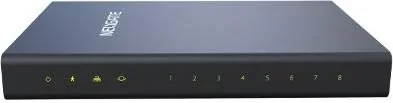

Yeastar NeoGate TA810 Manual
PDF manual · 63 Pages
English



Quick check
Incorrect answer, please try again.
Chat with your Yeastar NeoGate TA810 manual using AI
Get instant AI answers from your Yeastar NeoGate TA810 manual
Ask anything about the Yeastar NeoGate TA810. Answers come from this manual, with the pages they are based on.
Ask a Question
Do you recommend NeoGate TA810?
Yes NoFrequently Asked Questions
The TA810 acts as an Analog VoIP Gateway that connects legacy telephone systems to IP networks. It enables businesses to use traditional phones and fax machines with modern VoIP infrastructure, reducing costs while maintaining existing hardware investments.
Is this answer helpful?
The device supports three main modes: Account Mode, VoIP Mode, and SPS (Service Provider SIP) Mode. SPS is recommended for most scenarios as it offers peer-to-peer connectivity between the gateway and the SIP server.
Is this answer helpful?
By default, the device uses DHCP to obtain an IP address. You can find this IP by dialing ***1 on an analog phone connected to the unit. Enter the IP into a web browser and log in using the default credentials admin and password.
Is this answer helpful?
Yes, the Tone Zone Settings allow you to select pre-programmed settings for specific countries or manually configure custom ring cadences, dial tones, and busy signals to match local PSTN standards.
Is this answer helpful?
Absolutely. It includes a robust security center with firewall rules, IP blacklisting, and auto-defense features. It also supports TLS encryption and allows you to restrict access to specific IP addresses.
Is this answer helpful?
You can upgrade the firmware via HTTP by providing a direct download link to a BIN file, or through TFTP by setting up a local TFTP server and pointing the gateway to the firmware file location.
Is this answer helpful?
Advantages and Disadvantages
Advantages

- Supports flexible connection modes including SPS for seamless IPPBX integration
- Comprehensive security features like firewall and IP blacklist prevent unauthorized access
- Web-based GUI simplifies complex configuration tasks for administrators
- Wide codec support ensures high-quality voice transmission across various networks
- Allows preservation of legacy phone investments while adopting modern VoIP technology
Disadvantages

- Requires manual configuration of tone zones if pre-programmed country settings do not match
- Advanced features like VLAN and VPN require additional network equipment knowledge
- Default SSH service is disabled and may need enabling for remote command line access
- Firmware updates must be performed carefully to avoid potential system damage
- Some advanced routing options may have a learning curve for non-technical users
Product Specification
Type
Gateway
Product Description
Enhance Your Communication with the tiptel Yeastar Neogate TA810
The tiptel Yeastar Neogate TA810 represents a significant leap forward for businesses seeking to modernize their telephony infrastructure without abandoning legacy investments. This Analog VoIP Gateway serves as a robust bridge, connecting traditional telephones, fax machines, and PBX systems seamlessly to IP-based networks. Designed specifically for small to medium enterprises, the device allows organizations to preserve their existing hardware while significantly reducing communication costs through the adoption of Voice over Internet Protocol technology.
At the heart of the TA810 lies its impressive flexibility in connectivity modes. Whether you are looking to extend FXO ports for an IPPBX or integrate with a SIP server, the gateway supports multiple operational strategies including Account Mode, VoIP Mode, and the highly recommended SPS (Service Provider SIP) mode. These configurations enable sophisticated routing capabilities, allowing calls to flow efficiently between the Public Switched Telephone Network and your internal IP system. The device features eight high-quality FXO ports, ensuring ample capacity for handling multiple concurrent lines.
Configuration is streamlined through an intuitive web-based graphical user interface, making network management accessible even to those with limited technical expertise. Administrators can easily adjust settings for audio quality, tone zones, and DTMF signaling to match specific regional standards. Security is also a priority, with built-in firewalls, IP blacklisting, and support for TLS encryption to protect sensitive voice data from unauthorized access. With comprehensive codec support ranging from G711 to G729A/B, the TA810 ensures clear and reliable voice transmission across diverse network conditions.
Key Features Overview
- Dual Connectivity: Supports both SIP and IAX2 protocols for maximum compatibility.
- Advanced Routing: Flexible call routing rules allow precise control over inbound and outbound traffic.
- Security First: Includes firewall rules, auto-defense mechanisms, and encrypted transport options.
- Easy Management: Web GUI provides real-time status monitoring and simplified configuration.
Important Notes
- Always apply changes via the "Apply changes" button after modifying settings in the web interface.
- Ensure SMTP tests are successful before configuring email alarm notifications.
- For optimal performance, configure QoS settings on your router rather than relying solely on the gateway.
Search for 67,706 Manuals online


Type-in Brand or Model