


Yato YT-73131 Manual
PDF manual · 41 Pages
English



Quick check
Incorrect answer, please try again.
Chat with your Yato YT-73131 manual using AI
Get instant AI answers from your Yato YT-73131 manual
Ask anything about the Yato YT-73131. Answers come from this manual, with the pages they are based on.
YT-73131 Maintenance Schedule
If the foot liners are worn or damaged, replace them with new ones. Remove all remnants of old liners before gluing new ones.
Clean the detector with a soft, dry cloth. Do not use cleaning agents.
Ask a Question
Do you recommend YT-73131?
Yes NoDo you recommend YT-73131?
Yes NoFrequently Asked Questions
It can detect live AC wires, ferromagnetic metals, diamagnetic metals, and wooden beams hidden in walls. Each mode uses visual and sound cues to help locate the target more precisely.
Is this answer helpful?
No. It comes ready to use and only needs a suitable 9V battery installed before operation. After that, it can be switched on and used immediately.
Is this answer helpful?
Approximate detection ranges are 80 mm for ferromagnetic metal, 60 mm for diamagnetic metal, 50 mm for live wires, and 20 mm for wood. Real results may vary depending on conditions.
Is this answer helpful?
Calibration helps the detector reset its baseline so it does not react too strongly when no target is present. If the display shows a signal in empty space, manual calibration is recommended.
Is this answer helpful?
Not always. Wet surfaces, metal coverings, and shielded cables can make wire detection less reliable. In those cases, the metal mode may work better than the live-wire mode.
Is this answer helpful?
Clean it with a soft, dry cloth only, avoid cleaning agents, keep it free from metal stickers, and replace worn foot pads when needed. Remove the battery during long storage.
Is this answer helpful?
Advantages and Disadvantages
Advantages

- Detects wood, live wires, and two metal types in one compact tool.
- Clear display and audio alerts make scanning easier and faster.
- Battery-powered design supports mobility and on-site use.
- Auto shutoff and calibration help improve convenience and accuracy.
Disadvantages

- Detection depth is limited and depends heavily on material conditions.
- Wet, shielded, or metal-backed surfaces can reduce accuracy.
- Not suitable as a precision measuring instrument.
- Wood detection range is relatively shallow compared with metal detection.
Product Specification
Suitable for
Steel 3.15in, Copper 2.36in, live wires 1.97in, Wood 0.79in
Measuring range
max. 3.15in
Weight
0.29 lb
Product Description
Yato Locator Manual
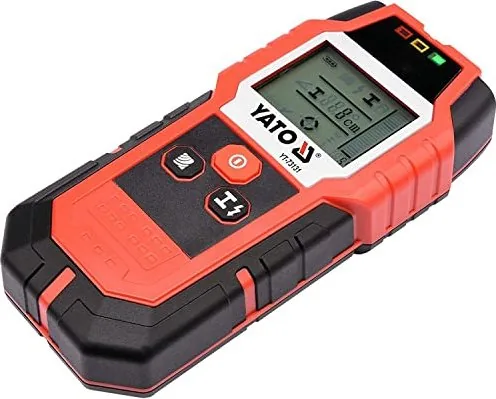
The Yato Locator is a compact wall detector designed for everyday renovation and installation work. It helps identify live wires, ferromagnetic and diamagnetic metals, and wooden beams hidden inside walls, making it easier to plan drilling, mounting, and repair tasks with greater confidence. Its clear display, simple controls, and battery-powered design make it practical for both professional users and home DIY projects.
How it helps in real work
This detector is built for fast surface scanning rather than laboratory-grade measurement. In practice, that means it gives helpful guidance about what may be inside a wall and where the strongest signal is located. The device uses visual indicators, sound signals, and amplitude readings to show when it has found a target. When scanning metal, it can also suggest whether the object is ferromagnetic or diamagnetic and show an approximate distance.
Easy operation and flexible modes
The Yato Locator is ready to use after inserting a 9V battery. It starts in metal detection mode, and users can switch between metal/current detection and wood detection with dedicated buttons. A calibration function improves accuracy, especially when the detector reacts even without a target nearby. The sensor feet must stay in contact with the surface during use, which helps the device maintain stable readings.
Practical performance and limits
The detector reaches up to about 80 mm for ferromagnetic metals, 60 mm for diamagnetic metals, 50 mm for live AC wires, and 20 mm for wood. These values are useful for typical wall work, but results depend on material size, placement, moisture, shielding, and nearby electromagnetic interference. Shielded cables, wet surfaces, and metal walls may reduce detection quality.
Notes
- Best results come from dry surfaces and active current in the wire being traced.
- If the display shows unstable readings, manual calibration is recommended.
- Remove the battery during long storage periods.
- Avoid stickers or metal labels, as they may affect performance.
Overall, the Yato Locator is a handy detection tool for quick wall inspection, offering a good balance of portability, ease of use, and useful detection modes for common construction tasks.
Search for 67,732 Manuals online


Type-in Brand or Model