
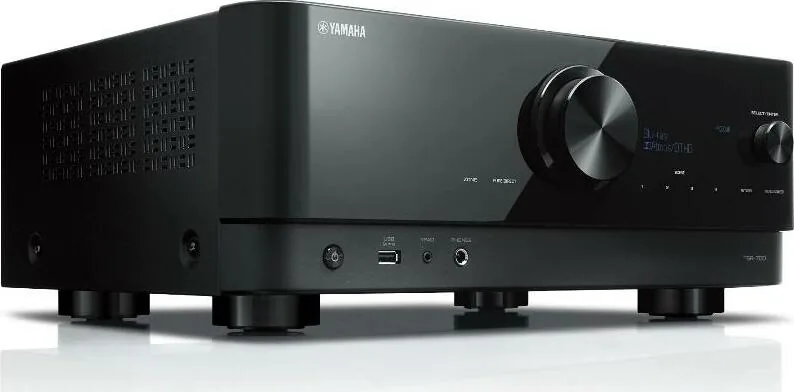
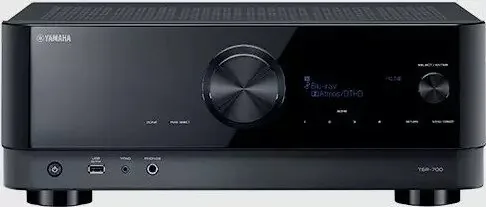
Yamaha TSR-700 Manual
PDF manual · 385 Pages
English



Quick check
Incorrect answer, please try again.
Chat with your Yamaha TSR-700 manual using AI
Get instant AI answers from your Yamaha TSR-700 manual
Ask anything about the Yamaha TSR-700. Answers come from this manual, with the pages they are based on.
Ask a Question
Do you recommend TSR-700?
Yes NoFrequently Asked Questions
It supports systems ranging from 2.1 and 3.1 to 5.1, 7.1, 3.1.2, 5.1.2, and 7.1/5.1.2 arrangements. It can also be configured for Virtual CINEMA FRONT, bi-amping, or Zone 2 depending on the installation.
Is this answer helpful?
Yes. Dolby Atmos and DTS:X content can be enjoyed with compatible front presence speakers in supported layouts such as 5.1.2 or 3.1.2. The receiver also includes Yamaha processing options for spacious sound with alternative speaker placements.
Is this answer helpful?
YPAO uses the included microphone at the listening position to measure speaker connections, distances, levels, and room acoustics. It then applies optimized speaker settings. Keep the room quiet and place the microphone at ear height for accurate results.
Is this answer helpful?
Yes. The receiver includes PHONO inputs compatible with turntables using MM cartridges. A turntable ground wire can be connected to the GND terminal to help reduce noise. MC cartridges with low output require an appropriate step-up device.
Is this answer helpful?
Yes, when the TV and connection support eARC or ARC. Connect the television to the receiver's HDMI OUT eARC/ARC port and enable the relevant TV and HDMI control settings. An optical digital connection is an alternative for TVs without ARC.
Is this answer helpful?
With a wired or wireless network connection, the receiver can play AirPlay audio, music from compatible PCs and NAS devices, internet radio, and supported streaming services. MusicCast also enables app control and playback with compatible Yamaha products.
Is this answer helpful?
Advantages and Disadvantages
Advantages

- Supports flexible speaker systems from 2.1 to 7.1 and 5.1.2, including Dolby Atmos and DTS:X playback.
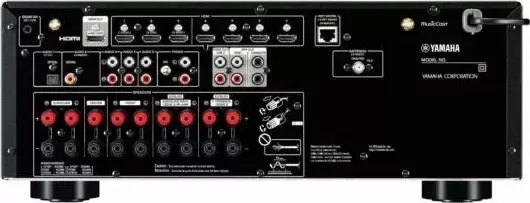
- Seven HDMI inputs plus eARC/ARC, phono, USB, optical, coaxial, network, and radio connections cover diverse sources.
- YPAO calibration measures the listening area and automatically optimizes speaker balance and acoustic settings.
- MusicCast, AirPlay, Bluetooth, internet radio, USB, and network playback support convenient music access.
- Zone 2, Party mode, and compatible wireless MusicCast Surround options add multi-room flexibility.
Disadvantages

- Advanced speaker layouts require careful amplifier assignment, wiring, and manual configuration.
- Wireless MusicCast Surround has source and configuration limitations, including restrictions for some high-resolution formats.
- Full performance depends on compatible speakers, TV features, network quality, and correctly selected cables.
- YPAO calibration emits loud test tones and requires a quiet room and unobstructed microphone placement.
Product Specification
Channels
7.2
Power per Channel
150 W (6 ohms)
Tuner
FM, DAB, AM, Internet radio
Audio Decoders
Dolby Atmos, Dolby Atmos Height Virtualizer, Dolby Digital Plus, Dolby Surround, Dolby TrueHD, DTS Neural:X, DTS-HD Master Audio, DTS:X
Streaming Services
Amazon Music, Apple AirPlay 2, Deezer, Pandora, Qobuz, Spotify, Tidal
Voice Assistants
Amazon Alexa, Apple Siri, Google Assistant
HDR
HDR, HDR10, HDR10+
Video Connections
3 x HDMI 2.1 In, 4 x HDMI In, 1 x HDMI 2.1 Out
Audio Connections
eARC, 1 x Digital Audio In (coaxial), 1 x Digital Audio In (optical), 3 x Stereo Line In (RCA), Phono In (RCA), 2 x Pre Out (RCA), 2 x Sub Out (RCA), Headphones (1/4-inch jack)
Additional Connections
USB-A, RJ-45
Wireless Connectivity
Bluetooth, Wi-Fi
Calibration System
YPAO R.S.C.
Special Features
ALLM (Auto Low Latency Mode), VRR (Variable Refresh Rate), HDMI Pass-Through, 8K Pass-Through, 4K Upscaling, DSD256, Gapless Playback, Multi-Zone
Power Consumption
0.1 W standby
Color
black
Dimensions
17.13 x 6.73 x 14.84 in (W x H x D)
Weight
21.61 lb
Product Description
Yamaha TSR-700 Manual: Home Theater Performance Made Flexible
The Yamaha TSR-700 is a versatile AV receiver designed to bring movies, games, television, and music together in one connected home entertainment system. Built for listeners who want more than ordinary stereo sound, it supports a wide range of speaker layouts, from a compact 2.1 setup to immersive 7.1 or 5.1.2 channel configurations. The Yamaha TSR-700 Manual is a useful companion for planning connections, tailoring settings, and getting the most from every source.
Immersive sound for films, games, and music
With support for Dolby Atmos and DTS:X content, the TSR-700 can create a more dimensional soundstage using front presence speakers. Yamaha sound programs, surround decoding, Virtual CINEMA DSP, and Virtual CINEMA FRONT offer flexible ways to enjoy spacious audio even when a full surround installation is not practical. Pure Direct provides a focused hi-fi listening option, while Compressed Music Enhancer, Extra Bass, and dialogue enhancement help adapt sound to different content and listening conditions.
Connectivity for a modern media system
The receiver provides seven HDMI inputs for compatible video sources such as game consoles, streaming devices, and disc players. Its HDMI output supports eARC/ARC, allowing TV audio to return through a single HDMI connection when the television is compatible. Additional analog, optical, coaxial, phono, USB, network, and antenna connections make it easy to integrate traditional audio components, turntables, local media, and radio.
Network features expand everyday listening options. Connect through Ethernet or Wi-Fi to access AirPlay, music stored on compatible PCs or NAS drives, internet radio, and supported streaming services. Bluetooth playback lets you send music from a mobile device to the receiver, while Bluetooth speaker or headphone output offers another convenient listening path.
Easy room calibration and multi-room listening
Yamaha YPAO room calibration uses the supplied microphone to measure speaker distances, levels, and acoustic characteristics at the listening position. It then helps optimize the system for the room, reducing the guesswork involved in speaker setup. For multi-room entertainment, Zone 2 can play audio in another area, while Party mode can share the same source across zones.
MusicCast integration adds app-based control and whole-home playback with compatible Yamaha devices. The system can also work with compatible MusicCast wireless surround speakers and a wireless subwoofer in supported configurations.
Notes
- Check speaker impedance and wiring before powering on the receiver.
- Use a suitable HDMI cable for eARC/ARC, 4K, and other advanced video features.
- Run YPAO after speaker placement is finalized for the best calibration results.
Search for 67,706 Manuals online


Type-in Brand or Model