
Yamaha TSR-400 Manual
PDF manual · 324 Pages
English



Quick check
Incorrect answer, please try again.
Chat with your Yamaha TSR-400 manual using AI
Get instant AI answers from your Yamaha TSR-400 manual
Ask anything about the Yamaha TSR-400. Answers come from this manual, with the pages they are based on.
Ask a Question
Do you recommend TSR-400?
Yes NoFrequently Asked Questions
YPAO uses a supplied microphone to measure speaker distances and optimize settings for your specific room. During calibration, ensure the room is quiet and the microphone is placed at ear height in the listening position. The system automatically adjusts volume balance and acoustic parameters based on these measurements.
Is this answer helpful?
Yes, using devices that support the MusicCast Surround function. You can connect wireless surround speakers and a subwoofer to create a 5.1-channel system wirelessly. Ensure these devices are registered with the same location on the MusicCast CONTROLLER app for proper setup.
Is this answer helpful?
The unit provides four HDMI input jacks (HDMI 1-4) for connecting video devices such as Blu-ray players or game consoles. There is one HDMI output jack with eARC/ARC support for connecting to a compatible television to output video and audio signals.
Is this answer helpful?
Connect your TV using an HDMI cable with eARC/ARC support or use a digital optical cable if eARC is not available. For eARC, ensure HDMI Control is enabled on both devices. Set the video content to play back on the unit automatically if using compatible settings.
Is this answer helpful?
Yes, the Zone function allows playback in multiple rooms. Connect zone speakers to expand audio coverage. You can operate zones separately using the remote control, adjusting volume and power for Zone A and Zone B independently.
Is this answer helpful?
The SCENE function allows you to select input sources and favorite settings with one touch. You can register your favorite input and sound mode combinations, then recall them instantly using the SCENE keys on the remote control or front panel.
Is this answer helpful?
You can update the unit's firmware via the network using the internet connection or using a USB flash drive. Follow the on-screen instructions in the Setup menu to initiate the update process. Ensure the power supply remains stable during the update.
Is this answer helpful?
Advantages and Disadvantages
Advantages

- YPAO automatically optimizes speaker settings for the room
- Supports multiple zones for playback in different rooms
- Offers Virtual CINEMA DSP without rear speakers
- Compatible with MusicCast for wireless speakers
- Includes SCENE function for one-touch setup changes
Disadvantages

- Antenna connections differ depending on country purchased
- YPAO microphone is sensitive to heat and noise requirements
- Wireless surround speakers require specific MusicCast devices
- Some HDMI functions depend on TV compatibility settings
- Zone speakers cannot use front speaker terminals simultaneously
Product Specification
Channels
5.2
Power per Channel
115W (6 Ohm)
Tuner
FM, DAB, DAB+, AM, Internet Radio
Audio Decoder
Dolby Digital Plus, Dolby TrueHD, DTS-HD Master Audio
Streaming Clients
Amazon Music, Apple AirPlay 2, Deezer, Pandora, Qobuz, Spotify, Tidal
Voice Assistants
Amazon Alexa, Apple Siri, Google Assistant
HDR
Dolby Vision, HDR, HDR10, HDR10+
Video Connections
4x HDMI 2.0 In, 1x HDMI 2.0 Out
Audio Connections
eARC, 1x Digital Audio In (Coaxial), 1x Digital Audio In (Optical), 3x Stereo Line In (RCA), 2x Sub Out (RCA), Headphone (6.35mm Jack)
Additional Connections
USB-A, RJ-45
Wireless
Bluetooth, Wi-Fi
Auto Calibration System
YPAO
Features
ALLM (Auto Low Latency Mode), VRR (Variable Refresh Rate), HDMI Pass-Through, 8K Pass-Through, 4K Upscaling, DSD256, Gapless Playback
Power Consumption
0.1W Standby
Color
Black
Dimensions
17.13 x 6.73 x 14.84 in (W x H x D)
Weight
19.40 lbs
Product Description
Experience Home Theater with Yamaha TSR-400
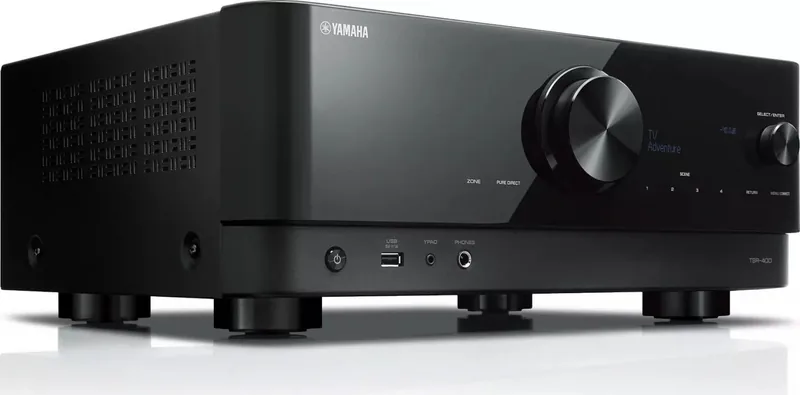
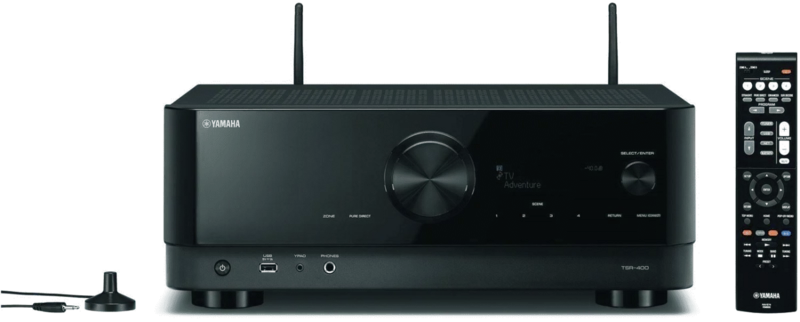
The Yamaha TSR-400 represents a significant step forward in home audio performance. This receiver brings cinematic sound quality to your living room. It offers versatile speaker configurations ranging from 2.1 to 5.1 systems. For users optimizing their audio environment, the instructions, often called the Yamaha TSR-400 Manual, contain vital setup guidelines for optimal performance.
Advanced Sound Field Effects
Sound quality is paramount. This model uses digital signal processing to create immersive soundscapes. Choose from various sound programs tailored to movie or music content. The inclusion of Virtual CINEMA DSP allows for surround effects even without rear speakers. Additionally, the SCENE function saves favorite settings for quick access. This simplifies daily operation significantly. You can also enjoy unprocessed playback using the Straight Decode mode for pure fidelity.
Connectivity and Streaming
Connecting devices is easier. The unit supports HDMI versions compliant with eARC and ARC for high-quality audio transmission from your television. Connect various playback sources including video discs. Network capabilities support both wired and wireless connections. Stream music from smartphone using AirPlay or Bluetooth. MusicCast technology enables multi-room audio playback when paired with compatible speakers. Internet radio stations are accessible via the network interface.
Setup and Configuration
Initial setup involves connecting speakers and configuring the audio environment. The Yamaha Parametric room Acoustic Optimizer automatically measures distances and optimizes settings for your specific room. This ensures balanced audio output across all channels. Users should pay attention to the antenna connections as these vary by region. Proper placement of the YPAO microphone is crucial. Following standard safety protocols ensures the longevity of the unit.
Multi-Room Audio Solutions
One standout feature is the Zone function. This allows you to play back an input source in the room where the unit is installed and in another room simultaneously. You can connect zone speakers independently to expand your audio coverage. This makes it possible to enjoy the same music throughout the house. The remote control facilitates easy operation across these zones. Setting volume differences between zones allows for a more comfortable listening experience.
Notes for New Users
- Ensure all speaker connections are secure to avoid short circuits.
- Update firmware regularly to access the latest features.
- Check supported file formats before using USB drives.
The Yamaha TSR-400 provides a solution for modern audio needs. Its flexibility in speaker connections and network integration suits various setups. By utilizing available configuration options, listeners can tailor the experience. With proper calibration and careful setup, this receiver delivers a satisfying auditory experience that enhances entertainment at home. It stands out as a reliable component for audiophiles.
Search for 67,706 Manuals online


Type-in Brand or Model