


Yamaha SR-X40A Manual
PDF manual · 120 Pages
English



Quick check
Incorrect answer, please try again.
Chat with your Yamaha SR-X40A manual using AI
Get instant AI answers from your Yamaha SR-X40A manual
Ask anything about the Yamaha SR-X40A. Answers come from this manual, with the pages they are based on.
Ask a Question
Do you recommend SR-X40A?
Yes NoFrequently Asked Questions
Yes. The SR-X40A supports Dolby Atmos and uses built-in height speakers to reproduce vertical sound. For full high-definition Atmos over a TV, connect an eARC-compatible TV to the sound bar with an Ethernet-supporting HDMI cable.
Is this answer helpful?
You can connect via HDMI eARC/ARC for audio and remote control, or use the included digital optical cable if HDMI ARC is not available. HDMI provides additional features like HDMI Control and passing audio from AV devices connected to the bar.
Is this answer helpful?
Yes. The unit supports Bluetooth streaming and AirPlay 2. When connected to your network it also supports various streaming services accessible via the Sound Bar Controller app or Alexa, depending on regional availability and service subscriptions.
Is this answer helpful?
Enable and configure Amazon Alexa through the Sound Bar Controller app and sign in with your Amazon account. Alexa can control power, inputs, volume, sound modes and play supported streaming services. Availability and language options vary by region.
Is this answer helpful?
Yes. Yamaha’s SW-X100A subwoofer (TRUE X SUB 100A) is supported for deeper bass, and TRUE X SURROUND-compatible wireless speakers can be registered as rear surrounds to create a real surround setup without speaker cables.
Is this answer helpful?
Use the Sound Bar Controller app to download and install firmware updates over the network. The UPDATE indicator flashes when new firmware is available. If network updates fail, you can update using a USB flash drive following Yamaha’s firmware update guide.
Is this answer helpful?
Ensure HDMI Control is enabled on both the sound bar and TV, use an ARC/eARC-compatible HDMI cable, and set the TV’s audio output to the sound bar. If issues persist, power-cycle devices and reseat cables; consult the troubleshooting section for additional steps.
Is this answer helpful?
Advantages and Disadvantages
Advantages

- Dolby Atmos and built-in height speakers create convincing vertical soundstage for immersive movies and games.
- Multiple control options: remote, TV HDMI Control, Sound Bar Controller app, Bluetooth, AirPlay 2 and Alexa voice.
- Flexible connectivity: HDMI eARC/ARC, optical input, wired LAN and Wi‑Fi for streaming services.
- Sound tailoring with Clear Voice and Bass EXT plus selectable modes for Stereo, Movie, Game and Standard.
- Expandable ecosystem: supports TRUE X SURROUND wireless speakers and compatible SW-X100A subwoofer.
Disadvantages

- High-definition Atmos via TV requires eARC-compatible TV and Ethernet-supporting HDMI cable for full audio fidelity.
- Wireless surround and subwoofer sold separately, increasing total system cost for full surround and deep bass.
- Some streaming and Alexa features are region-dependent and may not be available everywhere.
- Optical-only connection limits advanced features (use HDMI ARC/eARC for full control and high-res audio).
- Network and wireless setup requires the Sound Bar Controller app and a DHCP-enabled router; no IPv6 support.
Product Specification
Type
Soundbar
Power
180W Peak
Audio Decoder
Dolby Atmos, Dolby Digital
Streaming Clients
Apple AirPlay 2, Spotify, Tidal
Voice Assistants
Amazon Alexa
HDR
no
Video Connections
1x HDMI In, 1x HDMI Out
Audio Connections
eARC, 1x Digital Audio In (optical)
Other Connections
RJ-45
Wireless
Bluetooth 5.0, AAC, Wi-Fi (WLAN)
Special Features
HDMI Pass-Through, 4K Pass-Through, LipSync
Dimensions
39.96x2.48x4.41in (WxHxD)
Weight
8.60lb
Included
Soundbar
Product Description
Yamaha SR-X40A — Powerful, flexible sound bar
The Yamaha SR-X40A is a bar-style home audio system designed to upgrade TV sound with immersive, room-filling performance. Built-in height speakers and Dolby Atmos support create a vertical soundstage so effects and ambience feel like they come from above as well as around you. That makes movies, shows and games sound more cinematic without a complicated home-theater setup.
Connectivity is versatile: HDMI eARC/ARC support, optical input, wired LAN and Wi‑Fi are all included. Use a single HDMI cable to pass audio and control signals between TV and sound bar, or the supplied optical cable if HDMI ARC isn’t available. Wireless features include Bluetooth streaming and AirPlay 2 for easy playback from phones, tablets and computers. Network connection unlocks streaming services and Amazon Alexa voice control built into the unit.
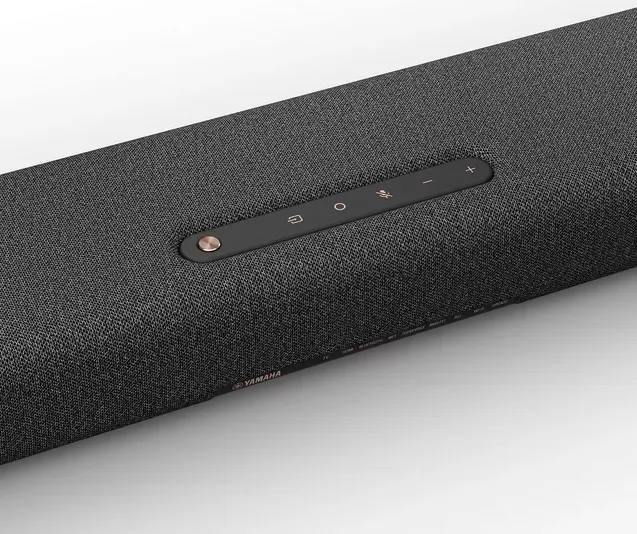
Controls are simple: the included remote, the Sound Bar Controller smartphone app, TV remote via HDMI Control, or Alexa voice commands. The top panel exposes quick tactile controls, microphones for Alexa and status indicators that show input, network and feature states. The Sound Bar Controller app manages network setup, firmware updates and finer configuration.
Sound tailoring features let you adapt audio to content and listening conditions. Dedicated sound modes (Stereo, Standard, Movie, Game) optimize processing for music, TV, cinema or gaming. Clear Voice emphasizes dialogue without raising overall volume; Bass EXT enhances low-frequency presence while keeping balance. You can add a dedicated TRUE X SUB 100A wired/wireless subwoofer for deeper bass and optionally pair Yamaha TRUE X SURROUND wireless speakers for full surround without running speaker cables.
Installation and safety are straightforward: tabletop placement or professional wall mounting, with cautions about ventilation and stable support. The bar ships with power cord, optical cable, spacers, mounting template and remote (CR2025 battery preinstalled). Firmware updates are supported through the app or USB, and the guide documents troubleshooting, settings (HDMI Control, Auto Power Standby, Child Lock, Bluetooth/Wi‑Fi enable/disable), and supported audio formats.
Overall, the SR-X40A blends modern streaming and smart assistant features with Yamaha’s surround processing and height-channel design, making it a strong choice for anyone wanting cinematic sound with minimal wiring and flexible control options.
Notes
- Built-in Alexa requires network setup and an Amazon account. Availability varies by region.
- For full Dolby Atmos via TV, use an eARC-compatible HDMI cable and an eARC-capable TV.
- Use the Sound Bar Controller app to configure Wi‑Fi, perform firmware updates, and fine-tune settings.
- TRUE X SURROUND wireless speakers and the SW-X100A subwoofer are sold separately.
Search for 67,706 Manuals online


Type-in Brand or Model