


Yamaha SR-B30A Manual
PDF manual · 85 Pages
English



Quick check
Incorrect answer, please try again.
Chat with your Yamaha SR-B30A manual using AI
Get instant AI answers from your Yamaha SR-B30A manual
Ask anything about the Yamaha SR-B30A. Answers come from this manual, with the pages they are based on.
SR-B30A Maintenance Schedule
Check the electric plug periodically and remove any dirt or dust which may have accumulated on it to prevent fire or electric shocks.
Confirm that the finished installation is safe and secure. Also, carry out safety inspections periodically to prevent devices from falling and causing injury.
Ask a Question
Do you recommend SR-B30A?
Yes NoFrequently Asked Questions
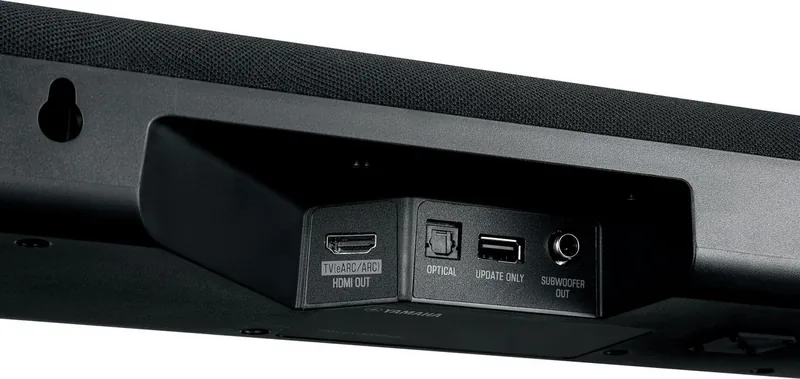
Use the HDMI OUT/TV eARC/ARC connection with the supplied HDMI cable when your TV supports eARC or ARC. This connection carries TV audio, supports HDMI Control, and enables compatible Dolby Atmos playback. Optical is an alternative for TVs without ARC, but it does not carry Dolby Atmos.
Is this answer helpful?
Yes. Activate Clear Voice with the remote to emphasize human voices without broadly increasing the overall volume. It is especially useful for films, TV dramas, games, and content with loud background music or effects.
Is this answer helpful?
Yes. The sound bar includes built-in subwoofers for bass reproduction. It also has a SUBWOOFER OUT connection, allowing a powered external subwoofer to be added for stronger low-frequency output. Both the internal and external subwoofers operate when an external unit is connected.
Is this answer helpful?
Yes. Select Bluetooth as the input, enable Bluetooth on the phone or tablet, and choose Yamaha SR-B30A from the available devices. The sound bar supports Bluetooth 5.1, SBC, and AAC audio. It can be connected with up to two previously paired devices.
Is this answer helpful?
Choose Standard for TV shows and sports, Movie for a broader cinematic surround effect, Game for clearer effect positioning in games, and Stereo for music or conventional two-channel listening. You can change modes at any time using the included remote.
Is this answer helpful?
Yes, if the sound bar is connected to a compatible TV through HDMI ARC or eARC and HDMI Control is enabled on both devices. Basic linked functions can include power, volume, and selecting the sound bar as the TV audio output.
Is this answer helpful?
Advantages and Disadvantages
Advantages

- Dolby Atmos playback is supported through an HDMI eARC connection with a compatible TV.
- Integrated subwoofers save space, while SUBWOOFER OUT supports an optional powered external subwoofer.
- Clear Voice and Bass Extension offer quick improvements for dialogue and low-frequency impact.
- HDMI Control can link power and volume operation to a compatible TV remote.
- Bluetooth multipoint capability allows convenient switching between two previously connected devices.
Disadvantages

- Dolby Atmos is unavailable when the TV is connected through the optical input.
- There is no HDMI input for connecting a player directly to the sound bar; sources connect through the TV.
- Treble and bass tone controls require the Sound Bar Remote smartphone app.
- Bluetooth audio uses SBC or AAC codecs, with no higher-resolution codec listed.
- Wall mounting should be handled by a dealer or qualified service personnel.
Product Specification
Type
Soundbar
Power
120 W peak
Audio Decoder
Dolby Atmos, Dolby Digital
HDR
No
Video Connections
1x HDMI In
Audio Connections
eARC, 1x Digital Audio In (optical)
Wireless
Bluetooth 5.1, AAC
Color
Black
Dimensions
35.83 x 2.68 x 5.24 in (W x H x D)
Weight
8.60 lb
Consists of
Soundbar
Product Description
Yamaha SR-B30A Manual: Compact Sound, Flexible Control
The Yamaha SR-B30A is a slim sound bar designed to make TV, movies, games, and music more engaging without adding a complicated multi-speaker setup. This Yamaha SR-B30A Manual overview highlights a practical audio solution for living rooms where clear dialogue, richer bass, and simple everyday control matter. With a compact 910 mm wide cabinet, integrated subwoofers, and multiple connection options, it fits neatly beneath many TVs or can be wall mounted.
Cinematic sound from a single sound bar
The SR-B30A delivers surround playback with dedicated Standard, Movie, and Game sound modes. Standard mode is well suited to TV programs and sports, placing extra focus on speech. Movie mode creates a more enveloping sound field for films, while Game mode helps make effects and positional details more distinct. For music or listeners who prefer a direct presentation, Stereo mode provides conventional two-channel playback.
Dolby Atmos compatibility through HDMI eARC adds another level of immersion when used with a compatible TV and source content. The sound bar also supports Dolby Digital, Dolby Digital Plus, Dolby TrueHD, and multichannel PCM through eARC. This makes it a capable choice for modern streaming services and connected entertainment devices.
Tailor dialogue and bass to your content
Yamaha includes useful sound tools that can be adjusted quickly from the remote. Clear Voice enhances the presence of dialogue without simply raising the overall volume, helping conversations remain understandable during action scenes or late-night viewing. Bass Extension refines the low-frequency presentation for a fuller, more impactful sound while preserving overall balance.
Built-in subwoofers provide bass without requiring a separate box in the room. For users who want more low-end output, the SR-B30A also includes a subwoofer output for an optional powered external subwoofer. Subwoofer level can be adjusted independently, giving listeners more control over the weight of movies, games, and music.
Easy TV, Bluetooth, and app operation
An HDMI eARC/ARC connection lets one cable carry TV audio and enables HDMI Control. When supported by the TV, this allows basic power and volume functions to be handled using the TV remote. Older or non-ARC TVs can connect through the optical digital input, though Dolby Atmos playback is not available over optical.
Bluetooth 5.1 streaming makes it easy to play audio from phones and tablets. The sound bar can maintain connections with up to two Bluetooth devices, so switching between listeners is straightforward. The Sound Bar Remote app adds convenient smartphone control and provides bass and treble adjustment from -6 to +6.
Notes: Use the supplied HDMI cable for TV connection. For the lowest standby power use, disable HDMI Control and Bluetooth Standby. Keep the sound bar clear of moisture, heat sources, and obstructed ventilation areas.
Search for 67,706 Manuals online


Type-in Brand or Model