
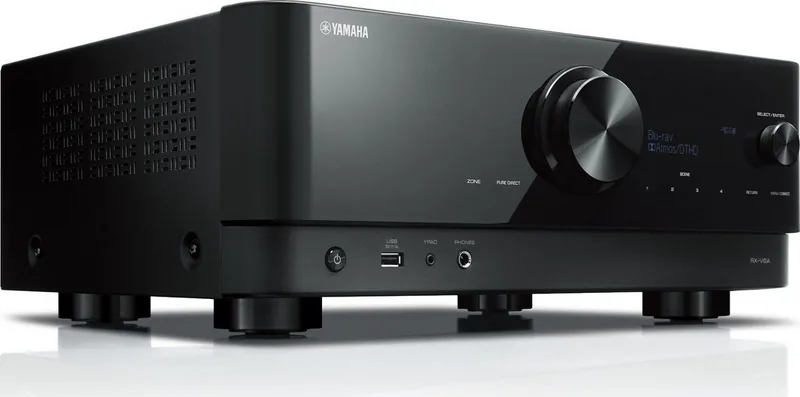
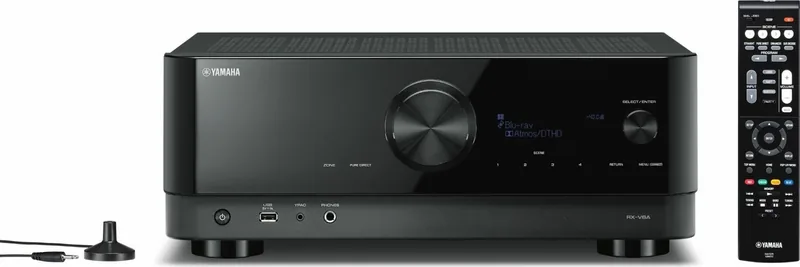
Yamaha RX-V6A Manual
PDF manual · 385 Pages
English



Quick check
Incorrect answer, please try again.
Chat with your Yamaha RX-V6A manual using AI
Get instant AI answers from your Yamaha RX-V6A manual
Ask anything about the Yamaha RX-V6A. Answers come from this manual, with the pages they are based on.
Ask a Question
Do you recommend RX-V6A?
Yes No
Sarah Weber
6 months ago
Is there a known fix for the RX-V6A HDMI 2.1 bug or update reboots? Reviewers mention units needing mainboard swaps. How should I handle this if it happens to my new device?

Manual.ly
6 months ago
We are aware of the stability issues reported. While a public board swap program exists in some markets, support for affected units varies by region. If your device reboots or loses signal, please contact our authorized dealer to arrange a warranty inspection. Our technical team can determine if the internal processor requires replacement to ensure full HDMI 2.1 functionality and stability.

Jason Roberts
7 months ago
I have read about a faulty sound/video processor causing HDMI issues and updates breaking the device. Is there a known fix or will defective units be exchanged?
Manual.ly
7 months ago
Thank you for your inquiry. We are aware of reports regarding specific firmware versions and hardware components affecting performance, including HDMI signal issues and update failures. Our engineering team is actively investigating these cases. If your unit is experiencing these problems, please contact our support team with your serial number to determine if an exchange or repair under warranty is applicable.
Grace Wright
5 months ago
Why is the display so small and hard to read from a distance? Also, why does the remote only allow sequential input selection instead of direct choice?
Jayden Ross
6 months ago
Are there known reliability or HDMI issues with the RX-V6A, such as audio/video dropouts, reboot loops after updates, or the HDMI 2.1 4K/120 Hz limitation?
Manual.ly
6 months ago
Some users have reported intermittent audio/video loss, startup problems after firmware updates, and early HDMI 2.1 compatibility limitations affecting certain 4K/120 Hz sources. Keep the receiver firmware current and use certified high-speed HDMI cables. If the unit repeatedly restarts, shows an internal error, or loses signal, reset it only if recommended in the manual and contact the retailer or Yamaha service for diagnosis or applicable hardware service.
Frequently Asked Questions
It supports several layouts, including 2.1, 3.1, 3.1.2, 5.1, 5.1.2, 7.1, and 7.1/5.1.2 systems. It also supports Virtual CINEMA FRONT, Zone 2 arrangements, and bi-amping for compatible front speakers.
Is this answer helpful?
Yes. Compatible Dolby Atmos and DTS:X content can be played through suitable speaker layouts such as 5.1.2 or 3.1.2. Front presence speakers can be placed high at the front, overhead, or used as Dolby Enabled speakers.
Is this answer helpful?
YPAO measures speaker connections, distances, levels, and room acoustics using the supplied microphone. It then automatically optimizes speaker settings for the main listening position. Keep the room quiet and position the microphone at ear height for best results.
Is this answer helpful?
Yes. The receiver includes a PHONO input for turntables with MM cartridges. A turntable with an MC cartridge may require a step-up transformer. Connecting the turntable ground wire can help reduce signal noise.
Is this answer helpful?
Yes. It supports Bluetooth, AirPlay, USB playback, media servers such as PCs or NAS devices, internet radio, and supported music streaming services. MusicCast CONTROLLER can be used for source selection and network-based control.
Is this answer helpful?
Yes, with compatible MusicCast Surround products. Supported setups can use wireless surround speakers and a wireless subwoofer in 5.1 or 5.1.2 systems. Certain sources, including DSD and some HDMI disc formats, have wireless playback restrictions.
Is this answer helpful?
Advantages and Disadvantages
Advantages

- Supports flexible layouts from 2.1 stereo to 7.1 and 5.1.2 Dolby Atmos or DTS:X systems.
- YPAO calibration automatically adjusts speaker distance, balance, and acoustic settings for the room.
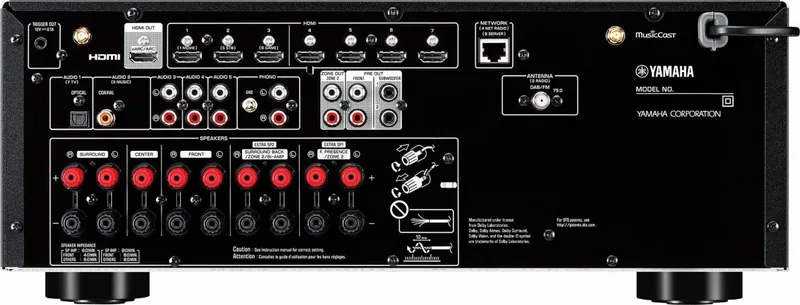
- Seven HDMI inputs plus eARC/ARC, phono, optical, coaxial, USB, Bluetooth, and network connectivity support many sources.
- MusicCast enables app control, multiroom playback, and compatible wireless surround speaker options.
- Includes sound modes for dialogue clarity, low-volume listening, enhanced compressed music, bass, and Pure Direct playback.
Disadvantages

- Advanced speaker assignments can require careful setup, especially for Zone 2, bi-amping, or height speakers.
- Rear surround and front presence speakers cannot output simultaneously in some 7.1/5.1.2 arrangements.
- Wireless MusicCast Surround has source and configuration limits, including restrictions for some high-resolution formats.
- YPAO measurement uses loud test tones and requires a quiet room for accurate results.
Product Specification
Channels
7.2
Power per channel
100 W (6 ohms)
Tuner
FM, DAB+, AM, Internet radio
Audio decoders
Dolby Atmos Height Virtualizer, Dolby Digital Plus, Dolby TrueHD, DTS-HD Master Audio
Streaming clients
Apple AirPlay 2, Spotify
HDR
Dolby Vision, HDR, HDR10, HDR10+, HLG
Video connections
7x HDMI 2.0 In, 1x HDMI 2.0 Out, HDCP 2.3, 3x Composite Video In, 1x Composite Video Out
Audio connections
eARC, 1x Digital Audio In (coaxial), 1x Digital Audio In (optical), 4x Stereo Line In (RCA), 1x AUX In (0.14 in jack), 2x Pre Out (RCA), 2x Sub Out (RCA), Headphones (0.25 in jack)
Additional connections
USB-A, RJ-45
Wireless
Bluetooth, Wi-Fi (WLAN)
Calibration system
YPAO R.S.C.
Features
ALLM (Auto Low Latency Mode), VRR (Variable Refresh Rate), 3D ready, HDMI Pass-Through, 8K Pass-Through, BT.2020, Deep Color, DSD128, Gapless Playback, x.v.Color
Power consumption
0.1 W standby
Color
Black
Dimensions
17.13 x 6.73 x 14.84 in (W x H x D)
Weight
21.61 lb
Product Description
Yamaha RX-V6A Manual: Build a More Immersive Home Theater
The Yamaha RX-V6A is a versatile AV receiver designed to bring movies, games, television, and music together in one connected home entertainment system. This Yamaha RX-V6A Manual overview highlights the receiver's flexible speaker support, network listening options, and practical setup tools for creating a more personalized listening space.
With support for configurations ranging from simple 2.1-channel stereo to 7.1 or 5.1.2-channel surround arrangements, the RX-V6A can suit compact rooms and more ambitious theater installations. Dolby Atmos and DTS:X compatibility lets compatible content add height effects for a more three-dimensional presentation. For rooms where rear speakers are difficult to place, Virtual CINEMA FRONT and Virtual CINEMA DSP provide alternative ways to enjoy a spacious surround-style experience.
Smart Calibration and Sound Control
Yamaha's YPAO room calibration system helps simplify speaker setup. Using the included microphone, it measures speaker connections, distances, levels, and acoustic characteristics at the listening position. The receiver then adjusts settings to better match the room. This can be especially useful when speaker placement is not perfectly symmetrical or when combining different speaker sizes.
Listening modes include Cinema DSP programs, surround decoding, Pure Direct, Extra Bass, Compressed Music Enhancer, and dialogue enhancement. These options allow users to favor clean stereo playback, fuller low-volume listening, stronger bass response, or clearer voices during films and shows. SILENT CINEMA also brings surround processing to headphones.
Connections, Streaming, and Multiroom Audio
The RX-V6A provides seven HDMI inputs for devices such as game consoles, media players, and disc players, plus an HDMI output with eARC/ARC support for compatible TVs. It also includes optical, coaxial, analog RCA, and phono inputs, making it suitable for both modern and traditional audio sources. Dual subwoofer outputs, pre-outs, trigger output, USB playback, and radio connections add further system flexibility.
Network features expand music access through AirPlay, Bluetooth, USB storage, media servers, internet radio, and supported streaming services. With MusicCast, the receiver can join a Yamaha multiroom system and be controlled from a mobile device. MusicCast Surround can also support compatible wireless surround speakers and a wireless subwoofer in supported layouts.
Notes
- Use eARC/ARC with a compatible TV to send television audio through a single HDMI cable.
- Speaker impedance and amplifier assignment should be configured before calibration.
- Firmware updates can add improvements and should be installed through a stable network or USB method.
- For secure streaming access, connect through a password-protected router rather than directly to public Wi-Fi.
Search for 67,706 Manuals online


Type-in Brand or Model
sgibson91
8 months ago
I am concerned about the stability issues reported after firmware updates and the HDMI signal loss. Is there a known fix for these problems and will devices with the faulty mainboard be replaced?
Manual.ly
8 months ago
We appreciate your feedback on the stability concerns. Please ensure your unit is on the latest stable firmware available in the settings menu. Regarding the HDMI signal drop, this is often related to HDCP handshake settings between the source and receiver. For the mainboard reports, we are monitoring the affected batch numbers. Please contact our support department with your serial number to determine if your unit qualifies for a proactive replacement under warranty. We are committed to resolving these hardware issues for all affected customers as soon as possible.