
Yamaha RX-V4A Manual
PDF manual · 324 Pages
English



Quick check
Incorrect answer, please try again.
Chat with your Yamaha RX-V4A manual using AI
Get instant AI answers from your Yamaha RX-V4A manual
Ask anything about the Yamaha RX-V4A. Answers come from this manual, with the pages they are based on.
Ask a Question
Do you recommend RX-V4A?
Yes No
Freeda Connelly
8 months ago
Is this receiver compatible with HDMI 2.1 consoles like the PS5? Some reviews mention motherboard defects affecting this feature.

Manual.ly
8 months ago
Thanks for reaching out. Earlier models had some motherboard revisions affecting HDMI 2.1 compatibility. Current stock includes updated boards. Please check the serial number on our website to confirm it belongs to the new batch. If you purchase one, it comes with full warranty coverage including any board replacements if needed. We recommend confirming compatibility with your specific console before use. Our support team is available to verify the unit status for you.

ljenkins58
7 months ago
Does this receiver support HDMI 2.1 for PS5 and does it have reliable DAB reception?
Manual.ly
6 months ago
Thank you for your inquiry. Regarding HDMI 2.1, please note that some units experienced hardware issues requiring motherboard replacements to enable full functionality. We recommend checking the latest official Yamaha statement before purchase if this feature is critical. As for DAB reception, while the unit supports digital radio, user feedback indicates that internet streaming via the app often provides a more consistent experience than local DAB signals.
Zoe Hunter
6 months ago
Is the front display easy to read when changing sound modes?
Luca Bianchi
6 months ago
Does this receiver fully support HDMI 2.1 features for a PS5, or are hardware board replacements still required?
Manual.ly
6 months ago
Some early units had HDMI 2.1 compatibility limitations that could affect certain PS5 gaming features. Availability and eligibility for hardware updates can depend on the production batch and region. Before purchasing, check the receiver's serial number, current firmware, and the retailer or Yamaha support information for the latest HDMI 2.1 compatibility status.
Frequently Asked Questions
The receiver supports 5.1-channel, 3.1-channel, and 2.1-channel configurations. It can also use Virtual CINEMA FRONT when surround speakers must be placed at the front, and Virtual CINEMA DSP can create surround effects without physical surround speakers.
Is this answer helpful?
YPAO uses the included microphone at the main listening position to measure connected speakers, distances, volume balance, and acoustic characteristics. It then applies optimized settings for the room. Keep the room quiet and avoid blocking the path between speakers and microphone during measurement.
Is this answer helpful?
Yes. With a compatible TV, the HDMI OUT connection can use eARC or ARC to send TV audio back to the receiver through the same HDMI cable. If the TV does not support eARC or ARC, an optical digital audio connection can be used for TV sound.
Is this answer helpful?
The RX-V4A can play music through Bluetooth, AirPlay, USB flash drives, network media servers such as PCs or NAS devices, Internet radio, and supported streaming services. It also includes analog, optical, and coaxial inputs for connected audio components.
Is this answer helpful?
MusicCast is Yamaha's multi-room music platform. Using the MusicCast CONTROLLER app, you can select music, configure compatible devices, and link playback across rooms. Compatible MusicCast speakers and a subwoofer can support selected wireless surround arrangements.
Is this answer helpful?
Yes. Connect headphones to the front PHONES jack. SILENT CINEMA can provide surround or sound-field effects through stereo headphones when an appropriate sound program or surround decoder is selected.
Is this answer helpful?
Advantages and Disadvantages
Advantages

- Supports flexible 2.1, 3.1, and 5.1 speaker systems, plus virtual surround modes for rooms with limited rear-speaker placement.
- YPAO room calibration automatically adjusts speaker distance, levels, and acoustic parameters using the included microphone.
- Four HDMI inputs and eARC/ARC support simplify connections for a TV, console, disc player, and other video sources.
- Wi-Fi, Bluetooth, AirPlay, USB, Internet radio, network playback, streaming services, and MusicCast provide broad music access.
- CINEMA DSP, Pure Direct, dialogue enhancement, Extra Bass, SCENE presets, and headphone surround offer varied listening options.
Disadvantages

- A 5.1-channel design does not provide the expanded speaker capacity of higher-channel home theater receivers.
- Wireless surround requires separate compatible MusicCast speakers and, where used, a compatible MusicCast subwoofer.
- Some wireless surround playback limitations apply, including DSD audio and certain HDMI DVD-Audio or SACD content.
- Pure Direct disables several conveniences, including sound program selection, Zone functions, and on-screen setup menus.
- Proper setup involves speaker wiring, TV configuration, network connection, and YPAO measurement, which may take time.
Product Specification
Channels
5.2
Power per channel
80 W (6 ohms)
Tuner
FM, DAB+, AM, Internet radio
Audio decoder
Dolby Digital Plus, Dolby TrueHD, DTS-HD Master Audio
Streaming clients
Apple AirPlay 2, Spotify
HDR
Dolby Vision, HDR, HDR10, HDR10+, HLG
Video connections
4x HDMI 2.0 In, 1x HDMI 2.0 Out, HDCP 2.3, 3x Composite Video In, 1x Composite Video Out
Audio connections
eARC, 1x Digital Audio In (coaxial), 1x Digital Audio In (optical), 3x Stereo Line In (RCA), 1x AUX In (3.5 mm jack), 1x Sub Out (RCA), Headphones (0.25 in jack)
Other connections
USB-A, RJ-45
Wireless
Bluetooth, Wi-Fi (WLAN)
Calibration system
YPAO
Special features
ALLM (Auto Low Latency Mode), VRR (Variable Refresh Rate), 3D ready, HDMI Pass-Through, 8K Pass-Through, 8K Upscaling, BT.2020, Deep Color, DSD128, Gapless Playback, x.v.Color
Power consumption
0.1 W standby
Color
black
Dimensions
17.13 x 6.73 x 14.84 in (W x H x D)
Weight
19.4 lb
Product Description
Yamaha RX-V4A Manual: A Flexible Home Theater Receiver
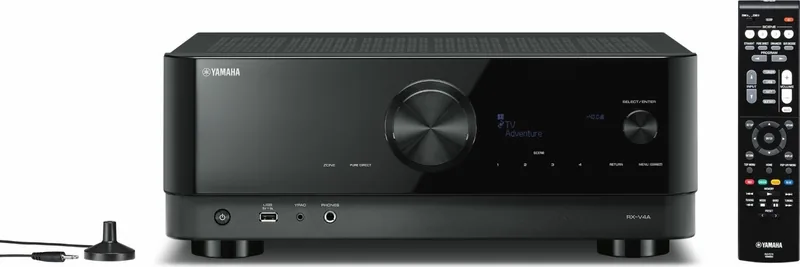
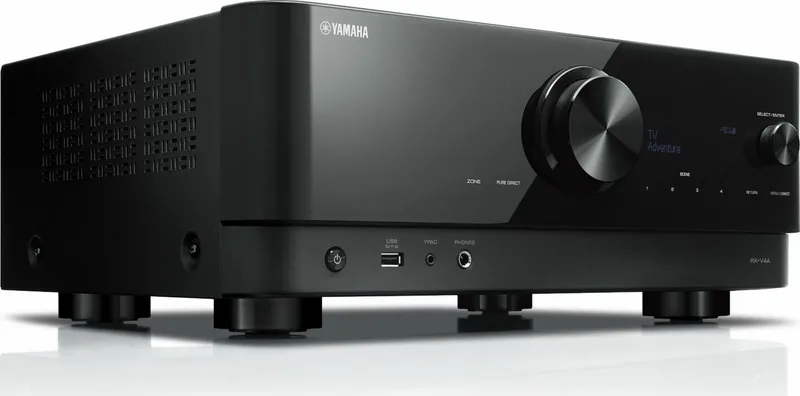
The Yamaha RX-V4A is a versatile AV receiver designed to bring movies, games, television, radio, and streamed music together in one home entertainment system. This Yamaha RX-V4A Manual overview highlights a receiver built for users who want clear connections, adaptable speaker options, and convenient everyday control without sacrificing an immersive listening experience.
Surround Sound for Different Rooms and Setups
At its core, the RX-V4A supports a range of speaker layouts, including 5.1-channel, 3.1-channel, and 2.1-channel systems. A full 5.1 setup delivers front, center, surround, and subwoofer channels for a more cinematic presentation, while smaller configurations can suit compact rooms or simpler stereo-focused installations. The receiver also supports Virtual CINEMA DSP and Virtual CINEMA FRONT, helping create a wider surround effect when rear speaker placement is not practical.
Yamaha YPAO calibration makes setup more approachable. Using the supplied microphone, the receiver measures speaker distance, level balance, and room acoustics, then adjusts settings to better match the listening position. This can be particularly valuable when speakers cannot be placed in ideal locations.
HDMI, Network, and Wireless Listening
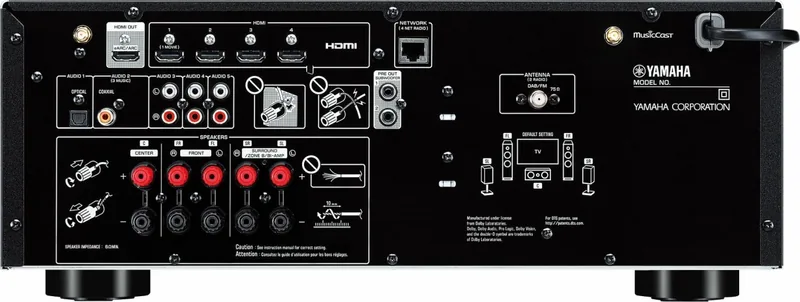
Four HDMI inputs make it easy to connect common video sources such as a game console, media player, or Blu-ray player. The HDMI output supports eARC/ARC, allowing compatible TVs to send their audio back through a single HDMI connection. Additional optical, coaxial, and analog audio inputs provide flexibility for CD players and other legacy equipment.
Network connectivity opens access to AirPlay, Internet radio, music streaming services, and music stored on compatible PCs or NAS devices. Bluetooth lets you play music from a phone or tablet, while the receiver can also transmit audio to compatible Bluetooth headphones or speakers. USB playback is available from a connected flash drive.
Sound Modes and Smart Control
The RX-V4A includes Yamaha CINEMA DSP sound programs tailored to movies, music, sports, games, and stereo listening. Pure Direct offers a simplified signal path for focused Hi-Fi playback, while Compressed Music Enhancer is intended to add fullness to supported compressed digital audio. Dialogue clarity, Extra Bass, sleep timer, SCENE presets, and shortcuts add useful control for daily use.
MusicCast expands the system into a multi-room platform through the MusicCast CONTROLLER app. Compatible MusicCast speakers and a subwoofer can also be used for supported wireless surround arrangements. For homes with a second listening area, Zone B connections can play audio in another room.
Notes
- Use the supplied YPAO microphone after placing and connecting speakers.
- Keep wireless antennas upright for Wi-Fi and Bluetooth use.
- Check TV compatibility and settings when using eARC/ARC.
- Update firmware through the network or USB when updates are available.
Search for 67,706 Manuals online


Type-in Brand or Model
Alex Gamer
6 months ago
Is this receiver fully compatible with PS5 consoles for HDMI 2.1 features, and are there common issues with app streaming or setup?
Manual.ly
6 months ago
We understand your concern about PS5 compatibility. While most units function correctly with HDMI 2.1, some early batches required board replacements. Please check the official manufacturer statement for your serial number to ensure you have the updated hardware. Regarding setup, users generally find the auto-calibration quick and easy. Sound quality is often praised for powerful bass without excessive distortion. Some users noted issues with specific streaming apps, but general HDMI integration with TVs and Blu-ray players works smoothly. Checking the latest firmware is always recommended for optimal performance.