
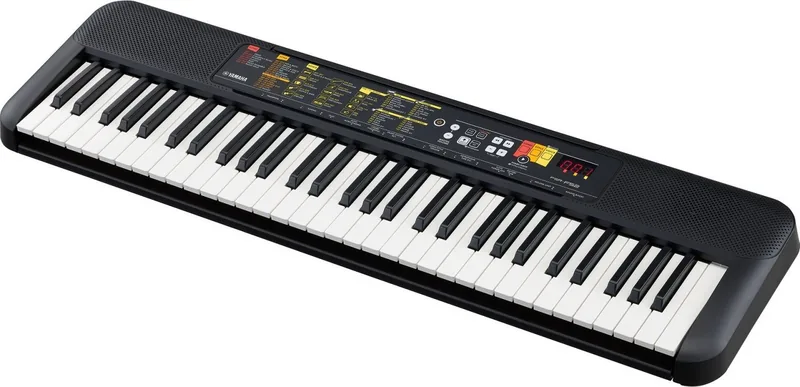

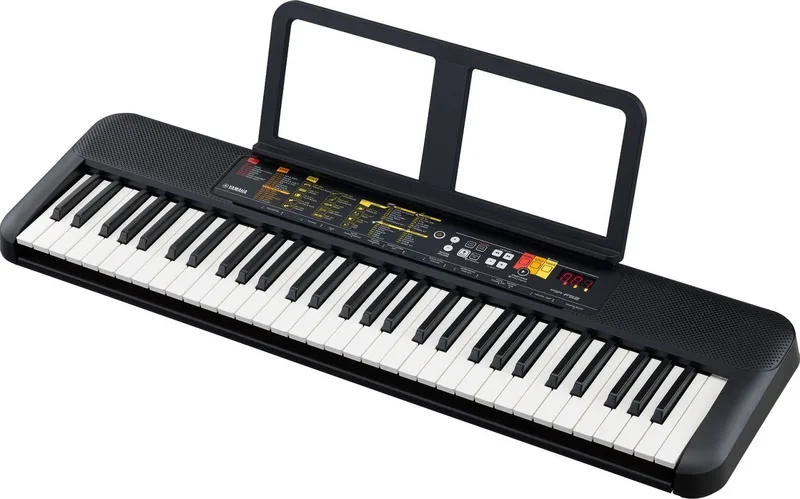
Yamaha PSR-F52 Manual
PDF manual · 20 Pages
English



Quick check
Incorrect answer, please try again.
Chat with your Yamaha PSR-F52 manual using AI
Get instant AI answers from your Yamaha PSR-F52 manual
Ask anything about the Yamaha PSR-F52. Answers come from this manual, with the pages they are based on.
PSR-F52 Maintenance Schedule
Check the electric plug periodically and remove any dirt or dust which may have accumulated on it.
When cleaning the instrument, use a soft cloth. Do not use paint thinners, solvents, alcohol, cleaning fluids, or chemical-impregnated wiping cloths.
When battery power becomes too low for proper operation, replace all batteries with new ones or already recharged ones.
Ask a Question
Do you recommend PSR-F52?
Yes No
Ray Knight
7 months ago
How much space does this digital piano take up, and is the key count sufficient for playing standard songs?
serenity92
6 months ago
Is this digital piano suitable for beginners, and what features are missing compared to professional models?

Manual.ly
6 months ago
Yes, this model is highly recommended for beginners due to its excellent sound quality and intuitive operation. It offers great value for money and is ideal for learning and practice. However, experienced players may notice the absence of advanced features such as intros and endings, which are common in more expensive instruments.
Lars Weber
6 months ago
Does this keyboard take up too much space for a small home setup?
Frequently Asked Questions
The keyboard features over 144 voices, including realistic pianos, organs, guitars, strings, brass, woodwinds, and unique world instruments like the Sitar, Bagpipe, and Gamelan. It also includes multiple drum kits to enhance percussion sounds.
Is this answer helpful?
Yes, the instrument runs on six AA batteries, which can be Alkaline, Manganese, or rechargeable NiMH types. However, using the AC adapter is recommended for consistent performance and to save battery life.
Is this answer helpful?
Smart Chord allows you to play complex chords by pressing just one key. You simply select the root note in the left-hand accompaniment area, and the keyboard generates the full chord based on the selected key signature.
Is this answer helpful?
Yes, the PSR-F52 has a Split function that divides the keyboard into two sections with different voices. This is useful for bass lines in the left hand and melody in the right hand simultaneously.
Is this answer helpful?
Absolutely. The built-in metronome helps with timing practice. You can adjust the beat count and tempo, and even use the Tap Tempo feature to set the speed by tapping the button.
Is this answer helpful?
Duo Mode splits the keyboard into two identical octaves, allowing two people to play side-by-side. It is activated via the Function menu where you can toggle the setting On or Off.
Is this answer helpful?
Advantages and Disadvantages
Advantages

- Over 144 high-quality voices including world instruments
- Smart Chord technology simplifies playing complex harmonies
- Duo mode splits keyboard for simultaneous teaching and learning
- Portable design with battery operation option for mobility
- Built-in accompaniment styles allow solo performances
Disadvantages

- No audio recording capabilities for internal playback
- Limited polyphony compared to professional stage keyboards
- Display is basic and lacks detailed graphical feedback
- Battery life depends heavily on usage intensity and type
- No USB-MIDI connectivity for direct computer integration
Product Specification
Type
Home Keyboard
Keys
61
Sound Generation
Sampling
Polyphony
32 voices
Controller
No
Sound Presets
136
Styles
158
Speakers
2 x 2.5 W
Display
LCD
Audio Connectors
1 x Headphone (3.5mm jack)
Features
Battery powered, Learning function
Dimensions
36.2 x 2.9 x 10.5 in (WxDxH)
Weight
6.17 lbs
Product Description
Discover the Yamaha PSR-F52 Digital Keyboard
The Yamaha PSR-F52 is a portable digital keyboard designed for musicians of all skill levels who seek versatility and ease of use. With its sleek design and user-friendly interface, this instrument serves as an excellent companion for practice, performance, or creative exploration. Whether you are a beginner learning your first chords or an experienced player looking for a reliable travel partner, the PSR-F52 delivers a rich musical experience.
Equipped with 61 full-size keys, the keyboard offers a comfortable playing surface that mimics the feel of a standard piano. The instrument boasts an impressive library of over 144 realistic voices, ranging from grand pianos and electric pianos to world instruments like the sitar, bagpipes, and gamelan. This diversity allows users to explore various genres and soundscapes without needing external equipment. Additionally, the built-in accompaniment styles provide instant band-like backing, enabling solo players to create full arrangements effortlessly.
One of the standout features is the One-Touch Setting (OTS) function. When a song or style is selected, pressing voice number 000 automatically configures the perfect instrument sound and settings for that specific track. For those interested in learning, the Duo mode splits the keyboard into two identical ranges, allowing teachers and students to play together on the same instrument. The Smart Chord technology simplifies harmony creation; users only need to press a single key to trigger complex chord progressions, making it accessible for novices while remaining powerful for advanced players.
The PSR-F52 also includes 69 preset songs covering children's classics, popular standards, and famous classical pieces. These tracks can be used for listening, practicing along with, or analyzing structure. The built-in metronome and tap tempo function help maintain rhythm, while the Sound Boost feature enhances volume and impact when playing without external speakers. Power flexibility ensures the keyboard can run on either the included AC adapter or six AA batteries, making it truly portable for outdoor gigs or lessons away from home.
Important Notes
- Always use the specified Yamaha PA-130 power adapter to prevent damage.
- Remove batteries if the instrument will not be used for an extended period.
- Keep the device away from water and extreme temperatures to ensure longevity.
- Use headphones at moderate volumes to protect hearing during long sessions.
Search for 67,706 Manuals online


Type-in Brand or Model
IustoQuibusdam58
4 months ago
Is this keyboard suitable for beginners who want to learn piano, and are there any missing features for advanced players?
Manual.ly
4 months ago
Yes, this digital piano is highly recommended for beginners. It offers a great price-performance ratio with normal-sized keys that feel similar to a classic piano, making it ideal for learning and practice. However, experienced players may notice some limitations compared to full-size pianos, such as a reduced number of keys and the absence of advanced features like intros and endings. Overall, it provides excellent sound quality for its size and price point.