

Yamaha Genos2 Manual
PDF manual · 144 Pages
English



Quick check
Incorrect answer, please try again.
Chat with your Yamaha Genos2 manual using AI
Get instant AI answers from your Yamaha Genos2 manual
Ask anything about the Yamaha Genos2. Answers come from this manual, with the pages they are based on.
Ask a Question
Do you recommend Genos2?
Yes NoFrequently Asked Questions
Yes, the Genos2 includes a MIC INPUT jack that accepts both XLR and standard phone plugs allowing you to sing along with keyboard performance or Song playback.
Is this answer helpful?
You can expand content using Yamaha Expansion Manager software on a computer to install downloaded packs supporting formats like WAV, AIFF, and SoundFont.
Is this answer helpful?
Turn off the power switch and disconnect the plug immediately and have the device inspected by Yamaha service personnel if unusual heat or smoke is detected.
Is this answer helpful?
Yes, Registration Memory allows you to save virtually all panel settings to a button for instant recall during performance without powering off the unit.
Is this answer helpful?
No, modifications not expressly approved by Yamaha may void your authority to use the product and warranty claims may be denied.
Is this answer helpful?
Yes, this product complies with Part 15 of the FCC Rules when installed according to instructions to prevent harmful interference.
Is this answer helpful?
Use a soft and dry cloth. Do not use solvents, alcohol or paper thinners which could damage the surface.
Is this answer helpful?
Advantages and Disadvantages
Advantages

- Advanced AEM tone generation technology for expressive and realistic voices including pianos and brass.
- Powerful DSP effects processing using technology from professional high-end mixing consoles.
- Real-time controller allows immediate sound shaping with knobs, sliders, and helpful visual aids.
- Extensive Style Dynamics Control to adjust energy of accompaniment styles in real time.
- Comprehensive connectivity options including HDMI, USB, MIDI, and Bluetooth for versatile integration.
Disadvantages

- Built-in speakers are not included requiring external equipment for audio output.
- Requires significant space for optimal setup including stand and accessories mounting.
- Firmware updates need internet connection and manual download process for improvements.
- Complex panel settings may require time to master for new users.
- Data loss risk if power is turned off without saving edited songs or styles.
Product Specification
Type
Workstation
Keys
76, Aftertouch, with Velocity sensitivity
Sound Engine
FM Synthesis, Sampling
Polyphony
384 voices
Controller
Joystick, 6 knobs, 9 faders
Sound Presets
2066
Styles
800
Speakers
No
Display
9.0", 800x480 pixels, LCD, Touchscreen
Audio Connections
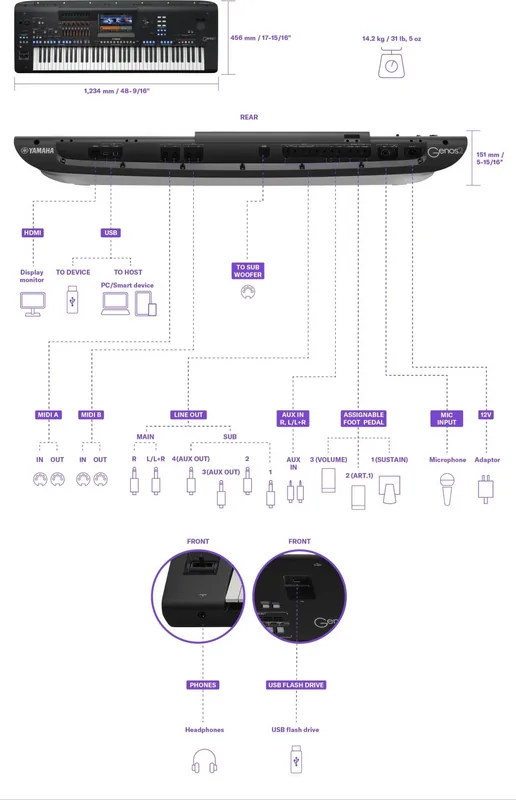
2x Stereo Line In (3.5mm Jack), Mic/Instrument In (XLR/6.35mm Combo), 2x Stereo Line Out (6.35mm Jack), 4x Line Out (6.35mm Jack), 1x Headphones (6.35mm Jack)
Additional Connections
2x USB-A (USB to Device), USB-B (USB to Host), HDMI, Wi-Fi (Wireless), Bluetooth 5.0, MIDI In/Out, Volume Pedal, Expression Pedal, Sustain Pedal
Features
Audio Player, Audio Recorder, MIDI Recorder, Sequencer, Looper, Arpeggiator, Vocoder, Audio Interface, Hard Drive (15GB)
Dimensions
48.58x5.94x17.95 inches (W x H x D)
Weight
31.31 lbs
Product Description
Yamaha Genos2 Performance Overview
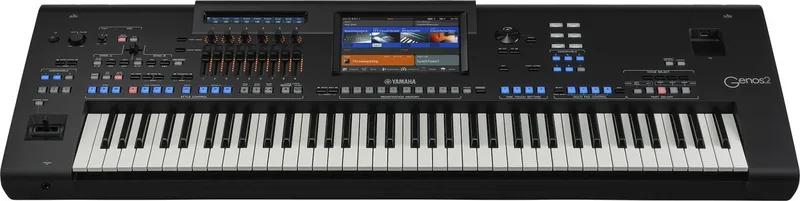
The Yamaha Genos2 stands as a pinnacle of electronic keyboard technology designed for musicians seeking versatility and depth. This instrument combines powerful tone generation with state-of-the-art digital electronics to deliver stunning sound and maximum musical versatility. Its beautifully curved design complements the robust features found within, making it a centerpiece for any performance setup. While exploring its capabilities, refer to the Yamaha Genos2 Manual for details.
At the heart of the Genos2 is advanced tone generation technology which ensures extraordinarily expressive and realistic Voices. From beautiful new pianos to powerful brass and legendary FM Voice technology, the sonic palette is vast. The powerful DSP processing enhances the sound with effects ranging from Reverb to Rotary Speaker, utilizing technology found in professional high-end mixing consoles. Accompaniment Styles bring a full band to your fingertips instantly. With Style Dynamics Control, you can finely adjust energy in real time. The new Ambient Drums allow you to choose between close mic or room sound.
The versatile real-time controller, known as Live Control, lets you shape sounds instantly using knobs and sliders with helpful visual aids. Voice and Style expandability are unlocked via software for installing expansion packs, supporting various formats for infinite creative potential. You can also create your own original content including Styles and Voices using editing tools. Registration Memory function allows saving virtually all panel settings to recall instantly with a single button press.
Comprehensive Audio features include a Dual Player for crossfading audio tracks and Multi Pads for adding creative layers. You can even record performance directly to high quality audio tracks ready to share. Wireless connectivity via Bluetooth enables playback from smart devices or recording through the corresponding app on your phone. Microphone effects allow adding harmony vocals and synth vocoder effects for singing performances.
Connectivity options are extensive with HDMI terminals for viewing on external monitors, USB terminals for USB drives and computers, and MIDI terminals for external gear. Audio connections support microphones and line outputs for professional setups. Safety guidelines emphasize using the supplied power cord and keeping the unit dry. Always disconnect during electrical storms. Ensure adequate ventilation and do not place burning items near the device. Proper grounding is required to avoid shock risks.
The system supports GM System Level 2 and XG formats. Firmware updates improve functions. Backup your important data to USB or external storage regularly as power loss can delete unsaved work. Handle with care to maintain components. Ensure the region matches power specifications before plugging in units.
Notes
Always review safety instructions before first use. Keep the power cord accessible for emergency disconnect. Use the supplied accessories for mounting the music rest. Contact local authorities for disposal according to regulations.
Search for 67,706 Manuals online


Type-in Brand or Model