
Yamaha ATS-B400 Manual
PDF manual · 88 Pages
English



Quick check
Incorrect answer, please try again.
Chat with your Yamaha ATS-B400 manual using AI
Get instant AI answers from your Yamaha ATS-B400 manual
Ask anything about the Yamaha ATS-B400. Answers come from this manual, with the pages they are based on.
ATS-B400 Maintenance Schedule
Regularly check the condition of the power plug and remove any accumulated dirt or dust to prevent fire or electric shock.
Regularly perform safety checks to ensure the unit is installed securely and does not fall over, preventing injury.
Ask a Question
Do you recommend ATS-B400?
Yes NoFrequently Asked Questions
Use the digital optical input jack and cable. Note that Dolby Atmos will not be supported when connected via optical audio, as this format is limited to HDMI connections only.
Is this answer helpful?
Yes, if connected via HDMI with the HDMI Control function enabled on both the TV and the sound bar. Check your settings in the configuration menu.
Is this answer helpful?
Use the Sound Bar Remote app on your smartphone for separate tone control adjustments. This allows you to match the audio balance to your personal preferences accurately.
Is this answer helpful?
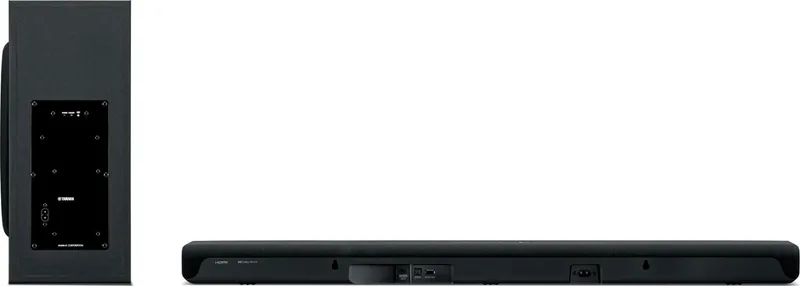
Check placement and ensure they are close enough to each other. Try manual pairing using the PAIRING button on the rear of the subwoofer unit.
Is this answer helpful?
Yes, it uses 25 W power during operation and has low standby consumption depending on HDMI Control settings. It meets Eco-Product standards.
Is this answer helpful?
Turn off the bar, hold the plus button on the front, press power until indicators flash to initialize the product to factory defaults.
Is this answer helpful?
Yes, press the subwoofer pairing button while holding the subwoofer minus button on the remote to initiate the pairing sequence successfully.
Is this answer helpful?
Advantages and Disadvantages
Advantages

- Clear Voice function enhances dialog clarity without raising overall volume for comfortable viewing
- Supports HDMI ARC for single cable connection and easy TV remote control integration
- Bass Extension feature improves low frequency presence for deeper sound without distortion
- Smartphone app allows detailed tone control adjustments for high and low frequencies
- Energy efficient with low standby power consumption designed for eco-friendly use
Disadvantages

- Dolby Atmos is not supported when using the optical audio input method
- Tone control adjustments can only be made through the dedicated smartphone app
- Bluetooth standby function is enabled by default which may prevent sleep mode
- Manual pairing required for subwoofer if automatic connection fails initially
- Requires specific region power supply to avoid voltage mismatch issues
Product Specification
Type
Soundbar with Subwoofer
Power
200W Peak
Audio Decoder
Dolby Atmos, Dolby Digital
HDR
No
Video Outputs
1x HDMI Out
Audio Ports
eARC, 1x Digital Audio In (Optical)
Wireless
Bluetooth 5.1, AAC
Color
Black
Dimensions
35.83x2.68x5.24in (WxHxD)
Subwoofer Dimensions
7.64x16.50x16.02in (WxHxD)
Weight
6.39 lbs
Subwoofer Weight
17.86 lbs
Includes
Soundbar, 1x Wireless Subwoofer
Product Description
Elevate Your Home Cinema Theater
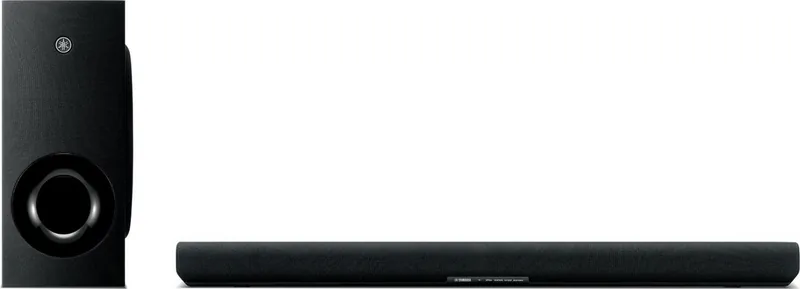
Welcome to the world of immersive audio with the Yamaha ATS-B400 Sound Bar System. This compact solution is designed to fill the living room with rich surround sound for your television. While the physical setup is straightforward, reviewing the Yamaha ATS-B400 Manual prior to initial use ensures optimal configuration of advanced features. Integrating seamlessly into modern decor, the design keeps the aesthetic clean while delivering powerful performance and clarity.
Sound customization is a distinct strong point of this unit. The dedicated Clear Voice function ensures human dialog remains crystal clear during movies without needing to increase the overall volume level. This makes late-night viewing much more comfortable for households. For those who crave significant depth, the Bass Extension feature enhances lower frequencies effectively. It provides strong presence without distorting the balance of the overall sound field. Users can switch between standard, movie, and game modes depending entirely on the specific content being enjoyed during the afternoon or evening.
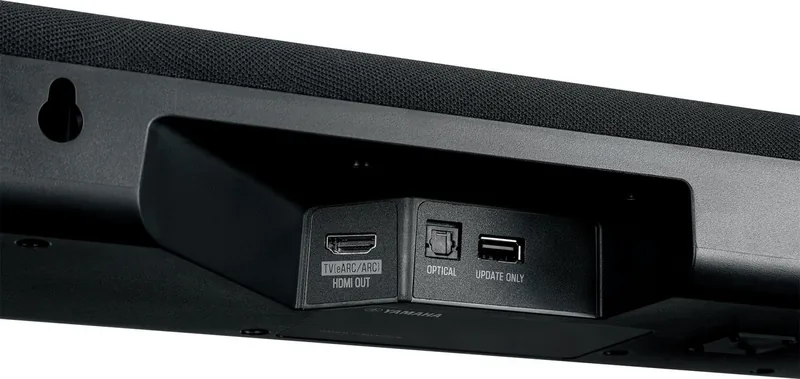
Connectivity options are extensive and fully modern for home entertainment needs. The HDMI ARC connection allows for single-cable integration with compatible televisions, enabling the TV remote to control the sound bar functions directly for ease of use. If your television lacks ARC, the optical input provides a robust digital audio link for signal transmission. Wireless convenience is also available with Bluetooth streaming, letting you play music directly from smartphones to the sound stage reliably.
Control flexibility extends well beyond just physical buttons on the device. A dedicated smartphone application named Sound Bar Remote allows for detailed adjustments from a comfortable distance. Through this app, you can even tune the tone control for high and low frequencies separately to perfectly match personal preferences. The system also features environmental certifications for low standby power, ensuring energy efficiency while delivering high fidelity experiences every single day.
Final Notes on Setup and Operation
Proper placement is absolutely key to acoustic performance in your space. The wireless subwoofer adds significant physical bass response to low notes. Remember to check power settings and connection cables for stable operation in the long term. Troubleshooting tips are essential for maintaining connectivity without interruption during playback. Enjoy your premium listening sessions with this versatile system today. When turning on, the subwoofer connects automatically. If issues occur, manual pairing is required using the rear button. Safety warnings during installation should always be followed strictly to prevent damage. The power supply requirements vary by region, so checking specifications before plugging in is crucial for safety. Maintenance is simple with replacement of the CR2025 battery in the remote control.
Search for 67,706 Manuals online


Type-in Brand or Model