

Yamaha ATS-B200 Manual
PDF manual · 90 Pages
English



Quick check
Incorrect answer, please try again.
Chat with your Yamaha ATS-B200 manual using AI
Get instant AI answers from your Yamaha ATS-B200 manual
Ask anything about the Yamaha ATS-B200. Answers come from this manual, with the pages they are based on.
Ask a Question
Do you recommend ATS-B200?
Yes NoFrequently Asked Questions
Using an HDMI cable is recommended to connect via the HDMI ARC port. Alternatively, you can use the provided optical digital audio cable. Ensure the TV HDMI settings are configured to output audio to the ARC port for best control compatibility.
Is this answer helpful?
Yes, it features Bluetooth version 5.0. You can connect smartphones or tablets wirelessly to stream music. The pairing process involves selecting the Yamaha name from your device's Bluetooth menu.
Is this answer helpful?
Enable the Clear Voice function on the remote. This boosts vocal frequencies relative to background noise, making speech easier to understand during movies with heavy sound effects or news broadcasts.
Is this answer helpful?
Yes, you can mount it vertically on a wall. You need to use the provided mounting bracket and screws. Ensure the wall material is strong enough to support the weight safely.
Is this answer helpful?
Check the input source selection on the remote. Ensure cables are firmly seated. If using Bluetooth, check for interference or distance issues from the source device. Restart the unit if the microcontroller hangs.
Is this answer helpful?
Press the reset button on the back panel for ten seconds to power cycle. Or initialize the unit by holding the volume down button while pressing the power button until all indicators blink.
Is this answer helpful?
Yes, the product is certified as an Eco product. Standby power consumption is very low, typically under 0.5 watts depending on the region and settings activated.
Is this answer helpful?
Advantages and Disadvantages
Advantages

- Advanced DTS Virtual:X technology creates immersive 3D soundscapes for movies and games.
- Clear Voice feature enhances dialogue clarity during noisy broadcast environments.
- Compatible with HDMI ARC allowing single cable connection to modern televisions.
- Bluetooth 5.0 streaming enables wireless music playback from mobile devices.
- Wall mounting options save floor space while maintaining a clean living room look.
Disadvantages

- No HDMI input ports limits direct connection of external media players to the unit.
- Standby power settings vary significantly between different regional models.
- Optical input replaces HDMI input if HDMI ARC is not used by the television.
- Sound modes cannot be customized beyond the preset options like game and movie.
- External subwoofer connection requires a specific mono cable sold separately.
Product Specification
Type
Soundbar
Power
120W Peak
Audio Decoder
Dolby Digital, Dolby Pro Logic II, DTS, DTS Virtual:X
HDR
No
Video Output
1x HDMI Out
Audio Connections
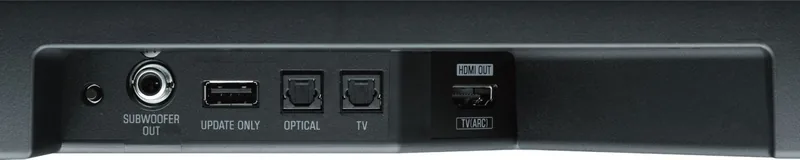
2x Digital Audio In (optical), 1x Sub Out (RCA)
Wireless
Bluetooth 5.0, AAC
Color
Black
Dimensions
35.83 x 2.09 x 5.16 inches (WxHxD)
Weight
7.05 lbs
Includes
Soundbar
Product Description
Enhance Your Home Theater Experience with the Yamaha ATS-B200
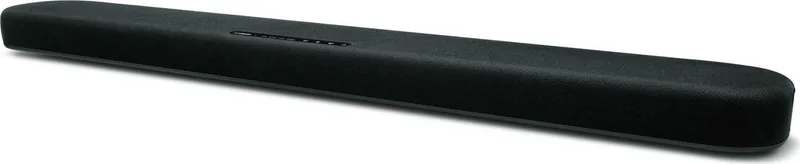
Finding the perfect balance between audio performance and sleek design can be challenging for modern viewers. The Yamaha ATS-B200 offers a compelling solution for those looking to upgrade their television sound without cluttering their living room. This compact soundbar is engineered to deliver a rich cinematic experience through advanced virtual surround technology.
Immersive Audio Technology
One of the standout features of this unit is the DTS Virtual:X technology. It creates a 3D soundscape that brings audio from all directions, including height. This means dialogue from movies or the impact of explosions feels enveloping. The system also includes Clear Voice functionality which boosts vocal frequencies, ensuring every line of dialog is crisp even during intense action scenes or live sports broadcasts with background noise. Additionally, the Bass Extension feature emphasizes low frequencies for a fuller, more impactful listening experience without needing a massive cabinet.
Connectivity and Control
Setup is designed to be straightforward. The unit supports HDMI Audio Return Channel connections, allowing you to link it to compatible TVs via a single cable. This simplifies wiring and enables HDMI control functions so your TV remote operates the audio system as well. Bluetooth connectivity lets you stream music directly from your smartphone or tablet wirelessly. You can also manage settings through a dedicated mobile application on iOS or Android devices. External subwoofers can be connected easily via the output jack for even deeper lows if required.
Eco-Friendly Design and Installation
Energy efficiency is a priority with the Yamaha Eco-Label certification. The power consumption in standby mode is minimal, reducing electricity costs over time without compromising performance. This reduces environmental impact while keeping costs down. For those with limited floor space, the bracket kit allows for secure wall mounting. A dedicated app helps manage volume and sound modes easily from your mobile device.
Installation and Setup
Mounting requires careful attention to wall stability. The included template simplifies the process. Whether placed on a cabinet or mounted, ensure ventilation is not blocked to prevent overheating. The system provides comprehensive connection diagrams for optical and HDMI links.
Product Support and Maintenance
Regular maintenance ensures longevity. Users often consult the Yamaha ATS-B200 Manual for setup details. Troubleshooting steps cover common issues like power cycles or Bluetooth pairing failures. Battery replacement for the remote is simple using the provided CR2025 lithium cell instructions. Understanding the product ensures optimal performance and longevity for your audio system over many years.
Search for 67,706 Manuals online


Type-in Brand or Model