

Yamaha ATS-2090 Manual
PDF manual · 61 Pages
English



Quick check
Incorrect answer, please try again.
Chat with your Yamaha ATS-2090 manual using AI
Get instant AI answers from your Yamaha ATS-2090 manual
Ask anything about the Yamaha ATS-2090. Answers come from this manual, with the pages they are based on.
Ask a Question
Do you recommend ATS-2090?
Yes NoFrequently Asked Questions
Connect the Center Unit HDMI OUT to the TV HDMI IN if ARC is available. Use the Optical jack if your TV lacks ARC. Ensure the HDMI control function is enabled on your TV for unified remote operation.
Is this answer helpful?
Yes, press the Bluetooth button on the unit or remote to pair. Select this unit on your device. The range is approximately 10 meters without interference.
Is this answer helpful?
It enhances human speech frequencies to make dialogue clearer during movies and news. Press the button again to disable the function.
Is this answer helpful?
Turn off the unit. Hold the SUBWOOFER button on the remote. Within 30 seconds, press and hold the PAIRING button on the rear panel of the subwoofer until the indicator glows.
Is this answer helpful?
Yes, it supports 4K pass-through and HDR formats like HDR10. Ensure you use a premium HDMI cable for the best signal quality.
Is this answer helpful?
Turn off the unit. Press and hold the MUSIC button for five seconds. Release when the indicator glows in the desired brightness mode.
Is this answer helpful?
Check if the router uses DHCP. Ensure the device is on the same 2.4-GHz network. Update firmware via the app if issues persist.
Is this answer helpful?
Advantages and Disadvantages
Advantages

- DTS Virtual:X creates immersive 3D audio from any source
- Built-in Amazon Alexa allows hands-free voice control
- HDMI ARC supports single cable connection for TV audio
Disadvantages

- Wi-Fi connection limited to 2.4-GHz band only
- Wireless subwoofer may require manual pairing occasionally
- Touch panel control needs child lock to prevent accidents
Product Specification
Type
Soundbar with Subwoofer
Channels
2.1
Power
200W Peak
Audio Decoder
Dolby Digital, Dolby Pro Logic II, DTS, DTS Virtual:X
Streaming Clients
Amazon Music, Spotify
Voice Assistants
Amazon Alexa
HDR
HDR, HDR10, HLG
Video Connections
1x HDMI In, 1x HDMI Out, HDCP 2.3
Audio Connections
1x Digital Audio In (optical)
Additional Connections
RJ-45 (10/100Base-TX)
Wireless
Bluetooth 4.2, Wi-Fi
Features
3D ready, HDMI Pass-Through, 4K Pass-Through, LipSync
Color
Black
Dimensions
36.61x2.44x4.29 in (WxHxD)
Subwoofer Dimensions
7.52x16.54x15.98 in (WxHxD)
Weight
5.95 lbs
Included
Soundbar, 1x Wireless Subwoofer
Product Description
Elevate Your Home Entertainment Experience
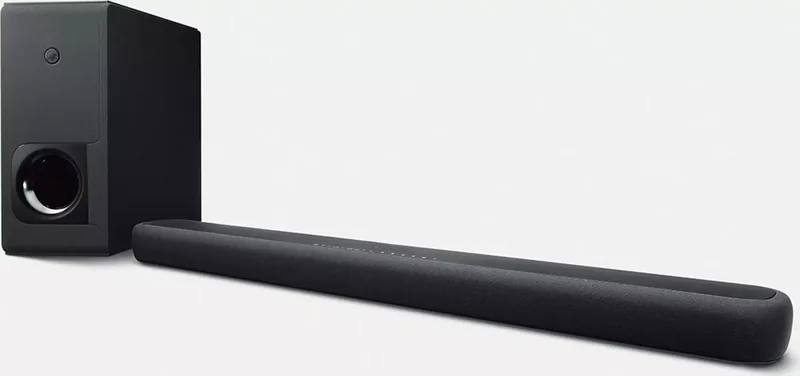
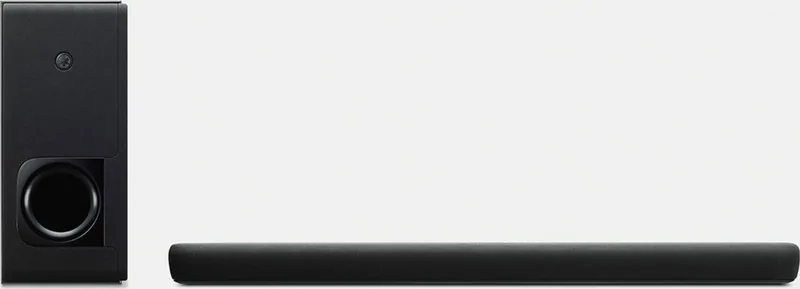
The Yamaha ATS-2090 is a robust front surround system engineered to bring cinema-quality sound to your living space. It combines high-efficiency amplification with virtual surround technologies to deliver an immersive listening experience. Many users consult the Yamaha ATS-2090 Manual details to maximize their system potential and ensure proper installation. This comprehensive overview covers essential features that define the product's performance capabilities in modern home theaters.
Advanced Audio Technologies
Sound quality is driven by DTS Virtual:X technology. This feature creates a virtual 3D acoustic environment where audio comes from varying heights and not just horizontal directions. It makes explosions feel impactful and dialogue clear. Clear Voice function specifically enhances human voices for better intelligibility during news or movies. Bass Extension boosts low-end frequencies automatically when needed. Users can select specific modes such as Movie, TV, Music, Sports, or Game to match the content type. Stereo playback remains available for two-channel sources as well. The supplied subwoofer measures nearly 17 inches in height for substantial presence. The center unit weights about 6 lbs for stability.
Seamless Connectivity Options
Installation supports both modern and legacy setups. HDMI Audio Return Channel allows a single cable connection for compatible televisions. Non-ARC models require an optical digital audio cable for audio return. This ensures compatibility regardless of your TV generation. The unit supports HDMI 2.3 and HDCP 2.3 for copyright protection with 4K HDR content. Wireless subwoofer transmission operates effectively over 10 meters without interference. Network functionality enables internet streaming and Alexa connectivity. Wi-Fi is restricted to the 2.4-GHz band for stability. Streaming services require a subscription for some content.
Smart Control and Customization
Amazon Alexa integration allows voice commands for volume and input switching. The touch panel responds to direct interaction but includes a child lock feature. Remote control battery replacement is necessary for extended use. Firmware updates can be managed through the Sound Bar Controller app on mobile devices. This ensures the system stays current with new features. HDMI control lets you operate the unit with the television remote for unified control. You can dim indicators to reduce brightness at night.
Installation and Usage Notes
Proper subwoofer placement is critical for bass performance. Avoid blocking the bass reflex port on the subwoofer front. Metallic objects between units may interfere with wireless communication. Check power connections securely to prevent protection circuit activation. If connectivity issues arise, try resetting the units or manually pairing the subwoofer. Always disconnect power before mounting the center unit on a wall. Regular cleaning avoids dust accumulation on microphones. The remote control is sensitive to sunlight. Power consumption remains low during standby hours. Each unit comes with power cords and an optical cable for initial setup.
Search for 67,706 Manuals online


Type-in Brand or Model
Lars Mueller
7 months ago
Is the HDMI connection fully compatible with PlayStation 4 without audio dropouts?
Manual.ly
7 months ago
This soundbar supports HDMI ports and ARC. If you experience audio dropouts, please install the latest firmware. We recommend trying a different HDMI cable or using the optical input if issues persist. Please check your TV settings for audio format compatibility.