
XPLORA X5 Play Manual
PDF manual · 84 Pages
English



Quick check
Incorrect answer, please try again.
Chat with your XPLORA X5 Play manual using AI
Get instant AI answers from your XPLORA X5 Play manual
Ask anything about the XPLORA X5 Play. Answers come from this manual, with the pages they are based on.
Ask a Question
Do you recommend X5 Play?
Yes NoFrequently Asked Questions
Ensure the SIM is active with sufficient data. Charge the watch if needed. Open the app to create an account. Scan the QR code shown on the watch. Provide child profile info and phone number. The watch will synchronize with the app.
Is this answer helpful?
Yes, you must remove the PIN code from the SIM card before use. Ensure it is a nano size SIM. You can also use the eSIM feature on newer models if supported by your carrier.
Is this answer helpful?
Use only the authorized magnetic charging cable. Charge for more than 15 minutes from a complete power off state. Use a 5V output with current above 500mA for safety.
Is this answer helpful?
Press and hold the SOS button for 5 seconds to initiate an emergency alert. This notifies pre-set guardians immediately. A short press returns to the previous menu.
Is this answer helpful?
No the battery is not user replaceable. Replacing it with an incorrect type poses a risk of explosion. If there is a problem please contact customer support.
Is this answer helpful?
The device supports GSM 2 3 5 8 and LTE bands 1 2 3 4 5 7 8 20. This ensures compatibility with most major mobile carriers globally for voice and data.
Is this answer helpful?
If the watch is not working press the power button for more than 10 seconds to perform a hard reset. Be sure to backup data before doing this.
Is this answer helpful?
Advantages and Disadvantages
Advantages

- Integrated GPS tracking for real time location monitoring of children during daily activities
- Dedicated SOS button allows instant emergency contact with guardians with a long press
- Compatible with multiple GSM and LTE network bands for global reliability and coverage
- User friendly application syncs easily between parent phone and child watch device
- RoHS compliant and CE certified meeting strict safety and electrical standards
Disadvantages

- Battery is non user replaceable which requires contacting support for any issues
- Requires specific nano SIM card or eSIM setup rather than standard SIM size
- Charging requires exact voltage and current specifications to prevent damage to unit
- PIN code must be manually removed from SIM card before initial use
- Service performance varies depending on local mobile network coverage quality
Product Specification
Display
1.4", 240x240 pixels, Color Display, LCD, Touchscreen, Rectangular, Backlit
Operating System
Android
Chipset
Qualcomm Snapdragon 210
RAM
512 MB
Storage
4 GB
Connectivity
Wi-Fi 4 (WLAN 802.11b/g/n)
Heart Rate Monitor
No
Activity Metrics
Time, Stopwatch, Pedometer
Additional Features
Date, Calendar, Alarm, Telephony (GSM/UMTS/LTE, Nano-SIM)
Sensors
Accelerometer
Navigation
Yes, GPS
Power Source
Battery (800 mAh)
Battery Life
3 Days (typical)
Case Material
Plastic
Band Material
Plastic
Dimensions (Case)
1.91 x 1.77 x 0.59 inches
Weight
1.20 oz
Special Features
Speaker, Microphone, Waterproof (IPX8), Digital Camera (2.0MP), Emergency Call
Product Description
Experience Safety and Connection with XPLORA 5 Play
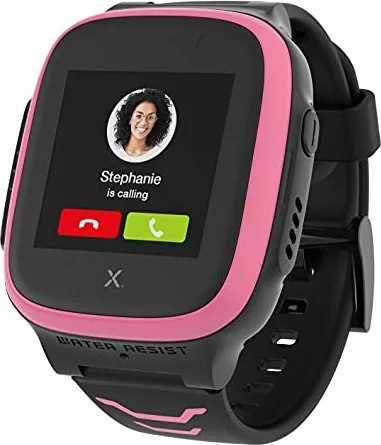
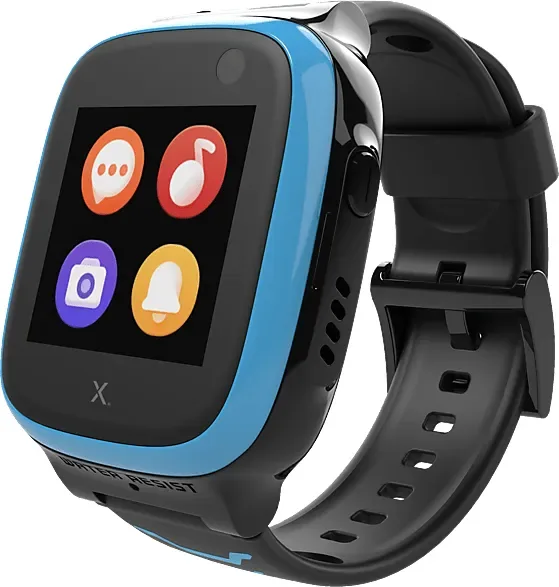
Introducing a new standard for children wearables with the XPLORA 5 Play smartwatch phone. This device offers a unique blend of fun and security designed specifically for younger users. Parents often worry about safety first which allows this device to excel in emergency protocols and peace of mind. The SOS function is accessible through the side button requiring a five second press to initiate an alert. This connects directly to guardian contacts stored within the application system. Communication happens securely over voice channels ensuring clear calls without distractions found on other devices. GPS tracking provides the real time location data needed for peace of mind during daily activities outside. This watch helps parents monitor their child location and keeps them safe effectively.
Setting Up Your Device
The initial configuration requires specific steps to ensure network connectivity. You must verify if your SIM card contains a personal identification number code. Removal of the PIN is mandatory before installation into the device slot. The watch accepts nano size SIM cards specifically or utilizes the eSIM feature for newer models. Activation is handled through the dedicated XPLORA application found on standard app stores. You will need to scan a QR code displayed on the watch screen to link the accounts. This process synchronizes the child profile with the guardian phone number. Check the XPLORA 5 Play Manual for detailed setup guides if available online. Ensure the internet connection is stable during this pairing process for a successful setup.
Technical Specifications and Care
Powering the unit requires adherence to strict electrical guidelines. Use only the authorized magnetic charging cable provided by the manufacturer. The input must maintain a 5V voltage and current above 500mA to function correctly. Charge the watch for at least fifteen minutes from a complete power off state before first use. The battery is not user replaceable to prevent explosion risks associated with incorrect types. Operating temperatures range from minus ten to forty five degrees Celsius. Radio frequency standards comply with international regulations measuring specific absorption rates near the body. The device supports multiple broadband networks including GSM and LTE for global reliability. Bluetooth connectivity allows for short range data transfer for updates and settings. Proper disposal of electronic components is required to protect the environment from hazardous materials. Contact customer support for any battery concerns. Enjoy the balance of freedom and safety this watch provides for your child.
Important Notes
XPLORA Technologies declares this phone for kids compliant with essential requirements. The GSM bands 2 3 5 8 ensure widespread coverage in most regions. WCDMA bands 1 2 4 5 8 support 3G networks for older connectivity areas. LTE FDD bands 1 2 3 4 5 8 20 handle high speed data connections. The highest SAR value reported is two point zero watts per kilogram near the body. This meets legal limits set by safety organizations. A hard reset is possible via the power button if issues arise. Hold the button for more than ten seconds to perform this recovery step. The unit is RoHS compliant for recycling. The service performance may vary depending on local mobile network coverage. Please verify the application version is correct for this specific watch model. Synchronization may take a few minutes after successful connection. This functionality ensures the device remains usable in various scenarios. Register your warranty details if applicable.
Search for 67,732 Manuals online


Type-in Brand or Model