
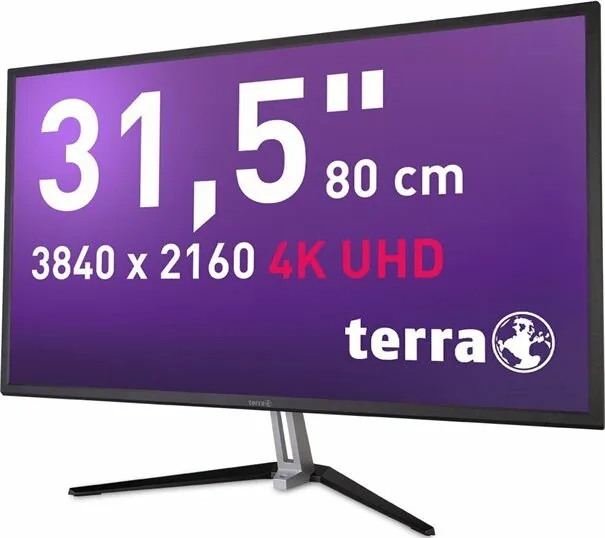
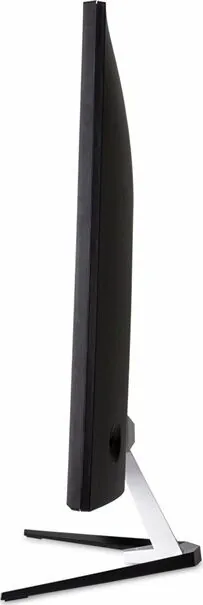
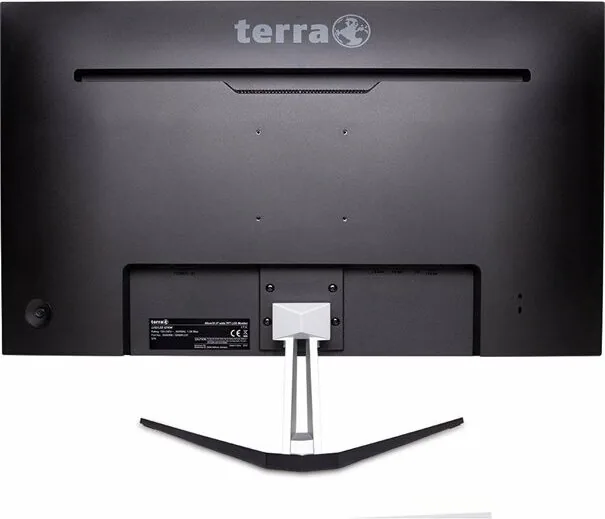
Wortmann Terra LED 3290W Manual
PDF manual · 20 Pages
English



Quick check
Incorrect answer, please try again.
Chat with your Wortmann Terra LED 3290W manual using AI
Get instant AI answers from your Wortmann Terra LED 3290W manual
Ask anything about the Wortmann Terra LED 3290W. Answers come from this manual, with the pages they are based on.
Ask a Question
Do you recommend Terra LED 3290W?
Yes NoFrequently Asked Questions
Use your Windows desktop display settings to select the advanced display settings. Set the resolution to 3840x2160. You must ensure your graphic card supports this via DisplayPort or HDMI. Check the refresh rate to confirm sixty Hertz operation.
Is this answer helpful?
The unit comes with an AC Power cord and a DisplayPort cable. An HDMI cable is listed as optional in the accessories list. Earphones are not supplied. You must connect the power cord to a grounded outlet before turning on.
Is this answer helpful?
Yes, but unplug the monitor before cleaning. Use a dry cloth and apply a non-ammonia based cleaner onto the cloth, not directly onto the glass screen. Avoid ammonia based products as they can damage the panel.
Is this answer helpful?
No, Picture by Picture is only available when one HDMI and one DisplayPort input are used. It is not available when using two HDMI input signals. You must set the resolution correctly to 3840x2160 for best quality in mixed modes.
Is this answer helpful?
Do not throw it in normal trash. According to WEEE regulation, this monitor cannot be handled as normal trash in Europe. Refer to the website for recycle information. Contact local refuse recycling systems for proper disposal.
Is this answer helpful?
If interference occurs, try resetting the monitor, reorienting the receiving antenna, or moving the monitor further from the receiver. Connect the monitor to a different circuit than the receiver. Consult a local dealer or technician if issues persist.
Is this answer helpful?
No, do not try to repair the monitor yourself as it contains high-voltage parts. The monitor should only be repaired by a qualified technician. Removing the cabinet may cause electric shock to human bodies.
Is this answer helpful?
Advantages and Disadvantages
Advantages

- UHD 3840x2160 resolution provides sharp imagery for professional work
- Multiple inputs including DisplayPort and HDMI for flexibility
- Eco mode reduces power consumption effectively for long use
- VESA DPMS compatibility ensures energy efficiency standards
- Picture by Picture allows monitoring multiple sources simultaneously
Disadvantages

- Small speakers limit audio quality significantly for movies
- Manual setup can be complex for users without experience
- HDMI cable optional requires separate purchase if needed
- High voltage parts inside prohibit user service repairs
- Sensitive to magnetic objects and direct sunlight exposure
Product Specification
Function
Monitor (stationary)
Diagonal
31.5" (31.50 in)
Resolution
3840x2160 (4K UHD), 16:9, 140ppi
Panel
VA
Backlight
LED, Blue Light Filter, flicker-free
Brightness
300cd/m^2 (typical)
Contrast
30,000,000:1 (dynamic)
Response Time
5ms (GtG)
Refresh Rate
60Hz (3840x2160)
Ports
2x HDMI 1.4, 1x DisplayPort 1.4, 1x 3.5mm Jack (Line-Out), 1x AC-In C13 (Power)
Shape
Flat
Viewing Angle
178deg/178deg
Surface
Non-glare (matte)
Color Depth
10bit (1.07 Billion colors)
FRC
Unknown
Speakers
Speakers (2x 3W)
Controls
Joystick
Ergonomics
Stand Base, Height Adjustable N/A, Pivot N/A, Rotate N/A, Tilt (+20deg/-5deg)
VESA
100x100 (Standard)
Power Consumption
39W (typical), 0.5W (Standby)
Energy Efficiency SDR (A-G)
31kWh/1000h (G)
Energy Efficiency HDR (A-G)
31kWh/1000h (F)
Features
Security Lock (Kensington Security Slot)
Screen-to-Body Ratio
87.35% (Calculated)
Dimensions
28.74x20.91x8.54in (WxHxD) with Stand Base, 28.74x16.89x2.09in (WxHxD) without Stand Base
Color
Black (Display Bezel) / Silver (Bottom Bezel) / Silver (Stand Base) / Black (Back)
Weight
14.55lbs (with Stand Base), 13.01lbs (without Stand Base)
Power Adapter
Internal
Warranty
Two Years (On-Site Exchange Service)
USB Label
Link
Product Description
Experience the Clarity of the Wortmann Terra LED 3290W
A 31.5 Inch Visual Upgrade
This high-performance monitor delivers an immersive viewing experience for professional and personal use. The 31.5 inch screen offers ample space for multitasking and media consumption without straining your eyes. The UHD resolution of 3840x2160 ensures that every detail is crisp and vibrant across the entire display area. Whether you are editing high-definition video content or working on complex spreadsheets, the display adapts to your needs seamlessly. The pixel dimensions support a wide range of viewing angles and color accuracy for creative professionals.
Connectivity and Features
Connecting your device is straightforward with the included DisplayPort cable. The HDMI input is available as an optional configuration to suit different setups and older hardware. The On Screen Display menu allows you to adjust brightness, contrast, and sharpness for optimal comfort during long sessions. Eco mode helps minimize power usage while the VESA DPMS compatibility ensures energy efficiency when idle. You can also enable Picture by Picture if using mixed input sources like one HDMI and one DisplayPort connection. This allows you to monitor multiple streams simultaneously.
Safety and Maintenance
Safety is paramount when operating any electronic device containing high voltage. The monitor complies with CE marks regarding electromagnetic compatibility and interference limits. Users should avoid exposing the screen to direct sunlight or nearby magnetic fields to prevent damage. Cleaning requires a dry cloth with a mild non-ammonia cleaner applied to the cloth, never directly on the glass screen. If smoke, noise, or odor is detected, disconnect the power immediately and contact service. Recycling follows WEEE regulations strictly in Europe and should not be treated as general refuse. Radio frequency energy is generated so placement matters. Consult technicians if interference occurs. Do not open cabinet as high voltage parts exist.
Installation and Support
Installing the stand base requires careful handling to avoid scratches on the casing. Always place the unit face down on a soft surface during assembly to protect the panel. The Wortmann Terra LED 3290W, 31.5 Manual details provide step-by-step instructions for proper initial setup. For technical issues, resetting to factory default settings often resolves common display or audio problems. Remember to update your graphics card settings to match the maximum refresh rate of sixty Hertz. DisplayPort version 1.2 may be needed for standard sixty Hertz output.
Technical Environment
Operating temperature ranges from zero to forty degrees Celsius. Storage conditions allow for wider ranges during transport and storage. The active display area measures nearly seven hundred millimeters across. Power management includes an off mode consuming less than half a Watt. This ensures responsible electricity usage even when the device is powered down but plugged in. Audio provides two small watt speakers for basic output. Troubleshooting starts with checking cable connections for loose pins. Always ensure your computer supports the full resolution via port.
Note
Ensure a grounded power supply is used for safety and compliance. Keep the cabinet free of heavy objects and water during use. Warranty card included. Quick start guide helps with first setup.
Search for 67,706 Manuals online


Type-in Brand or Model