
Wortmann Terra LED 2427W HA Greenline Plus Manual
PDF manual · 20 Pages
English



Quick check
Incorrect answer, please try again.
Chat with your Wortmann Terra LED 2427W HA Greenline Plus manual using AI
Get instant AI answers from your Wortmann Terra LED 2427W HA Greenline Plus manual
Ask anything about the Wortmann Terra LED 2427W HA Greenline Plus. Answers come from this manual, with the pages they are based on.
Ask a Question
Do you recommend Terra LED 2427W HA Greenline Plus?
Yes NoFrequently Asked Questions
It supports Full HD 1920 x 1080 pixels. It functions at a vertical frequency of 75 Hz. Other resolutions like VGA and MAC formats are also compatible with the display technology.
Is this answer helpful?
Yes, the stand allows vertical movement of 120 mm. You can also tilt the screen and swivel it left or right for better positioning.
Is this answer helpful?
The box contains an HDMI cable, AC DC power supply, and a screwdriver. DisplayPort cable is optionally usable but may need separate purchase.
Is this answer helpful?
Yes, the monitor features an Anti Blue Light function. It reduces the blue light portion of the image to care for your eyes.
Is this answer helpful?
Use the reset function within the OSD settings menu. This restores the monitor to its original manufacturer defaults.
Is this answer helpful?
No, under WEEE regulations it must be recycled properly. Do not place it in general household waste bins.
Is this answer helpful?
Yes, the unit generally comes with standard warranties. Contact the dealer or service center for specific claims and details.
Is this answer helpful?
Advantages and Disadvantages
Advantages

- Height adjustable stand up to 120mm enhances ergonomic comfort significantly.
- Full HD resolution at 75Hz ensures crisp visuals and smooth motion.
- Anti Blue Light function reduces eye strain during prolonged viewing sessions.
- Multiple connectivity options including HDMI and optional DisplayPort for flexibility.
- Energy saving ECO mode helps reduce electricity consumption costs effectively.
Disadvantages

- Maximum resolution is limited to 1920 x 1080 pixels without 4K support.
- Built-in speakers are low power at 2 Watts per speaker unit.
- OSD menu adjustments require physical button navigation on front panel.
- Manual requires understanding of specific safety warnings to prevent damage.
- Warranty details are subject to specific dealer or technical support channels.
Product Specification
Function
Monitor (stationary)
Diagonal
23.8 inches
Resolution
1920x1080 (FHD), 16:9, 93 PPI
Panel
VA
Backlight
LED, Blue Light Filter, Flicker-Free
Brightness
250 cd/m2 (typical)
Contrast
80,000,000:1 (Dynamic)
Response Time
5ms (GtG)
Refresh Rate
75Hz (1920x1080)
Ports
1x HDMI, 1x DisplayPort 1.2, 1x AC In C13 (Power In)
Design
Straight (Flat)
View Angles
178 deg/178 deg
Coating
Anti-glare (Matte)
Color Depth
8-bit (16.7 Million Colors)
Frame Rate Control
Unknown
Speakers
Speakers (2x 2W)
Controls
Mechanical Buttons
Ergonomics
With Stand, Height Adjustable (4.72 inches), Pivot N/A, Swivel (plus-minus 45 deg), Tilt (plus 20 deg/minus 5 deg)
VESA Mount
100x100 (Mountable)
Power Consumption
17W (Typical), 0.5W (Standby)
Energy Efficiency SDR (A to G)
17kWh/1000h (E)
Features
Security Lock (Kensington Slot), Slim Bezel
Screen-to-Body Ratio
89.30% (Calculated)
Dimensions
21.18 x 19.25 x 9.02 inches (WxHxD) with stand compressed, 21.18 x 12.80 x 1.50 inches (WxHxD) without stand
Color
Black (Display Bezel) / Black (Lower Bezel) / Black (Stand) / Black (Rear)
Weight
8.82 lbs (with stand), 5.51 lbs (without stand)
Power Supply
Internal
Warranty
Two Years (On-Site Exchange Service)
USB Label
Link
Product Description
Wortmann Terra LED 2427W HA Greenline Plus Overview
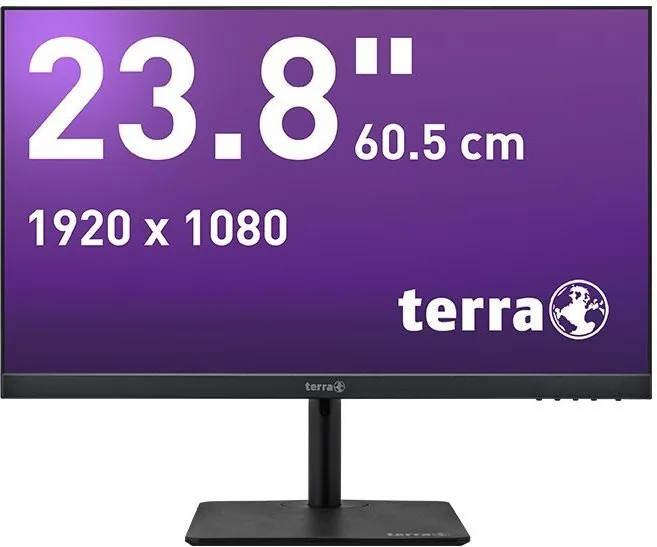
The Wortmann Terra LED 2427W HA Greenline Plus is a versatile 23.8 inch display designed for modern productivity needs. This monitor combines high resolution with energy efficiency in a sleek package. The screen boasts a Full HD resolution of 1920 x 1080 pixels with a refresh rate of 75 Hz. This ensures smooth motion and clear text for daily office tasks or leisure activities. The active display area measures 527.04 mm by 296.46 mm providing ample space for your content.
Ergonomic Adjustability
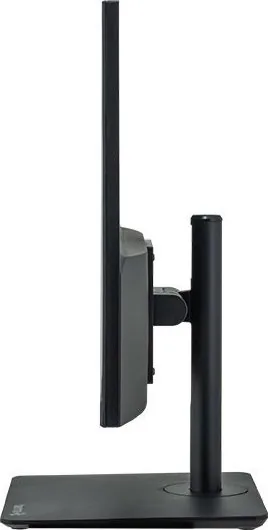
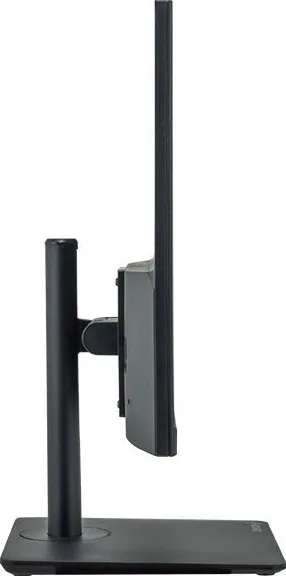
Comfort is central to the design philosophy. The stand features a height adjustment capability of up to 120 mm. This allows users to position the screen at eye level easily. Additionally, the panel tilts upward by 20 degrees and downward by 5 degrees. You can also swivel the screen 45 degrees to the left or right. These physical movements prevent neck and back strain during extended work sessions. The manual emphasizes placing the monitor in a dry, clean environment away from magnetic sources.
Connectivity Options
Digital signal transmission is handled via HDMI cables included in the box. An optional DisplayPort cable can also be connected for additional compatibility. Both inputs ensure versatility across different computer systems. The OSD menu provides extensive control over picture settings. Users can adjust brightness, contrast, and dynamic contrast ratio. There is also an Over Drive feature to enhance moving images. Picture formats can be set to Wide, 4:3, or Auto depending on the content source.
Health and Efficiency
Eye care is a significant focus of the Greenline Plus series. The Anti Blue Light function reduces harmful blue light emissions. This helps alleviate eye fatigue when working late into the night. An ECO mode is also available for power saving, disabling other adjustments to lower energy usage. The manual notes that this monitor should only be used with a grounded power source to prevent electrical hazards. Safety warnings strictly warn against opening the housing due to internal high voltage parts.
Technical Standards and Support
The device meets various regulatory standards including CE, UKCA, and WEEE compliance. It is manufactured in Germany, ensuring quality construction. The system supports multiple resolutions from VGA up to Full HD. Troubleshooting sections in the manual guide users on fixing common issues like no power or poor color reproduction. Recycling is mandatory under European laws and should be handled at designated collection points. The manufacturer provides open source code details upon request for software components. The warranty covers manufacturing defects for a specified period. Service centers handle repairs for hardware failures. You should keep the receipt and manual for verification purposes during any claim process.
Final Thoughts
This monitor offers a solid solution for home and business environments. Its combination of adjustability, clear resolution, and safety features makes it a reliable choice. The inclusion of a quick start guide and necessary cables simplifies initial setup. Whether for writing code or watching movies, this device delivers consistent performance.
Troubleshooting Guide
Users may encounter power or image issues. Check the power cable connections first. If the screen shows no signal, verify the video cable connection. Incorrect color settings can often be fixed by resetting to factory defaults. If problems persist, contact the service center. Always ensure the cable lengths are sufficient for your setup.
Environmental Responsibility
Proper disposal is crucial for environmental health. The device must not be thrown in regular trash bins. Use local recycling centers for electronic waste. This helps in managing hazardous materials within the electronics. Germany mandates strict recycling for such products. Adhering to these rules protects the ecosystem.
Search for 67,706 Manuals online


Type-in Brand or Model