

Free Withings Manuals – Read, Download & Print
4 Manuals
Manuals



Categories


Introduction to Withings Manuals
Withings is a leading brand in the connected health technology sector. Their products range from smartwatches to home scales. To ensure the best experience, users rely on user guides. This document explores the importance of Withings manuals and how to utilize them effectively. Accessing the correct documentation is the first step in owning a smart health device. Proper knowledge prevents misuse and ensures data accuracy. This guide covers all aspects of finding and reading the official documentation provided by the manufacturer.
The Importance of Comprehensive Documentation
User manuals serve as the primary resource for troubleshooting and setup. They contain detailed safety warnings that generic advice cannot provide. For example, water resistance ratings are explained in specific chapters. Ignoring these warnings can void the warranty instantly. Detailed instructions help users configure settings for their specific goals. Whether tracking weight loss or improving sleep quality, the device settings must be optimized. The manual explains how to calibrate sensors for the most accurate readings. Without this information, data might be skewed or incorrect. Accurate health data is the foundation of informed medical decisions.
Detailed Breakdown of Device Categories
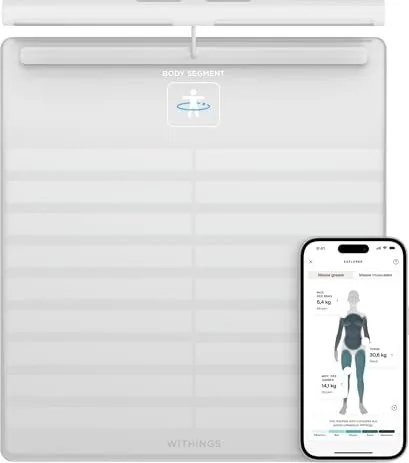
Withings manufactures several distinct categories of products. Each category has unique requirements found in its manual. Weight scales are one of the most common items. They use sensors to measure body composition. The manual explains how to stand on the glass platform correctly. It also discusses placement on hard floors for stability. Smartwatches require different instructions regarding charging. Some models use magnetic chargers while others use pins. The manual indicates the exact charging port location to avoid physical damage. Blood pressure monitors are another critical category. Cuff placement is vital for heart health readings. The guide details how to position the arm and connect the tube.
Smart Home and Sleep Solutions
Sleep trackers and mats have become increasingly popular. These devices measure heart rate and respiration during the night. They often require precise positioning under the mattress. The manual provides specific diagrams for this placement. Incorrect placement leads to poor data collection. It also explains how to sync the device with the phone app. Some devices require a dedicated hub for connectivity. Users need to read the manual to understand the hub setup process. Home air monitors are also part of the ecosystem. They track CO2 levels and temperature. The instructions explain how to replace filters or clean the unit.
How to Access the Official Manuals
Finding the correct manual can sometimes be challenging due to model variations. Withings provides a centralized support portal on their website. Users must enter the model number or serial number to find the file. The search function filters based on regional language preferences. Files are typically provided in PDF format for easy viewing. This eliminates physical bulk and allows for quick searching within the document. Users are encouraged to save a digital copy to their device. In case the original packaging is discarded, the digital manual remains accessible. QR codes on the product packaging also link directly to the support page for quick access.
Connectivity and Network Requirements
A robust internet connection is necessary for many functions. The manual specifies bandwidth requirements for syncing. If the connection is weak, updates may fail. Users are advised to test their router settings. Sometimes firewall rules block the device communication. The guide explains how to whitelist the device IP. This ensures seamless data transmission to the cloud servers. Mobile data networks can also be used for initial setup in some regions. This flexibility is explained in the connectivity section to avoid confusion during travel.
Troubleshooting Common Setup Issues
Connectivity is the most frequent issue encountered by new users. Bluetooth pairing errors often appear in forums. The manual offers specific steps to reset the network modules. It advises users to clear the pairing list on their phone first. Rebooting both the device and the router is a standard suggestion. Battery issues are another common concern. The manual specifies the charging time required for a full cycle. It warns against using unauthorized cables that might damage the port. If the device does not turn on, the manual suggests a hard reset procedure using specific button combinations. Following these steps prevents the need for excessive customer support calls.
Software Updates and Firmware Maintenance
Connected devices rely heavily on software updates. The manual explains the update process clearly. Users should check for updates periodically to secure their data. Firmware updates often fix bugs related to connectivity or battery life. The guide warns users not to disconnect power during the update phase. It also notes compatibility requirements for the companion app. If the phone operating system is outdated, the manual suggests an update before syncing the device. Keeping the software current ensures continued support from customer service teams.
Privacy and Data Security Guidelines
Health data is sensitive and requires protection. The manual outlines settings for data privacy. It explains how to share data with physicians or family members securely. Account security features such as strong passwords are emphasized. The manual details what information is sent to the cloud server. Users can control sharing permissions within the user guide. This transparency helps users make informed decisions about their digital footprint. Understanding where health data is stored is crucial for peace of mind.
Conclusion and Final Recommendations
Using the Withings manual ensures a seamless experience with your technology. It answers questions before they become urgent problems. Keep the digital file accessible in a cloud folder for long term storage. Do not discard the box completely as it may hold the manual or QR codes. Regular reading of the guide updates knowledge on new features added via app changes. By following these instructions, users extend the life of their investment. Health remains the priority for all connected devices. Adhering to the guide ensures safety and reliability for years to come. Support is available if the document does not resolve the issue.
Search for 67,706 Manuals online


Type-in Brand or Model