
Watercool Heatkiller V RTX 3080/3090 Manual
PDF manual · 8 Pages
English



Quick check
Incorrect answer, please try again.
Chat with your Watercool Heatkiller V RTX 3080/3090 manual using AI
Get instant AI answers from your Watercool Heatkiller V RTX 3080/3090 manual
Ask anything about the Watercool Heatkiller V RTX 3080/3090. Answers come from this manual, with the pages they are based on.
Heatkiller V RTX 3080/3090 Maintenance Schedule
Unscrew terminal screws and lift front cover to access internal components. Ensure correct screw lengths are used when reassembling.
Conduct a leak test preferably outside the PC. Check GPU temperatures immediately after starting the computer to ensure proper contact.
Ask a Question
Do you recommend Heatkiller V RTX 3080/3090?
Yes NoDo you recommend Heatkiller V RTX 3080/3090?
Yes NoFrequently Asked Questions
It is intended for RTX 3080 and RTX 3090 cards using supported PCB layouts, particularly reference or Founders Edition designs. Always check Watercool's compatibility listing for the exact card model before installation.
Is this answer helpful?
Yes. RTX 3090 cards have additional memory chips, and the supplied pad set includes pads marked for RTX 3090 use. Remove protective film from both sides of every thermal pad before fitting it.
Is this answer helpful?
The block can be mounted without a backplate, but Watercool recommends using a compatible backplate. It can help create a more complete installation and is the preferred assembly approach.
Is this answer helpful?
Use the port closest to the graphics card slot bracket as the inlet. Following the defined flow direction supports the intended operation of the Heatkiller V VGA design.
Is this answer helpful?
Use demineralized or deionized water with an appropriate corrosion inhibitor. The guidance also references products such as Mayhem's XT-1, Innovatek Protect, and Aquacomputer Double Protect.
Is this answer helpful?
Yes. Perform a complete leak test after installation, preferably outside the computer. If testing inside the system, do not power the hardware during the test. Check GPU temperatures immediately after startup.
Is this answer helpful?
Advantages and Disadvantages
Advantages

- Full-cover water block designed for compatible RTX 3080 and RTX 3090 PCB layouts.
- Includes thermal-pad guidance, including extra memory-pad placement for RTX 3090 cards.
- Defined inlet position and support for corrosion-inhibited deionized coolant simplify loop planning.
- Compatible with SLI/CF setups and optional dual or triple links for multi-GPU systems.
- Can be opened for maintenance by experienced custom-loop builders.
Disadvantages

- Compatibility must be verified carefully because the block is made for specific PCB designs.
- Removing the factory cooler may void the graphics card manufacturer's warranty.
- Installation requires precise thermal-pad placement, even mounting pressure, and a leak test.
- Opening the block for maintenance may affect guaranteed leak-tightness.
- A compatible backplate is recommended but may need to be obtained separately.
Product Specification
Type
GPU
Connections
G1/4 in.
Special features
Voltage regulator cooled (GPU)
Product Description
Watercool Heatkiller V RTX 3080/3090 - Read, Download & Print Free
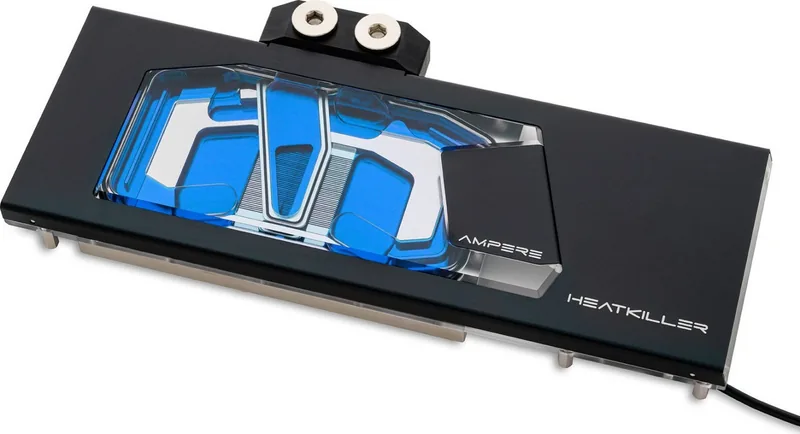
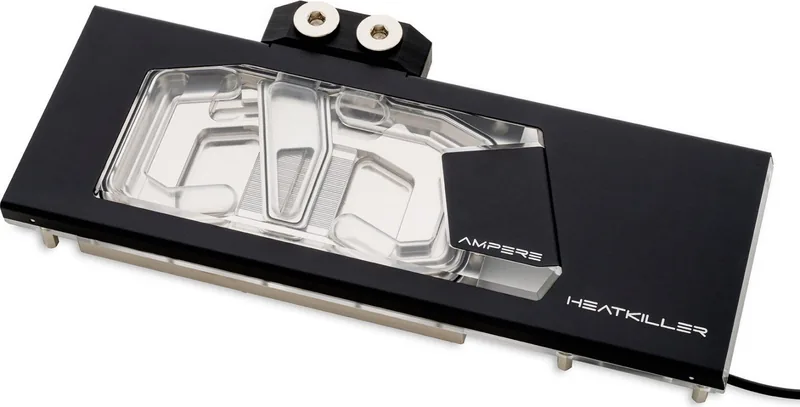
The Watercool Heatkiller V RTX 3080/3090 is a full-cover GPU water block designed for custom liquid-cooling systems built around compatible NVIDIA GeForce RTX 3080 and RTX 3090 graphics cards. Created for specific PCB layouts, this cooling solution covers the GPU and key board components to support efficient heat transfer during demanding gaming, rendering, and compute workloads.
Designed for PCB-Specific Compatibility
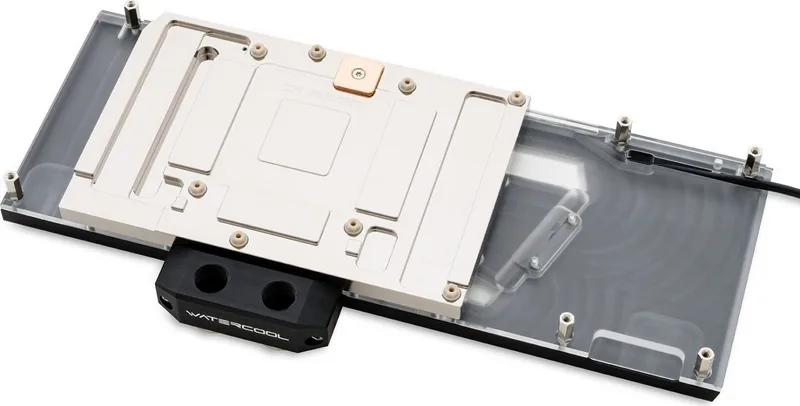
Compatibility is the most important consideration before installation. The Heatkiller V VGA series is engineered around particular board designs, including reference or Founders Edition layouts. Users should confirm their exact graphics card against Watercool's compatibility information before removing the factory cooler. The supplied thermal pads are arranged according to the card layout, with additional pads provided for the extra memory chips found on RTX 3090 models.
Careful Installation for Reliable Cooling
Installation begins by removing the original cooler, backplate, and old thermal material. Fresh thermal compound is applied evenly to the GPU, while thermal pads are positioned on the relevant components after their protective films are removed. The block is then secured with the included stainless-steel screws and plastic washers. Tightening should begin around the GPU area and continue in a crosswise pattern to distribute pressure evenly.
Although the block can be installed without a backplate, Watercool recommends pairing it with a compatible backplate for a more complete build. A small amount of PCB flex can be normal after assembly, but users should inspect every area for unintended contact and verify that the GPU meets the cooling surface correctly.
Maintenance and Loop Planning
The Heatkiller V can be opened for maintenance, allowing experienced users to access the acrylic top and internal components. Care is essential because screw lengths may differ, and reopening the block places leak-tightness responsibility on the user. For everyday operation, the port closest to the graphics card slot bracket is the designated inlet.
For coolant, demineralized or deionized water combined with a suitable corrosion inhibitor is recommended. The block also supports SLI/CF configurations, with optional dual and triple links available to simplify multi-GPU loop connections. After installation, perform a leak test before powering hardware and monitor GPU temperatures immediately at startup.
Note: Removing a graphics card's original cooler may affect the manufacturer warranty. Installation, maintenance, and leak testing should be completed carefully and at the builder's own risk.
Search for 67,732 Manuals online


Type-in Brand or Model