
Wansview 101 Manual
PDF manual · 2 Pages
English



Quick check
Incorrect answer, please try again.
Chat with your Wansview 101 manual using AI
Get instant AI answers from your Wansview 101 manual
Ask anything about the Wansview 101. Answers come from this manual, with the pages they are based on.
Ask a Question
Do you recommend 101?
Yes NoFrequently Asked Questions
The product description focuses on Windows XP through Win10 support. While many webcams work on Mac, this specific model is explicitly listed for Windows operating systems in the provided parameters.
Is this answer helpful?
Yes, the webcam features a built-in sound-absorbing and noise-reducing microphone designed to filter out ambient distractions effectively.
Is this answer helpful?
The USB data cable provided with the webcam has a length of 150cm, which allows for flexible positioning around your desk area.
Is this answer helpful?
It supports various chat tools and video conferencing software such as QQ, WeChat, Dingding, Skype, Facebook, Zoom, YouTube, and Face Time.
Is this answer helpful?
Turn on the Camera Mount, point it toward the front of the display, press down on the mount, and snap the rear end of the screen mount to the back of the screen.
Is this answer helpful?
The device supports MJPEG, H264, and H265 compression formats for versatile video processing and transmission.
Is this answer helpful?
No, it is a driver-free device that operates on a plug and play basis, meaning it is ready to use as soon as you connect the cable.
Is this answer helpful?
Advantages and Disadvantages
Advantages

- FULL HD 1080p resolution with 2MP sensor ensures crystal clear video quality for all users.
- Built-in noise-reducing microphone filters ambient sound for clearer audio during calls.
- Driver-free plug and play design allows for instant connection and usage without setup.
- Wide 90-degree viewing angle captures more of the room and multiple participants easily.
- Broad operating system support includes Windows XP through Win10 and various video software.
Disadvantages

- Fixed focal length lens may limit focus capabilities compared to auto-focus models.
- USB 2.0 interface is older technology which might limit maximum data transfer speeds.
- Non-replaceable USB cable length of 150cm might not suit all desk setups.
- Software settings for resolution optimization require manual adjustment by the user.
- Rear screen mount requires specific compatibility with the screen thickness and material.
Product Specification
Type
Webcam
Image Sensor
1x 1/3" CMOS 2.0 MP
Resolution
1920x1080 pixels (30fps)
Lens
0.14 in
Viewing Angle
90 deg
Compression/Codecs
MJPEG, H.264, H.265
Wireless
N/A
Microphone
Built-in
Speaker
N/A
Lighting
N/A
Cable Length
4.92 ft
Power Supply
via USB
Mount
Clip
Dimensions
4.45x2.76x1.18 in
Package Contents
Camera
Product Description
Enhancing Your Video Communication Experience
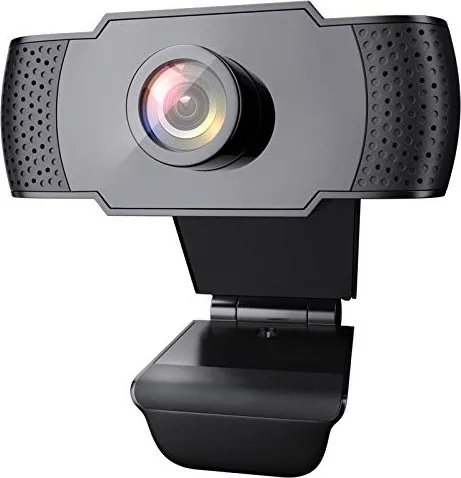
In the modern digital landscape, clear video quality is essential for remote work and staying connected with loved ones. The Wansview 1080p 101 Webcam offers a robust solution for users seeking high definition visual output without complex configurations. This device integrates seamlessly into laptops and desktops, making it ideal for frequent video conferencing needs for professionals and families alike.
Crystal Clear Visuals
At the heart of this webcam lies a FULL HD 1080p lens with a 2MP sensor. This ensures that every video call looks professional and sharp. The viewing angle measures 90 degrees, providing a wide perspective that is perfect for meetings where multiple participants are visible. The contrast optimization engine works to maintain image clarity even in slightly dimmer environments. Additionally, the 2MP image processing chip supports various ISP processing algorithms and compression standards including MJPEG H264 and H265. The lens specification includes a focal length of 3.6mm which helps in focusing range accuracy.
Superior Audio Capture
One common issue with built-in laptop microphones is background noise interference. This model features a built-in sound-absorbing and noise-reducing microphone to solve this. This technology filters out ambient distractions effectively, allowing your voice to come through clearly. Users can engage in conversations on platforms like Skype Zoom and YouTube confidently. It also supports QQ WeChat and Dingding for seamless communication across different regions and time zones.
Easy Installation and Compatibility
Setup is designed to be driver-free and plug-and-play for maximum user convenience. Simply connect the USB 2.0 data cable to your computer and the device is ready to use immediately. The power line length is 150cm which allows for flexible positioning around your desk area. It supports a broad range of operating systems including Windows XP Vista Win7 Win8 and Win10. Refer to steps found in Wansview 1080p 101 Webcam Manual for snap compatibility. The installation involves snapping the camera mount to the rear of your screen and pointing it forward for optimal framing.
Useful Notes
Always ensure your USB connection is secure for best performance during calls. The bracket ensures stability during intense calls without slipping. Check your software settings for resolution options to maximize quality. Ensure your monitor or laptop screen can accept the rear mount weight.
Search for 67,732 Manuals online


Type-in Brand or Model