


WAD Alessa SW003 Manual
PDF manual · 27 Pages
English



Quick check
Incorrect answer, please try again.
Chat with your WAD Alessa SW003 manual using AI
Get instant AI answers from your WAD Alessa SW003 manual
Ask anything about the WAD Alessa SW003. Answers come from this manual, with the pages they are based on.
Alessa SW003 Maintenance Schedule
Unplug the appliance and wipe it with a soft, dry cloth to remove dirt build-up.
Allow the appliance to cool down completely before cleaning or storing it.
Store the appliance and power cord in a dry place when not in use.
Ask a Question
Do you recommend Alessa SW003?
Yes NoFrequently Asked Questions
The WAD Alessa supports a temperature range from 80 °C up to 230 °C, selectable via the touchscreen + and − controls once the display is unlocked.
Is this answer helpful?
The straightener reaches approximately 180 °C in about 70 seconds, enabling fast start-up and efficient styling sessions.
Is this answer helpful?
The screen auto-locks after 3 seconds of inactivity. To unlock, slide your fingers up and down over the three icons (on, +, −) until you hear a short beep indicating the screen is unlocked.
Is this answer helpful?
Safety features include an auto-shutoff after 60 minutes of inactivity, an anti-pinch system, a 360° swivel cable with hanging hook, and recommendations against use near water; damaged cords must be replaced by authorized service.
Is this answer helpful?
No. The manual specifies the appliance must be used only on clean, fully dry hair. Operating with wet hair or wet hands is unsafe and may damage the device.
Is this answer helpful?
Regular maintenance is minimal: wipe the unplugged unit with a soft, dry cloth, allow it to cool before storage, and keep both device and cable in a dry place. Any other maintenance must be performed by an authorized service technician.
Is this answer helpful?
The product includes a six-month warranty against manufacturing defects from the purchase date. The warranty does not cover damage caused by improper use or failure to follow manufacturer instructions; claims should be directed to BDN Cosmetics S.L. at the address provided.
Is this answer helpful?
Advantages and Disadvantages
Advantages

- Fast heat-up: reaches 180 °C in approximately 70 seconds for quick styling.
- Wide temperature range of 80–230 °C for adaptability across hair types.
- Black titanium floating plates deliver even heat distribution and smooth glide.
- Touchscreen controls with auto-lock improve safety and prevent accidental changes.
- Ionic generator and anti-pinch plus 360° swivel cable enhance usability and results.
Disadvantages

- Professional-grade device; may be overpowered or complex for casual users.
- Touchscreen sensitivity and auto-lock could be inconvenient during quick adjustments.
- No extended warranty beyond six months for manufacturing defects.
- Requires dry hair and dry-hand operation—limited use in humid or damp environments.
- Repairs and cord replacement must be handled by manufacturer or authorized service.
Product Specification
Operating Mode
Mains operation (55W)
Color
black
Display
Touchscreen
Temperature Range
176-446°F
Heat-up Time
70s
Special Features
Automatic shut-off after 1h, automatic voltage adjustment (110-230V), ceramic coating (Titanium), ionization, hanging loop, swivel cord, lock, button lock
Scope of delivery
Pouch, heat protection mat
Product Description
WAD Alessa Manual — WAD Alessa Hair Straightener
Discover the WAD Alessa, a professional-grade hair straightener engineered for efficient, safe and precise styling. The WAD Alessa (model SW003) blends modern touchscreen controls with durable materials and smart safety features to deliver salon performance at home or in professional settings.
Design and key features
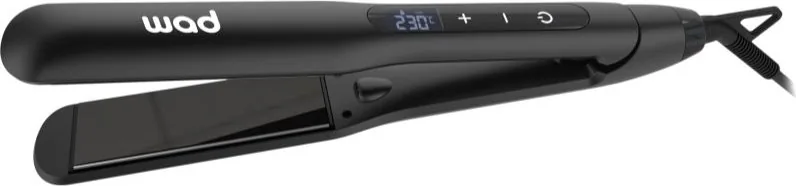
The Alessa features black titanium floating plates sized 100.6 x 35.4 mm, a PTC heating element and a rapid warm-up that reaches 180 °C in about 70 seconds. Its temperature range spans 80–230 °C, adjustable via a responsive touchscreen with an auto-lock that engages after 3 seconds; unlocking is done by sliding fingers up and down over the on, + and - icons. The straightener weighs approximately 410 g and includes a 360° swivel cable with hanging hook for flexible handling.
An ion generator reduces static for smoother results, while an anti-pinch system and non-slip ergonomic housing improve comfort and safety during styling. Floating plates ensure even pressure across the hair; the device automatically switches off after 60 minutes of inactivity to reduce risk.
Performance and usage
Intended for professional use, the Alessa operates on 100–240 V at 50/60 Hz and draws 55 W. The touchscreen shows 230 °C on startup and provides intuitive +/− controls for precise temperature selection once unlocked. For best results, use only on clean, fully dry hair and ensure hands are dry before plugging in. After styling press the on/off button for two seconds to power down, and always allow the appliance to cool before cleaning or storing.
Safety, maintenance and warranty
The Alessa includes multiple safety cautions: avoid use near water, do not operate with wet hands or on wet surfaces, and replace damaged power cords only via the manufacturer or authorized service. Clean with a soft, dry cloth when unplugged; store the unit and cord in a dry place. The product complies with CE marking and comes with a six-month warranty against manufacturing defects; the warranty excludes damage from misuse.
Final thoughts
WAD Alessa combines fast heat-up, wide temperature control and salon features like titanium plates and ionic technology in a lightweight, ergonomic package. It’s designed for users who need reliable, professional styling with built-in safety and easy maintenance.
Notes
- Always read and follow safety precautions before use.
- Only use approved accessories and have repairs done by authorized service technicians.
- The device should not be used outdoors or near aerosol/oxygen sources.
- The touchscreen locks after 3 seconds; swipe to unlock.
- Dispose of responsibly at appropriate electronic-waste collection points.
Search for 67,706 Manuals online


Type-in Brand or Model