

Wabeco BF1240 Manual
PDF manual · 56 Pages
English



Quick check
Incorrect answer, please try again.
Chat with your Wabeco BF1240 manual using AI
Get instant AI answers from your Wabeco BF1240 manual
Ask anything about the Wabeco BF1240. Answers come from this manual, with the pages they are based on.
BF1240 Maintenance Schedule
Apply commercially available lubricating oil to the steel column, hexagonal bracket, and rotating points of the feed shaft. Move the housing and bracket up and down during this process.
Oil all sliding surfaces and feed screws with customary greasing oil. Move the top slide back and forth in each axis while lubricating.
Ask a Question
Do you recommend BF1240?
Yes NoFrequently Asked Questions
It is used to hold and guide a drilling machine for more stable, accurate drilling. With the right setup, it can also support light milling, tapping, and accessory-based precision work.
Is this answer helpful?
Yes. The design allows both drilling and milling, but milling requires firmer clamping and a properly secured workpiece. The guide housing and machine support must be locked as instructed.
Is this answer helpful?
The depth stop lets you set a drilling depth before you start. Once adjusted, it helps produce repeated holes at the same depth, which is useful for batch work and accurate fabrication.
Is this answer helpful?
Yes. The moving parts should be lubricated regularly, and the guide play may need readjusting over time. Keeping the surfaces clean and oiled helps maintain smooth movement and accuracy.
Is this answer helpful?
The system can accept a rotary table, machine support, clamping fixture, tapping attachment, and 2-axis coordinate tables. These accessories expand its usefulness for detailed workshop tasks.
Is this answer helpful?
It can be, but beginners should take time to learn the setup, safety rules, and adjustment steps. The stand rewards careful use and works best when the workpiece is clamped correctly.
Is this answer helpful?
Advantages and Disadvantages
Advantages

- Solid steel construction provides stability and reduces vibration during drilling and light milling.
- Depth stop and scale-based adjustments support repeatable, accurate work.
- Supports multiple accessories, including rotary table, tapping attachment, and coordinate tables.
- Guide play can be adjusted for smoother, more precise movement.
- Versatile setup can handle drilling, milling, and angled work.
Disadvantages

- Assembly and adjustment take time and require careful setup.
- Regular lubrication and checking are needed to keep performance smooth.
- Some operations are more suitable for drilling than heavy milling.
- Safe use depends on proper clamping and strict adherence to instructions.
- Accessory setup can be complex for beginners.
Product Description
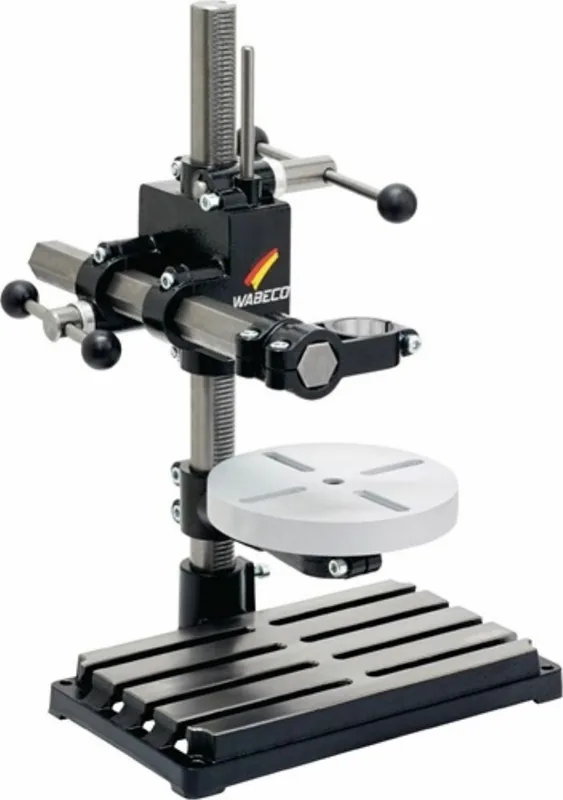
Wabeco BF1240 Drill Stand: Precision, Stability, and Versatility
The Wabeco BF1240 Drill Stand is built for makers who want more control than a handheld drill can offer. In the spirit of the Wabeco BF1240 Drill Stand Manual, the design focuses on safe setup, repeatable accuracy, and dependable support for drilling and light milling tasks. Its solid steel construction and adjustable guide system make it a practical choice for workshops where precision matters.
What makes it stand out
At its core, the BF1240 combines a rigid steel column with a guided machine carrier that can be adjusted for smooth movement and minimal play. That means cleaner holes, more predictable depth control, and better stability when working on metal, wood, or plastic. The stand also supports useful accessories such as a rotary table, a clamping fixture, a tapping attachment, and coordinate tables, turning one base unit into a flexible work station.
Another strength is its adaptability. The BF1240 family can be set up for drilling or milling, and the machine support can be rotated in 15° steps for angled work. The depth stop helps deliver consistent results when repeated hole depth is important, while the lubrication and alignment instructions show that Wabeco expects long-term use rather than casual handling.
Practical benefits for workshop use
This drill stand is especially appealing for users who value repeatability. The manual emphasizes proper clamping, careful adjustment of guide play, and correct lubrication before use. Those details matter because they help reduce vibration, improve feed smoothness, and extend service life. For drilling, the open support position gives the needed travel. For milling, the support can be locked firmly to improve rigidity.
The accessory ecosystem is another advantage. The rotary table adds positioning flexibility, the tapping attachment helps control thread depth, and the coordinate tables allow finer movement with scale-based readings. For small production jobs, prototypes, or repair work, that combination can save time and improve consistency.
Notes
- Always secure the workpiece before starting.
- Wear eye protection and remove chips with tools, not by hand.
- Recheck clamp tightness after setup changes.
- Lubricate moving surfaces regularly for smoother operation.
Overall, the BF1240 is a well-thought-out drill stand for users who want a sturdy, upgradeable setup with the feel of a compact workshop machine rather than a simple drill accessory.
Search for 67,706 Manuals online


Type-in Brand or Model