
VR-Radio IRS-450 ZX-1685-675 Manual
PDF manual · 62 Pages
English



Quick check
Incorrect answer, please try again.
Chat with your VR-Radio IRS-450 ZX-1685-675 manual using AI
Get instant AI answers from your VR-Radio IRS-450 ZX-1685-675 manual
Ask anything about the VR-Radio IRS-450 ZX-1685-675. Answers come from this manual, with the pages they are based on.
Ask a Question
Do you recommend IRS-450 ZX-1685-675?
Yes NoVideo Manual
Grace Digital Wireless Hi-fi Internet Radio Tuner featuring Pandora and NPR (GDI-IRDT200)
Frequently Asked Questions
The tuner supports manual wireless configuration (SSID/password, DHCP or static IP), WPS PBC for quick pairing within 120 seconds, and an option to skip network setup. Use left/right buttons to choose network modes and confirm with Scan/Select.
Is this answer helpful?
It supports UPnP and DLNA for streaming from PCs, NAS or mobile DLNA apps. Audio formats include MP3, WMA, WAV and AAC. Use Windows Media Player (11+) or compatible server software; mobile streaming requires appropriate apps.
Is this answer helpful?
Install the free AirMusic Control app (Android/iOS), ensure your phone and tuner share the same 2.4 GHz network, then open the app to auto‑connect. From the app you can stream music, operate a virtual remote, create album covers and send voice messages to the tuner.
Is this answer helpful?
Go to Internet Radio → Service → New Station, enter the station’s web address, assign a favorite slot with Up/Down and press Select to save. You can also add stations from My mediaU after registering and activating the feature on the device.
Is this answer helpful?
Ensure the device is connected to a stable power source before starting an update. Do not interrupt power during the update process; a loss of power may permanently damage the unit. Follow on‑screen prompts and vendor guidance.
Is this answer helpful?
The tuner offers two independent alarms and a nap/snooze timer. Alarm repetition options include daily, once or weekdays; sounds can be tone, melody, Internet radio or USB. Configure times and volumes via the Settings menu.
Is this answer helpful?
Delete personal data by performing a factory reset, remove the device from the AirMusic app and unregister it from accounts like My mediaU. Also remove batteries from the remote and follow the privacy guidance in the app.
Is this answer helpful?
Advantages and Disadvantages
Advantages

- Combines Internet radio, DAB+/DAB and FM reception with Wi‑Fi streaming (2.4 GHz).
- Supports UPnP and DLNA for streaming from PCs and mobile devices.
- AirMusic Control app enables remote control, streaming, album‑cover creation and voice messages.
- Compact design with clear display, Line Out, headphone jack and included remote.
- Multiple network setup options: manual, WPS PBC and advanced DHCP/static configuration.
Disadvantages

- Wi‑Fi limited to 2.4 GHz (no 5 GHz support).
- Small display (2.4") may limit on‑device navigation detail.
- WPS pairing requires router support and strict 120‑second timing.
- Software updates risk device damage if power is interrupted during the process.
- My mediaU registration required for some cloud features, adding setup steps.
Product Specification
Type
Tuner
Tuner
FM, DAB, DAB+, Internet radio, 20 station presets
Audio connections
Stereo Line Out (3.5mm jack), Headphones (3.5mm jack)
Other connections
Antenna
Wireless
Wi-Fi 4 (WLAN 802.11b/g/n)
Features
Remote control, Display, Spotify
Color
black
Dimensions
4.76x2.95x2.36in (WxHxD)
Weight
0.44 lb
Product Description
VR-Radio Digital Wi‑Fi Hi‑Fi Tuner with Internet Radio
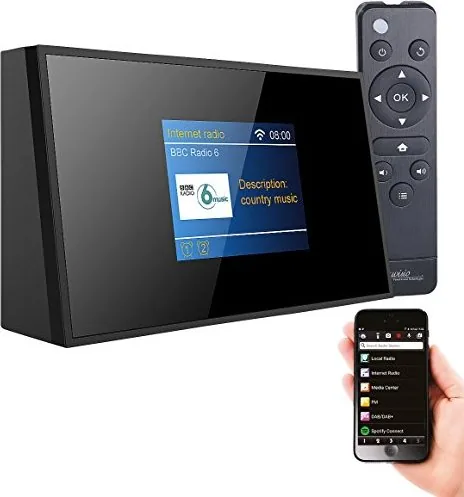
Discover the VR-Radio Digital Wi‑Fi Hi‑Fi Tuner with Internet Radio — a compact, versatile audio hub designed for modern homes. This tuner combines Internet radio, DAB+/FM reception and Wi‑Fi streaming in a small footprint, making it ideal for bedrooms, kitchens and desktop listening stations. With a clear 2.4" display, detachable antenna and simple controls, it delivers accessible high‑fidelity audio and networked convenience.
Key features and usage
The tuner supports Internet radio, DAB+/DAB and FM bands and connects to 2.4 GHz Wi‑Fi (IEEE 802.11 b/g/n). Use the front panel buttons or the included remote control to navigate menus, select presets and manage playback. For mobile control and streaming, install the free AirMusic Control app (Android/iOS) to pair your smartphone with the device, send audio, create album covers, record voice messages and use the intercom function.
Network setup offers multiple options: manual SSID/password entry, WPS PBC for quick pairing, or advanced manual configuration (DHCP/STATIC). The tuner also supports UPnP and DLNA for streaming from PCs, NAS or compatible mobile DLNA apps. A Media Center and My mediaU integration let you register the device and push favorite streams or custom stations to the unit.
Practical features
Set alarms (two independent alarms), snooze, sleep timers and dimmer modes for low‑light environments. The device handles common audio formats (MP3, WMA, WAV, AAC) and provides Line Out and headphone jacks. Software updates are supported — follow instructions carefully to avoid power loss during updates. Factory reset clears custom settings and returns the tuner to stock configuration.
Design and accessories
The package includes the tuner, power adapter, antenna, remote, 3.5 mm audio cable and manual. Remote uses two AAA batteries. The tuner’s compact dimensions and lightweight design make placement flexible while the adjustable antenna improves DAB/FM reception.
Notes
- Recommended app: AirMusic Control for full mobile functionality.
- Use WPS only when your router supports it and within the 120‑second window.
- Do not dispose of the device in household waste; follow local electronic disposal rules.
- Keep firmware updates connected to stable power to prevent damage.
Search for 67,706 Manuals online


Type-in Brand or Model