
Vogel's PFS 3306 Manual
PDF manual · 1 Pages
English


Quick check
Incorrect answer, please try again.
Chat with your Vogel's PFS 3306 manual using AI
Get instant AI answers from your Vogel's PFS 3306 manual
Ask anything about the Vogel's PFS 3306. Answers come from this manual, with the pages they are based on.
Ask a Question
Do you recommend PFS 3306?
Yes NoFrequently Asked Questions
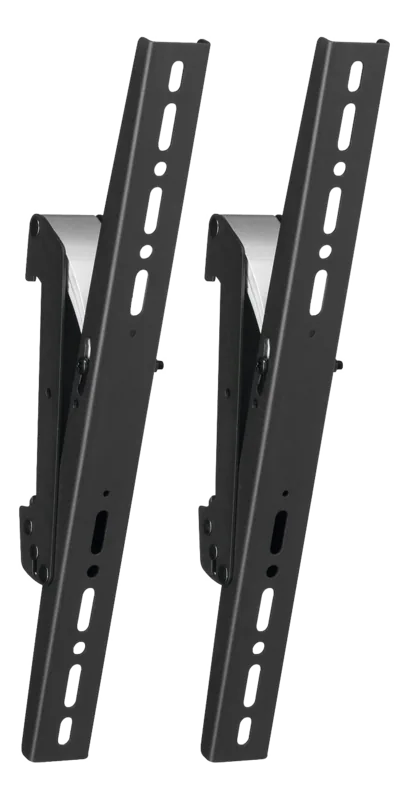
Vogel's PFS 3306 is intended to mount compatible interface display strips as part of the PFS 3302, 3304, 3306, and 3308 series. It helps you position the display securely and align it to a chosen viewing angle using the steps and settings shown in the instructions.
Is this answer helpful?
The guidance shown specifies a maximum of 80 kg (176 lbs). When planning your install, ensure your display and components stay within this limit and that the supporting structure is rated appropriately for the total load.
Is this answer helpful?
Yes. The setup information indicates angle options of 0, 10, 15, and 20 degrees. Choose the angle that matches your viewing needs, then secure the mount according to the mounting steps.
Is this answer helpful?
The instructions describe a push/pull release approach and a click-style engagement. In practice, you connect so it locks in place, and if you need adjustment, you follow the push or pull release step to disengage safely before repositioning.
Is this answer helpful?
The information references multiple mounting contexts, including floor, ceiling, and wall. Your suitability depends on your installation design, surface type, and the correct use of the mounting hardware referenced in the guidance.
Is this answer helpful?
The text references several M-series mounting options, including M8 variants. Use fasteners and compatible hardware that match your surface and installation plan, and verify that all components are tightened and secured as instructed.
Is this answer helpful?
The text references an optional component (PFA 91096). Whether you need it depends on your exact configuration. If your installation calls for additional support or accessories, check compatibility before final mounting.
Is this answer helpful?
Advantages and Disadvantages
Advantages

- Supports up to 80 kg (176 lbs), helping you plan confidently for heavier displays
- Offers angle options of 0, 10, 15, and 20 degrees for improved viewing alignment
- Includes an easy push to release and pull to release approach with click-style engagement
- Designed for flexible installation contexts such as floor, ceiling, and wall mounting
- Part of a compatible PFS 3302/3304/3306/3308 series for easier system planning
Disadvantages

- Must be installed within the 80 kg (176 lbs) maximum load limit
- Best results depend on correct surface preparation and matching M8 fasteners
- May require optional accessories (example shown: PFA 91096) depending on your setup
- Angle adjustments are limited to the options indicated (0, 10, 15, 20 degrees)
Product Specification
Type
Adapter strip, VESA adapter, Other
Suitable for
Connect-it
Product Description
Vogel's PFS 3306 Manual - Secure, flexible mounting for interface display strips
If you are setting up a clean display installation, Vogel's PFS 3306 is designed to help you mount compatible interface display strips with confidence. Part of the PFS 3302/3304/3306/3308 family, this model focuses on stability, straightforward handling, and flexibility during positioning, so your setup can look professional from day one.
A standout feature is the support for heavy loads, with a maximum of 80 kg (176 lbs). Depending on your installation layout, the system also offers angle options shown in the setup guidance, including 0, 10, 15, and 20 degrees. That means you can align the display to your preferred viewing angle without complicated rework.
The mounting concept is built around an easy connect and release mechanism. The workflow described in the instructions uses a push and pull approach, including a "click" style engagement and a release step when adjustments are needed. This helps make mounting smoother, especially when you are positioning multiple components or performing maintenance later.
For installers, the guidance also references hardware and mounting points that align with common M-series fasteners, including several M8 variants. That level of compatibility can simplify planning during installation, as you can match the mount hardware to your surface and workflow. The text also indicates the system applies to common mounting contexts such as floor, ceiling, and wall configurations.
Top results you can expect
- Load-rated performance up to 80 kg (176 lbs) for secure display support
- Angle settings (0, 10, 15, 20 degrees) to fine-tune viewing alignment
- Quick engagement and adjustment using push/pull release steps
- Installation guidance tailored for multi-mount scenarios and compatible PFS models
Notes
- Always verify compatibility with your specific display strip and installation setup.
- Plan your fasteners and surface type before you start mounting.
- Follow the provided steps carefully to achieve the intended secure fit.
Search for 67,706 Manuals online


Type-in Brand or Model