ulega zaburzeniom gdy transmisja bezprzewodowa odbywa się w małej odległości.
- Należy zachować odległość większą niż 30 cm pomiędzy słuchawką a elektronicznym
implantem! ! W razie potrzeby skonsultować się z lekarzem przed użyciem słuchawek.
OSTROŻNIE Zagrożenie pożarem, wybuchem, poparzeniami podczas znacznego
przekroczenia temperatury, w przypadku otwarcia zabezpieczającej oslony oraz w
przypadku zwarcia baterii gdy dotkniecie baterię z przeciekiem.
- Dostosować funkcjonowanie i temperaturę przechowywania do max. 40°C.
- NIE otwierać urządzenia.
- NIE powodować zwarcia baterii podczas otwierania urządzenia.
-
Nie dotykać baterii z przeciekiem. W przypadku kontaktu ze skórą zasięgnąć pomocy lekarskiej
.
- Ostrożnie wyrzucić zepsute urządzenie.
Przygotowanie i funkcjonowanie
Słuchawki można wykorzystać do:
- łatwego wykonywania połączeń bezprzewodowych przy pomocy funkcji głośnej rozmowy
- odtwarzania bezprzewodowo muzyki
- przełączania pomiędzy odtwarzaniem muzyki i wykonywaniem połączeń
Przed pierwszym użyciem należy w pełni naładować zestaw słuchawkowy przez co najmniej
2 godziny.
ŁADOWANIE BATERII
W tym celu należy użyć dostarczonego kabla USB. Podłączyć źródło zasilania USB o natężeniu
minimum 100 mA do gniazda ładowania (A) słuchawek. Kontrolka LED (E) świeci podczas ładowania na
czerwono, a po całkowitym naładowaniu na zielono (2-3 h).
WŁĄCZANIE/WYŁĄCZANIE
W celu włączenia należny nacisnąć przycisk (F) i przytrzymać go przez co najmniej 2 sekundy. Kontrolka
LED (E) miga wówczas 3 razy na niebiesko, rozbrzmiewa sygnał dźwiękowy oznaczający włączenie się
urządzenia i urządzenie automatycznie przechodzi w tryb parowania. Kontrolka LED miga naprzemiennie
na niebiesko i czerwono.
Jeśli w pobliżu znajduje się znane, aktywne urządzenie Bluetooth, słuchawki łączą się z nim automatycznie,
a kontrolka LED świeci stale na niebiesko. Aby wyłączyć, należy nacisnąć przycisk (T) i przytrzymać go
przez co najmniej 3 sekundy. Kontrolka LED miga wówczas przez chwilę na czerwono.
PAROWANIE Z URZĄDZENIEM BLUETOOTH
Aby połączyć z urządzeniem Bluetooth należy zapoznać się z instrukcją urządzenia Bluetooth.
Jeżeli słuchawki zostaną włączone, przejdą automatycznie w tryb parowania [kontrolka LED (E) miga
wówczas naprzemiennie na czerwono i niebiesko]. Urządzenie Bluetooth rozpoznaje teraz słuchawki
automatycznie, należy wybrać słuchawki „HELMETPRO” (jeśli to konieczne, należy dodatkowo
wprowadzić „0000”). Słuchawki i urządzenie są teraz ze sobą sparowane.
Kontrolka LED (E) na słuchawkach świeci stale na niebiesko. Raz sparowane urządzenie jest zazwyczaj
po każdym wyłączeniu i włączeniu ponownie rozpoznawane, a łączenie odbywa się automatycznie.
REGULOWANIE GŁOŚNOŚCI (TELEFON I MUZYKA)
Nacisnąć krótko przyciski C (+) lub D (-).
TELEFONOWANIE
W celu wykonywania połączeń korzystać z telefonu w normalny sposób. Przekazywanie do
słuchawek odbywa się automatycznie. Rozmowę telefoniczną można odebrać i zakończyć przez
krótkie naciśnięcie przycisku (F). W celu ponownego wybrania należy dwukrotnie nacisnąć przycisk (F).
ANULOWANIE SPAROWANIA Z URZĄDZENIEM BLUETOOTH
Anulować sparowanie ze słuchawkami w menu Bluetooth urządzenia.
DALSZE FUNKCJE STEROWANIA
W zależności od używanego urządzenia Bluetooth za pośrednictwem słuchawek można
sterować dalszymi funkcjami urządzenia:
- Odtwarzanie/pauza: każdorazowo przytrzymać nieco dłużej przycisk (F)
- Następny/poprzedni utwór: Nacisnąć każdorazowo krótko przyciski (C) lub (D) 3
sekundy
Dane techniczne– Fot. 1
Baterie i akumulatory
Baterii i akumulatorów nie wolno utylizować wraz z odpadami komunalnymi.
Konsumenci są prawnie zobowiązani do zwrotu zużytych baterii w punktach ich zbiórek
w celu zapewnienia ich prawidłowego, ekologicznego recyklingu. Proszę zwracać
zużyte baterie w komunalnych punktach ich zbiórek lub w sklepach.
Baterie i akumulatory proszę zwracać wyłącznie rozładowane.
Utylizacja urządzenia
Urządzenie to nie może być utylizowane z odpadami komunalnymi. Należy je oddać w
miejsce zbiórki odpadów elektronicznych w Twojej miejscowości.
Utylizacja opakowania
Opakowanie należy przekazać do recyklingu. Nie należy wyrzucać go wraz z odpadami
komunalnymi i postępować zgodnie z miejscowymi przepisami dotyczącymi odpadów.
P
Manual de instruções: Auriculares Bluetooth
®
Sport Air Helmet Pro
Por favor leia este manual cuidadosamente ANTES de usar o aparelho, para
fazer com que seja fiável e seguro de usar e mantenha as instruções a salvo
e passe-as aos donos seguintes.
Utilização prevista
De acordo com este manual o aparelho é exlcusivamente para o uso privado e não pode ser
utilizado para fins comerciais. Qualquer outro modo de uso é denunciado como ilegal e pode
levar a danos de objetos ou até mesmo de pessoas.
Declaração de conformidade
O(a) abaixo assinado(a) Vivanco GmbH declara que o presente tipo de equipamento
de rádio [Auriculares Bluetooth
®
38918] está em conformidade com a Diretiva
2014/53/UE. O texto integral da declaração de conformidade está disponível
no seguinte endereço de Internet: www.vivanco.de.
Avisos de segurança
Por favor, preste atenção ao facto de que as crianças e as pessoas incapacitadas também
devem cumprir as presentes instruções!
AVISODiz respeito a perigos que possam provocar a morte ou feridas graves
.
CAUTELADiz respeito a perigos que, em casos raros, podem provocar feridas
ligeiras ou moderadas.
AVISO Risco de acidente, se usados na estrada e em situações
potencialmente perigosas.
- Não utilize, se insonorizar o ambiente puder ser perigoso, tal como durante a
condução, andar de bicicleta, caminhar ou correr em áreas com tráfego.
CAUTELADanos de audição e perdas de audição permanentes devido ao
elevado volume.
- Defina um volume adequado e evite usar continuamente num volume alto.
CAUTELA Lesão do ouvido, se a peça de ouvido for inserida demasiado para
dentro do canal auricular.
- Não introduza a peça de ouvido demasiado para dentro do canal auricular e remova-a
cuidadosamente, para que nenhuma parte permaneça no canal auricular. As peças
presas no interior só devem ser removidas por um especialista médico.
CAUTELAO funcionamento de implantes eletrónicos (pacemakers, etc.) são
afetados, se o rádio estiver próximo.
- Mantenha uma distância entre a peça de ouvido e o implante > a 30cm!
Se necessário, consulte um médico antes de utilizar.
CAUTELA Perigo de incêndio, explosão, queimaduras se a temperatura de
funcionamento for substancialmente ultrapassada, se o alojamento do
componente eletrónico estiver aberto ou em caso de curto-circuito da
bateria, quando tocar numa bateria com fuga.
- Mantenha a temperatura de funcionamento e armazenamento a um máx. de 40° C.
- NÃO abra o dispositivo.
- NÃO provoque um curto-circuito da bateria, com o dispositivo aberto.
- Não toque em fugas da bateria. Em caso de contacto com a pele, procure cuidados
médicos.
- Elimine o dispositivo, quando defeituoso, com cuidado.
Preparação e funcionamento
Com estes auriculares, pode
- Efetuar chamadas sem fios com facilidade através da função de mãos livres
- Desfrutar e controlar músicas sem fios
- Alternar entre reproduzir música e fazer chamadas
Antes da primeira utilização, os auriculares deverão estar totalmente carregados por pelos
menos 2 horas.
Carregar a bateria
Para este propósito, utilize o cabo USB incluído. Ligue uma fonte de energia com o minímo
de 100mA à tomada de carregamento (A) no auscultador. O LED de controlo (E) acende com
a cor vermelha durante o processo de carga e com a cor verde após o carregamento estar
completo (2-3 h).
Interruptor ON/OFF
Pressione o botão (F) pelo menos durante 2 segundos para ligar. O LED de controlo (E) pisca
3x com a cor azul, o sinal acústico "power on" soa e a seguir muda automaticamente para o
modo de acoplamento. O LED pista alternadamente nas cores azul e vermelho.
Se nas imediações estiver um aparelho Bluetooth ativo e conhecido, o auscultador conecta-se
automaticamente, estando depois o LED de controlo permanentemente aceso com a cor azul.
Pressione o botão (F) pelo menos durante 3 segundos para desligar. O LED de controlo pisca
brevemente com a cor vermelha.
EMPARELHAR COM UM DISPOSITIVO BLUETOOTH
Para emparelhar com um dispositivo Bluetooth, consulte as instruções do dispositivo Bluetooth.
Ligue o auscultador. O aparelho muda automaticamente para o modo de acoplamento
(o LED (E) pisca alternadamente nas cores vermelho e azul). A seguir o aparelho Bluetooth
deteta automaticamente o auscultador. Selecione o auscultador "HELMETPRO" (se for
necessário, introduza "0000"). A seguir, o auscultador e o aparelho estão conectados e o LED
de controlo (E) no auscultador acende permanentemente com a cor azul. Um aparelho que
tenha sido acoplado normalmente é detetado de novo e conectado automaticamente de cada
vez que for desligado e ligado.
CONTROLO DE VOLUME (TELEMÓVEL E MÚSICA)
Ao pressionar brevemente os botões C (+) ou D (-).
CHAMADA
Para uma chamada, utilize o seu telefone normalmente. A transferência ocorre automaticamente
no auricular acoplado. Uma chamada pode ser aceite e concluída ao pressionar o botão (F)
no auricular. Para repetir a marcação, pressione (F) duas vezes sucessivamente.
DESACOPLAMENTO DE UM DISPOSITIVO BLUETOOTH
Desacoplar o auricular no menu Bluetooth do seu dispositivo Bluetooth.
OUTRAS FUNÇÕES DE CONTROLO
De acordo com o dispositivo Bluetooth utilizado pode controlar outras funções do seu
dispositivo a partir do auricular.
- Play/Pause: pressione por mais tempo o botão (F)
- Próxima/Anterior música: Pressionar brevemente as teclas (C) ou (D) 3 segundos respectivamente
Dados técnicos – figura 1
Baterias e carregadores
Baterias e carregadores não devem ser removidos com lixo de casa privado. Está
legalmente obrigado a devolver baterias velhas utilizadas, para que possam ser
destruídas de acordo com especificações legais e ambientais. Entrega de
baterias e carregadores somente em estado descarregado/vazio.
Reciclagem do aparelho
Este aparelho não deve ser adicionado com lixo de casa privado. Por favor,
entregue-o num local de recolha de aparelhos elétricos da sua área de residência
ou da sua cidade.
Reciclagem da caixa
A caixa possui capacidade de reutilização. Não junte com o seu lixo de casa
privado. Siga as instruções de reciclagem.
(A)
(B)
(C)
(E)
(D)
(F)
(A) Micro USB Charging Port
(B) Mic Hole
(C) Volume + / Next
(D) Volume - / Previous
(E) Indicator Light
(F) Multi-Function Key
max. 2.5mW, FHSS
2.4-2.48GHz
/2
%
Quick check
I'm not a robot
Incorrect answer, please try again.
Chat with your Vivanco Sport Air Helmet Pro manual using AI
Get instant AI answers from your Vivanco Sport Air Helmet Pro manual
Ask anything about the Vivanco Sport Air Helmet Pro. Answers come from this manual, with the pages they are based on.
Ask a Question
0/1000
Do you recommend Sport Air Helmet Pro?
YesNo
0
Sven Kroll
11 months ago
The earbuds do not last anywhere near 10 hours. Mine drop to empty after about 45 minutes and the battery percentage seems very inaccurate. Is there a reason and how can I fix it?
0
Manual.ly
10 months ago
Sorry for the frustration. The advertised runtime (up to 10 hours) is measured under ideal conditions and can be significantly lower with higher volume, low temperatures, or frequent use of features like calls/voice assistant. The battery indicator also may show inaccurately at first after new use, partial charging, or frequent short charging cycles. Please try: charge the case and earbuds fully to 100 percent and keep them connected until charging stops; then use them until they are low (about 10-20 percent) and recharge fully again (1-2 cycles) to recalibrate the indicator. Also ensure a proper seal in your ears and check for any firmware updates in the app, if available. If the runtime still stays around 4-5 hours under normal listening, please contact support with your purchase date for troubleshooting or warranty options.
M: OA-GPT-5-NAN
M: OA-GPT-5-NAN
Frequently Asked
Questions
A
It is a Bluetooth headset for private listening, hands-free phone calls, and basic music control. The design focuses on wireless convenience and simple everyday use rather than advanced smart features.
Is this answer helpful?
A
Turn the headset on, then search for the Bluetooth device named HELMETPRO. If a code is requested, enter 0000. After pairing once, the headset usually reconnects automatically when the device is nearby.
Is this answer helpful?
A
The headset can run for up to 10 hours, depending on use. Charging takes about 2 hours, and the LED light indicates charging status. A full initial charge is recommended before first use.
Is this answer helpful?
A
Yes. The multifunction button can answer or end calls, redial the last number, and control playback. Separate buttons let you change volume and move to the next or previous track.
Is this answer helpful?
A
No, the instructions warn against using it in traffic or other situations where losing awareness of your surroundings could be dangerous. It is best used in safe, non-hazardous environments.
Is this answer helpful?
A
Charge the headset fully for at least 2 hours before using it. Use the included USB cable and make sure the device is within the recommended temperature range. Follow the pairing steps carefully for the best result.
Is this answer helpful?
M: OA-GPT-54-NAN
Advantagesand
Disadvantages
Advantages
Bluetooth 4.0 support with stable wireless connectivity and automatic reconnection to known devices.
Up to 10 hours of operation, making it useful for daily listening and phone calls.
Simple controls for power, volume, playback, and call handling keep operation easy.
Clear LED feedback and straightforward pairing with the HELMETPRO name simplify setup.
VS
Disadvantages
Not suitable for use in traffic or other situations where hearing the surroundings is important.
Battery life depends on usage, and the first full charge is required before use.
Limited to private use; it is not intended for commercial applications.
No advanced smart features are described, so it stays fairly basic in functionality.
M: OA-GPT-54-NAN
Product
Specification
Design
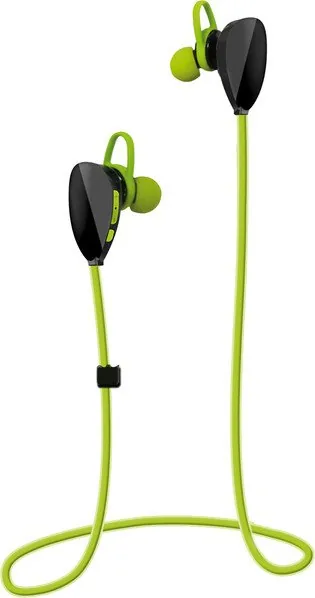
Earphones (In-Ear)
Form Factor
Neckband, Ear-wings
Acoustic Design
closed
Microphone
no
Wireless
Bluetooth 4.0
Controls
3-button remote control
Battery life
10h
Battery
USB Micro-B charging port, 2h charging time
Color
green, black
M: OA-GPT-54-NAN
Product
Description
Vivanco Sport Air Helmet Pro: Simple Wireless Sound for Everyday Use
The Vivanco Sport Air Helmet Pro is a practical Bluetooth headset made for users who want reliable audio without unnecessary complexity. The Vivanco Sport Air Helmet Pro Manual presents it as a private-use headset for music, calls, and hands-free convenience, with a focus on easy operation and dependable wireless performance. It is the kind of product that fits neatly into a daily routine, whether you are listening at home, taking calls, or managing audio on the go.
One of its strongest features is the balanced set of core specs. Bluetooth 4.0 support, a wireless range of up to 10 meters, and battery life of up to 10 hours make it a solid companion for regular use. The 170 mAh lithium polymer battery charges in about 2 hours, and the LED indicator gives clear feedback while charging or pairing. That simplicity is useful for anyone who prefers a headset that is easy to set up and quick to understand.
The controls are also straightforward. A multifunction key handles power, pairing, call answering, redial, and playback control, while separate buttons adjust volume and track selection. Once paired, the headset reconnects automatically to known devices, which saves time and reduces frustration. The pairing name HELMETPRO and the common code 0000 help make the setup process predictable and accessible.
What makes this headset especially appealing is its emphasis on convenience without overcomplication. It supports hands-free calling, music playback, and switching between the two with minimal effort. For listeners who want something compact, responsive, and easy to carry through a busy day, it offers a clean mix of function and portability. It is not trying to be a premium smart device; instead, it focuses on doing the essential things well.
Safety guidance is a major part of the product story too. The instructions stress responsible volume levels, careful ear use, and avoiding situations where blocking outside sound could be dangerous, such as driving, cycling, or running in traffic. The headset should also be kept within its temperature limit and handled with care during charging and disposal. These points add confidence for users who value clear operating guidance.
Notes
Best for private listening and hands-free calling.




Sven Kroll
11 months ago
The earbuds do not last anywhere near 10 hours. Mine drop to empty after about 45 minutes and the battery percentage seems very inaccurate. Is there a reason and how can I fix it?
Manual.ly
10 months ago
Sorry for the frustration. The advertised runtime (up to 10 hours) is measured under ideal conditions and can be significantly lower with higher volume, low temperatures, or frequent use of features like calls/voice assistant. The battery indicator also may show inaccurately at first after new use, partial charging, or frequent short charging cycles. Please try: charge the case and earbuds fully to 100 percent and keep them connected until charging stops; then use them until they are low (about 10-20 percent) and recharge fully again (1-2 cycles) to recalibrate the indicator. Also ensure a proper seal in your ears and check for any firmware updates in the app, if available. If the runtime still stays around 4-5 hours under normal listening, please contact support with your purchase date for troubleshooting or warranty options.