Plug the product into a socket (230 volts) and make sure that it is switched on. The display of the
product lights up briefly and shows all symbols. After this, it jumps to the display of the currently
applied voltage (V).
To use all the functions of the digital energy monitor, the electricity tariff must be entered.
Setting the tariff
• Press the UP button until the display shows "€ KWh 0.00".
• Press and hold the MODE button for approx. 3 seconds (the numbers in the display start flashing).
• By pressing the UP button, you can now change the respective number and enter your electricity
tariff. To move on to the next number, briefly press the MODE button.
• To return to the initial menu, press the MODE button. The product is now ready for operation and
you can plug a device that you want to monitor into the digital energy monitor. Please note the
maximum load of 16A, max. 3680W.
Reading/displaying the various measured values
See description “UP button“.
Note:
The product has an internal short-term memory which automatically saves the entries and data after
disconnection from the mains. Please note that this short-term memory only lasts for approx. 2 months.
If the product is disconnected from the mains for longer, the memory will empty itself.
To delete the internal measurement data on the product itself, press the "RESET" button.
Cleaning and maintenance
If the product needs to be cleaned, disconnect it from the mains/power socket.
Clean it only with a dry cloth when it is disconnected from the power supply.
Disposal of the device
This device shall not be disposed with housejold waste. Please hand it over to any collection
point for electric devices in your community or district.
Disposal of packaging
The packaging must not be disposed in the household garbage.
Please act according to the respective local disposal prescriptions.
Inbetriebnahme
Stecken Sie das Gerät in eine Steckdose (230 Volt) und stellen Sie sicher, dass diese eingeschaltet ist.
Das Display des Gerätes leuchtet kurz auf und zeigt alle Symbole an. Hiernach springt es auf die Anzeige
der aktuell anliegenden Spannung (V). Um alle Funktionen des Energiekostenmessgerät verwenden zu
können, muss der Stromtarif eingegeben werden.
Einstellen des Tarifs
• Drücken Sie die Taste UP, bis die Anzeige „€ KWh 0,00“ erscheint.
• Drücken und halten Sie die Taste MODE für ca. 3 Sekunden (die Zahlen im Display beginnen zu blinken).
• Durch Drücken der Taste UP können Sie nun die jeweilige Zahl verändern und ihren Stromtarif eingeben.
Um zur nächsten Zahl weiterzuspringen, drücken Sie bitte kurz die Taste MODE.
• Um zum Ausgangsmenü zurück zu gelangen, drücken Sie bitte die Taste MODE. Das Gerät ist nun
betriebsbereit und Sie können ein Gerät, welches Sie überwachen möchten, in das Energiekosten-
messgerät einstecken. Beachten Sie hierbei bitte die maximale Belastung von 16A, max. 3680W.
Ablesen/Anzeigen der verschiedenen Messwerte
Siehe Beschreibung „UP-Taste“.
Hinweis:
Das Gerät hat einen internen Kurzzeitspeicher, welcher nach dem Trennen vom Stromnetz die Eingaben
und Daten automatisch speichert. Bitte beachten Sie, dass dieser Kurzzeitspeicher nur ca. 2 Monate
anhält. Sollte das Gerät länger vom Stromnetz getrennt sein, leert sich der Speicher von selbst.
Um die internen Messdaten am Gerät selbst zu löschen, drücken Sie die Taste „RESET“.
Reinigung und Pflege
Sollte das Gerät gereinigt werden müssen, so trennen Sie dieses vom Stromnetz / von der Steckdose.
Reinigen Sie es im spannungsfreien Zustand ausschließlich mit einem trockenen Tuch.
Entsorgung des Gerätes:
Dieses Gerät darf nicht mit dem Hausmüll entsorgt werden. Geben Sie es bei einer Sammelstelle
für Elektrogeräte Ihrer Gemeinde oder Ihres Stadtteils ab.
Entsorgung der Verpackung:
Die Verpackung ist einer Wiederverwendung zuzuführen. Sie gehört nicht in den Hausmüll.
Handeln Sie entsprechend der lokalen Entsorgungsvorschriften.
Technische Daten:
Spannung: 230V~ / 50Hz
Max. Belastung: max. 16A
Spannungsmessbereich: 200V~ – 276V~; +/- 2%
Leistungsmessbereich: 0,1W – 3680W; +/- 2%
Insgesamt kWh Anzeige: 0.000kWh – 9999kWh
Gesamtkostenanzeige: 0,00€ - 9999€
Preisanzeigebereich: 00,00€ - 9,99€
D
Bedienungsanleitung Energiekostenmessgerät
WICHTIG, VOR GEBRAUCH SORGFÄLTIG LESEN! AUSBEWAHREN FÜR SPÄTERES NACHSCHLAGEN!
Bestimmungsgemäßer Gebrauch
Das Gerät dient zum Messen und Anzeigen der Leistungsaufnahme elektrisch betriebener Geräte.
Es ist ausschließlich zum Einsatz im privaten Bereich bestimmt und darf nicht für gewerbliche
Zwecke verwendet werden.
Das Produkt ist nicht amtlich geeicht und darf deshalb nicht für Abrechnungszwecke verwendet werden.
Sicherheitshinweise
Bitte achten Sie darauf, dass auch Kinder und Behinderte diese Hinweise beachten!
GEFAHR: Lebensgefahr durch Stromschlag!
Tod und Verbrennungen können die Folge sein!
--> Nutzen Sie das Gerät bitte nicht, wenn es beschädigt zu sein scheint.
--> Vermeiden Sie den Kontakt zu Netzspannungen.
--> Öffnen Sie das Gerät nicht.
--> Das Gerät ist nur für Innenräume vorgesehen. Nutzen Sie es nicht in feuchten Räumen
oder in der Nähe von Wasser.
--> Reparaturen sind nur durch Fachleute durchzuführen.
--> Nur an eine ordnungsgemäß geerdete Schutzkontaktsteckdose anschließen.
--> Benutzen Sie das Gerät nicht bei hohen Temperaturen, bedecken Sie es nicht und
stellen Sie ausreichende Luftzirkulation sicher.
VORSICHT Verletzungsgefahr durch Kurzschluss! Brandgefahr durch Überlastung!
--> Das Gerät ist an Haussteckdosen zu betreiben, deren Spannung, Leistung und Frequenz den
Angaben am Typenschild des Gerätes entsprechen müssen.
--> Nur geeignet für Geräte, die die maximal zulässigen Ausgangsströme des Produktes nicht
überschreiten.
--> Nicht hintereinander stecken.
--> Spannungsfrei nur bei gezogenem Stecker.
--> Nicht abgedeckt betreiben.
--> Positionieren Sie das Gerät so, dass Sie dieses schnell vom Stromnetz trennen können.
Inbetriebnahme und Bedienung
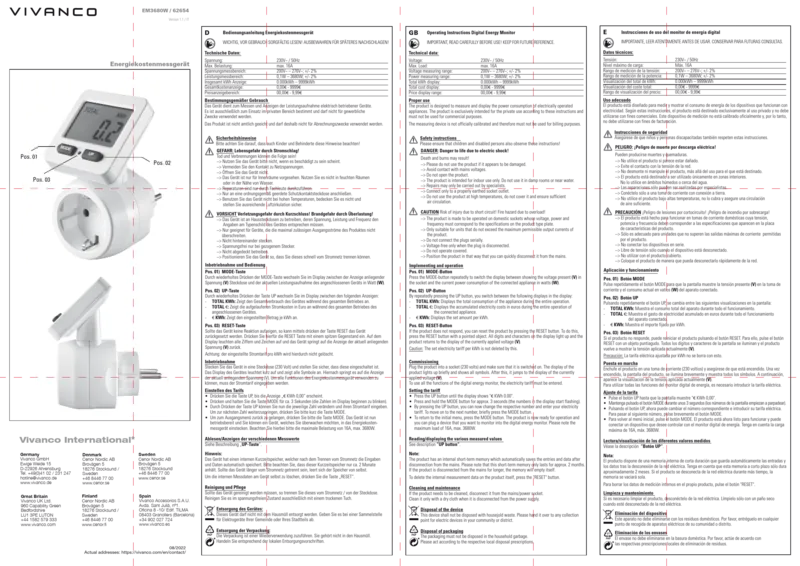
Pos. 01) MODE-Taste
Durch wiederholtes Drücken der MODE-Taste wechseln Sie im Display zwischen der Anzeige anliegender
Spannung (V) Steckdose und der aktuellen Leistungsaufnahme des angeschlossenen Geräts in Watt (W).
Pos. 02) UP-Taste
Durch wiederholtes Drücken der Taste UP wechseln Sie im Display zwischen den folgenden Anzeigen:
- TOTAL KWh: Zeigt den Gesamtverbrauch des Gerätes während des gesamten Betriebes an.
- TOTAL €: Zeigt die aufgelaufenen Stromkosten in Euro an während des gesamten Betriebes des
angeschlossenen Gerätes.
- € KWh: Zeigt den eingestellten Betrag je kWh an.
Pos. 03) RESET-Taste
Sollte das Gerät keine Reaktion aufzeigen, so kann mittels drücken der Taste RESET das Gerät
zurückgesetzt werden. Drücken Sie hierfür die RESET Taste mit einem spitzen Gegenstand ein. Auf dem
Display leuchten alle Ziffern und Zeichen auf und das Gerät springt auf die Anzeige der aktuell anliegenden
Spannung (V) zurück.
Achtung: der eingestellte Stromtarif pro kWh wird hierdurch nicht gelöscht.
Technical data:
Voltage: 230V~ / 50Hz
Max. Load: max. 16A
Voltage measuring range: 200V~ – 276V~; +/- 2%
Power measuring range: 0,1W – 3680W; +/- 2%
Total kWh display: 0.000kWh – 9999kWh
Total cost display: 0,00€ - 9999€
Price display range: 00,00€ - 9,99€
GB
Operating Instructions Digital Energy Monitor
IMPORTANT, READ CAREFULLY BEFORE USE! KEEP FOR FUTURE REFERENCE.
Proper use
The product is designed to measure and display the power consumption of electrically operated
appliances. The product is exclusively intended for the private use according to these instructions and
must not be used for commercial purposes.
The measuring device is not officially calibrated and therefore must not be used for billing purposes.
Safety instructions
Please ensure that children and disabled persons also observe these instructions!
DANGER: Danger to life due to electric shock!
Death and burns may result!
--> Please do not use the product if it appears to be damaged.
--> Avoid contact with mains voltages.
--> Do not open the product.
--> The product is intended for indoor use only. Do not use it in damp rooms or near water.
--> Repairs may only be carried out by specialists.
--> Connect only to a properly earthed socket outlet.
--> Do not use the product at high temperatures, do not cover it and ensure sufficient
air circulation.
CAUTION Risk of injury due to short circuit! Fire hazard due to overload!
--> The product is made to be operated on domestic sockets whose voltage, power and
frequency must correspond to the specifications on the product type plate.
--> Only suitable for units that do not exceed the maximum permissible output currents of
the product.
--> Do not connect the plugs serially.
--> Voltage-free only when the plug is disconnected.
--> Do not operate covered.
--> Position the product in that way that you can quickly disconnect it from the mains.
Implementing and operation
Pos. 01) MODE-Button
Press the MODE-button repeatedly to switch the display between showing the voltage present (V) in
the socket and the current power consumption of the connected appliance in watts (W).
Pos. 02) UP-Button
By repeatedly pressing the UP button, you switch between the following displays in the display:
- TOTAL KWh: Displays the total consumption of the appliance during the entire operation.
- TOTAL €: Displays the accumulated electricity costs in euros during the entire operation of
the connected appliance.
- € KWh: Displays the set amount per kWh.
Pos. 03) RESET-Button
If the product does not respond, you can reset the product by pressing the RESET button. To do this,
press the RESET button with a pointed object. All digits and characters on the display light up and the
product returns to the display of the currently applied voltage (V).
Caution: The set electricity tariff per kWh is not deleted by this.
Datos técnicos:
Tensión: 230V~ / 50Hz
Nivel máximo de carga: Máx. 16A
Rango de medición de la tensión: 200V~ – 276V~; +/- 2%
Rango de medición de la potencia: 0,1W – 3680W; +/- 2%
Visualización del total de kWh: 0.000kWh – 9999kWh
Visualización del coste total: 0,00€ - 9999€
Rango de visualización del precio: 00,00€ - 9,99€
E
Instrucciones de uso del monitor de energía digital
IMPORTANTE, LEER ATENTAMENTE ANTES DE USAR. CONSERVAR PARA FUTURAS CONSULTAS.
Uso adecuado
El producto está diseñado para medir y mostrar el consumo de energía de los dipositivos que funcionan con
electricidad. Según estas instrucciones, el producto está destinado exclusivamente al uso privado y no debe
utilizarse con fines comerciales. Este dispositivo de medición no está calibrado oficialmente y, por lo tanto,
no debe utilizarse con fines de facturación.
Instrucciones de seguridad
Asegúrese de que niños y personas discapacitadas también respeten estas instrucciones.
PELIGRO: ¡Peligro de muerte por descarga eléctrica!
Pueden producirse muertes y quemaduras.
--> No utilice el producto si parece estar dañado.
--> Evite el contacto con la tensión de la red.
--> No desmonte ni manipule el producto, más allá del uso para el que está destinado.
--> El producto está destinado a ser utilizado únicamente en zonas interiores.
No lo utilice en ámbitos húmedos o cerca del agua.
--> Las reparaciones sólo pueden ser realizadas por especialistas.
--> Conéctelo sólo a una toma de corriente con conexión a tierra.
--> No utilice el producto bajo altas temperaturas, no lo cubra y asegure una circulación
de aire suficiente.
PRECAUCIÓN ¡Peligro de lesiones por cortocircuito! ¡Peligro de incendio por sobrecarga!
--> El producto está hecho para funcionar en tomas de corriente domésticas cuya tensión,
potencia y frecuencia deben corresponder a las especificaciones que aparecen en la placa
de características del producto.
--> Sólo es adecuado para unidades que no superen las salidas máximas de corriente permitidas
por el producto.
--> No conectar los dispositivos en serie.
--> Libre de tensión sólo cuando el dispositivo está desconectado.
--> No utilizar con el producto cubierto.
--> Coloque el producto de manera que pueda desconectarlo rápidamente de la red.
Aplicación y funcionamiento
Pos. 01) Botón MODE
Pulse repetidamente el botón MODE para que la pantalla muestre la tensión presente (V) en la toma de
corriente y el consumo actual en vatios (W) del aparato conectado.
Pos. 02) Botón UP
Pulsando repetidamente el botón UP, se cambia entre las siguientes visualizaciones en la pantalla:
- TOTAL KWh: Muestra el consumo total del aparato durante todo el funcionamiento.
- TOTAL €: Muestra el gasto de electricidad acumulado en euros durante todo el funcionamiento
del aparato conectado.
- € KWh: Muestra el importe fijado por kWh.
Pos. 03) Botón RESET
Si el producto no responde, puede reiniciar el producto pulsando el botón RESET. Para ello, pulse el botón
RESET con un objeto puntiagudo. Todos los dígitos y caracteres de la pantalla se iluminan y el producto
vuelve a mostrar la tensión aplicada actualmente (V).
Precaución: La tarifa eléctrica ajustada por kWh no se borra con esto.
Vivanco International
*
08/2022
Actual addresses: https://vivanco.com/en/contact/
Great Britain
Vivanco UK Ltd.
960 Capability Green
Bedfordshire
LU1 3PE LUTON
+44 1582 579 333
www.vivanco.com
Spain
Vivanco Accesorios S.A.U.
Avda. Sant Julià, nº1.
Oficina 8 -10/ Edif. TILMA
08403 Granollers (Barcelona)
+34 902 027 724
www.vivanco.es
Energiekostenmessgerät
EM3680W / 62654
Version 1.1 / IT
Pos. 01
Pos. 02
Pos. 03
Finland
Cenor Nordic AB
Brovägen 5
18276 Stocksund /
Sweden
+46 8446 77 00
www.cenor.fi
Denmark
Cenor Nordic AB
Brovägen 5
18276 Stocksund /
Sweden
+46 8446 77 00
www.cenor.se
Sweden
Cenor Nordic AB
Brovägen 5
18276 Stocksund
+46 8446 77 00
www.cenor.se
/2
%
Quick check
I'm not a robot
Incorrect answer, please try again.
Chat with your Vivanco EM3680 manual using AI
Get instant AI answers from your Vivanco EM3680 manual
Ask anything about the Vivanco EM3680. Answers come from this manual, with the pages they are based on.
Ask a Question
0/1000
Do you recommend EM3680?
YesNo
0
florida44
6 months ago
Does the device work correctly after reading the instructions?
0
Manual.ly
6 months ago
Yes, our testing confirms that the device functions properly once you have read the instruction manual. If you experience any issues, please ensure all steps in the guide are followed carefully.
M: QW-35-FL
M: QW-35-FL
Frequently Asked
Questions
A
Press the UP button until the display shows € KWh 0.00. Then hold the MODE button for three seconds until numbers flash. Use the UP button to change the digits and press MODE briefly to move to the next number.
Is this answer helpful?
A
The internal short-term memory will automatically empty itself. You will need to re-enter your measurement data and tariff settings once you plug it back in.
Is this answer helpful?
A
No, the device is not officially calibrated and is intended strictly for private household use. It should not be used for commercial billing or legal accounting.
Is this answer helpful?
A
Use a pointed object to press the RESET button located on the device. This will restart the display to show the current voltage, though your tariff setting remains intact.
Is this answer helpful?
A
Yes, provided the connected appliance does not exceed the 16A/3680W limit. Ensure the area has good air circulation and never cover the device while it is active.
Is this answer helpful?
M: QW-35-FL
Advantagesand
Disadvantages
Advantages
Provides real-time monitoring of voltage, wattage, and electricity costs
Easy-to-use interface with clear digital display for all measurements
Internal memory retains data for up to two months without power
Compact design fits easily into standard wall outlets
Helps identify energy-hungry appliances to reduce monthly bills
VS
Disadvantages
Not suitable for commercial billing due to lack of official calibration
Short-term memory clears automatically if unplugged for over two months
Maximum load limit of 3680W restricts use with high-power appliances
Requires manual entry of electricity tariff for accurate cost calculation
Reset function does not delete the saved electricity tariff settings
M: QW-35-FL
Product
Specification
Type
Energy cost meter
M: QW-35-FL
Product
Description
Vivanco EM3680W Energy Cost Meter White Manual: A Smart Way to Track Power
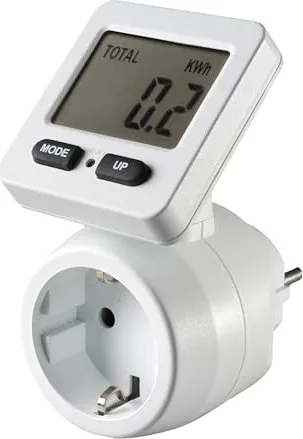
The Vivanco EM3680W Energy Cost Meter White is a practical digital tool designed for homeowners who want to take control of their electricity usage. This compact device plugs directly into standard wall sockets and allows you to monitor the power consumption of any connected appliance in real-time. Whether you are checking the energy drain of an old refrigerator or tracking the cost of running a home office setup, this meter provides immediate feedback on voltage, wattage, and cumulative costs.
Setting up the device is straightforward. Once plugged into a 230-volt outlet, the display illuminates to show the current voltage. To unlock full functionality, users must input their specific electricity tariff per kilowatt-hour. This simple step transforms raw data into meaningful financial information, displaying exactly how much money your devices are costing you over time. The interface features intuitive buttons for navigating between total energy consumption in kilowatt-hours, total accumulated costs in euros, and the set price per unit.
Safety is a priority with this unit. It is rated for a maximum load of 16 amperes and 3680 watts, making it suitable for most household appliances but not high-power industrial equipment. The device includes a short-term memory that retains data for approximately two months even if unplugged, ensuring you don't lose your historical usage records immediately after disconnecting. For maintenance, simply wipe the white casing with a dry cloth while disconnected from the power source. Remember, this tool is intended for private residential use only and is not officially calibrated for commercial billing purposes.
Important Notes
Always disconnect the device before cleaning.
Do not stack multiple plugs (daisy-chain) as this poses a fire hazard.
The internal memory resets if unplugged for more than two months.
Dispose of the unit at an electronic waste collection point, not regular trash.




florida44
6 months ago
Does the device work correctly after reading the instructions?
Manual.ly
6 months ago
Yes, our testing confirms that the device functions properly once you have read the instruction manual. If you experience any issues, please ensure all steps in the guide are followed carefully.