
Vitalmaxx 3V Manual
PDF manual · 8 Pages
English



Quick check
Incorrect answer, please try again.
Chat with your Vitalmaxx 3V manual using AI
Get instant AI answers from your Vitalmaxx 3V manual
Ask anything about the Vitalmaxx 3V. Answers come from this manual, with the pages they are based on.
Ask a Question
Do you recommend 3V?
Yes NoVideo Manual
LEBEXY Smartwatch Schrittzähler Fitness Armband Tracker, 1.3 Zoll
Frequently Asked Questions
It shows steps, distance (KM or MILE), calorie consumption (KCAL), workout time (EXT/MIN) and a continuous clock. Use the M button to cycle through these readings.
Is this answer helpful?
From the STEP display press M for ~3 seconds to open settings. Cycle through time, unit, weight, step length and step target with M; adjust values with S. Even if changing one item you must scroll the whole menu.
Is this answer helpful?
Remove the tracker from the band, unscrew the rear battery cover, remove old cells and insert two AG13/LR44 button cells with the positive pole up. Replace cover and reinsert tracker into the wristband.
Is this answer helpful?
When the progress bar is full the display blinks for about 30 seconds and steps are not registered during that time. After 30 seconds the tracker resumes normal counting and the full bar remains visible.
Is this answer helpful?
Steps, distance, calories and workout time are automatically reset overnight. You can also press S for ~3 seconds, then S once to clear readings (Clr shown). The process times out after ~10 seconds if no button is pressed.
Is this answer helpful?
Clean with a slightly damp, soft cloth and mild detergent if needed. Avoid abrasive cleaners. Store in a dry, shaded place away from children and pets, and remove batteries for long-term storage.
Is this answer helpful?
No. The device is intended for private fitness tracking and not for medical or commercial use. For defects or repairs, contact customer service rather than attempting DIY repairs.
Is this answer helpful?
Advantages and Disadvantages
Advantages

- Simple, easy-to-use interface with two-button operation (M and S) for display and settings.
- Tracks steps, distance, calories and workout time plus continuous clock display.
- Portable, lightweight design with removable tracker module and wristband.
- Battery-powered with common AG13/LR44 cells; batteries preinstalled for immediate use.
- Automatic nightly reset of daily stats and visible progress bar toward step target.
Disadvantages

- Not intended for medical or commercial use—limited to basic activity tracking.
- No wireless syncing or smartphone app compatibility; manual data only.
- Temporary pause in step counting for ~30 seconds after reaching target.
- Short display backlight duration (~4 seconds) and 5–10s step registration delay.
- Requires manual battery replacement and care to avoid leakage; not rechargeable.
Product Specification
Display
LCD, backlit
Heart rate measurement
no
Measurement functions
Time, pedometer, distance, calorie consumption
Navigation
no
Power supply
Battery
Strap material
Silicone
Case colors
black
Strap colors
black
Dimensions (case)
1.06x0.59 in
Length (strap)
9.45 in
Product Description
Vitalmaxx 3V Aktivitäts-Tracker schwarz Manual
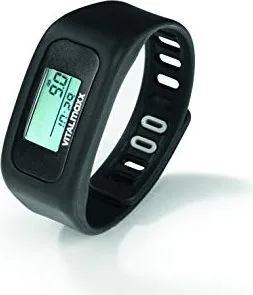
The Vitalmaxx 3V Aktivitäts-Tracker in black is a simple, wrist-worn pedometer designed for everyday activity tracking. Lightweight and battery-powered (2 x AG13/LR44 button cells), it displays steps, distance, calories burned and workout time while maintaining a continuous clock readout. The device uses two buttons: M (Mode/Light) to cycle displays and enter settings, and S (Set) to adjust values. Settings include 12/24h time format, metric or imperial units, body weight, step length and a customizable step target. Progress toward a target is shown as bars along the display edge; once the target is reached, the full bar blinks for about 30 seconds and step counting temporarily pauses. Readings (steps, distance, calories, workout time) reset automatically overnight, and can also be cleared manually via the S button.
This tracker is intended for private, non-medical use. It arrives with batteries preinstalled and includes a removable tracker module that fits into a wristband with a snap closure. For accurate readings, right-handed users are advised to wear it on the left wrist and left-handed users on the right. The display backlight activates for roughly 4 seconds when M is pressed. If the unit is inactive for about 3 minutes it enters standby to save power.
Operation is straightforward: take the unit from its packaging, check for damage, set your preferred units and personal parameters via the settings menu, then fasten the band and walk. There is a short display latency of 5–10 seconds for step registration. Battery replacement involves unscrewing the rear battery cover, inserting two AG13/LR44 cells with the positive pole up, resealing the compartment and reinserting the unit into the band. Remove batteries when storing the device long-term to prevent leakage.
Care and storage are basic: clean with a slightly damp, soft cloth and mild detergent if needed; avoid abrasive or corrosive cleaners. Store in a cool, dry place away from direct sunlight and out of reach of children and pets. For safety, keep packaging material and batteries away from children; swallowed batteries are hazardous and require immediate medical attention. Do not attempt repairs; contact customer service for defects or damage. The product should be disposed of responsibly: batteries removed and recycled separately, and the unit taken to an appropriate e-waste recycling center.
Notes:
- Includes wristband and two button cells (AG13/LR44) — batteries preinstalled at delivery.
- Not suitable for medical or commercial monitoring; intended for private fitness tracking only.
- Protect from heat, moisture, direct sunlight and shocks.
Search for 67,706 Manuals online


Type-in Brand or Model
Lena Schmidt
8 months ago
Does the fitness tracker come with a reliable clasp, and what can I do if the step counter counts incorrectly?
Manual.ly
8 months ago
The closure must be tightened so the band sits firmly (not loose) but still comfortable. If yours does not hold, try adjusting the band position and make sure the clasp clicks securely. For step accuracy, keep the tracker correctly positioned on the wrist, sync it to the app, and check that the device firmware and app are up to date. Then restart the tracker and allow it a short period of normal wear so it can recalibrate. If the step counter remains consistently wrong or the clasp will not stay closed, please contact support so we can arrange a replacement or warranty option.