
Viofo MT1 Manual
PDF manual · 11 Pages
English



Quick check
Incorrect answer, please try again.
Chat with your Viofo MT1 manual using AI
Get instant AI answers from your Viofo MT1 manual
Ask anything about the Viofo MT1. Answers come from this manual, with the pages they are based on.
Ask a Question
Do you recommend MT1?
Yes NoFrequently Asked Questions
Ensure camera is off. Push card until click. Metal contacts face VIOFO logo side. Format to FAT32 file system on computer before use. Turn off MT1 before inserting card.
Is this answer helpful?
Yes. Download VIOFO App from store. Connect to VIOFO_MT1 Wi-Fi. Default password is 12345678. View live feed or download videos directly to phone library.
Is this answer helpful?
Standard warranty is 12 months from purchase. Register product online to extend by 6 months to 18 months total. Accessories carry 3 month warranty.
Is this answer helpful?
Connect Red Power, Blue ACC, and Black Ground to motorcycle wiring. Ensure correct polarity. Professional installation is suggested to prevent electrical damage.
Is this answer helpful?
The G-Sensor activates. Current footage is locked immediately. It will not be overwritten by loop recording to preserve evidence of the collision event.
Is this answer helpful?
Yes. Format card, copy file, insert into camera. Power on unit. Do not unplug or turn off camera during upgrade process to ensure success.
Is this answer helpful?
Yes. GPS module logs position and speed. Sync with Dashcam Viewer software on PC to visualize tracks and speed lines on recorded video files.
Is this answer helpful?
Advantages and Disadvantages
Advantages

- Records Full HD video at 30fps for clear details
- Mobile app provides live view and remote settings
- G-Sensor protects critical footage during accidents
- Supports microSD card up to 256GB capacity
- Includes built-in GPS for speed and location logging
Disadvantages

- Requires hardwiring ignition power for reliable function
- Professional mechanic installation advised to avoid errors
- Firmware update needs memory card formatting first
- No internal storage requires separate microSD purchase
- Default Wi-Fi password might need changing for security
Product Specification
Effective Megapixels
2.13 Megapixels
Expandable Storage
microSD/microSDHC/microSDXC
Video Function
H.264, MPEG-4, 1920x1080@30p (16:9)
Viewing Angle
170 degrees
Display
No
Wireless
Wi-Fi (WLAN), GPS
Features
Motion sensor, second camera
Product Description
Comprehensive Guide to Viofo MT1 Manual
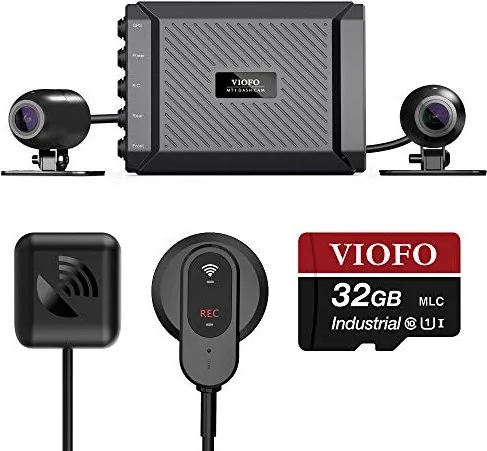
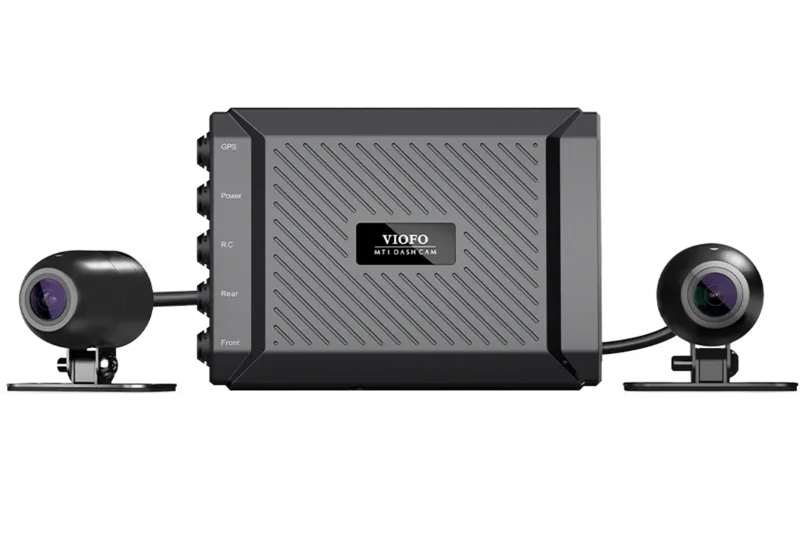
The Viofo MT1 Manual is an essential document for motorcycle riders utilizing the VIOFO MT1 Dash Camera. This guide ensures users understand installation, operation, and maintenance procedures. Safety is paramount, and this device helps record every ride effectively. The manual details how to set up the front and rear cameras for a full view of the road. It also explains the wiring requirements for power connections to ensure reliable operation. Users can configure recording settings to meet their specific needs using the included remote control and mobile application.
Camera and Recording Features
The camera records in 1920 by 1080P resolution at 30 frames per second. Video files are saved separately for front and rear views. Loop recording overwrites old footage automatically when storage is full. Manual recording saves extended files upon pressing the remote button. Emergency recording locks video during collisions to protect evidence. The G-Sensor sensitivity can be adjusted to low settings for optimal performance. Wide Dynamic Range helps exposure in changing light conditions. Files are named with sequence numbers for easy file management.
Installation and Wiring
Professional installation is recommended for power connections. Connect the Ground, ACC, and Power cables to the motorcycle wiring correctly. Incorrect wiring may cause damage to the dash camera or vehicle. The remote control must be attached where it is accessible without obstructing riding. Mounting includes plastic or metal options for securing the main unit. Ensure surfaces are clean before applying adhesive pads. The GPS module must be attached to receive location data for tracking. Insert memory card with contacts facing VIOFO logo. Turn off camera before inserting or removing card to prevent file corruption. LED indicators show status for power and recording.
Connectivity and Application Use
The VIOFO App allows smartphone control and video downloads. Live viewing of both cameras is supported once connected via Wi-Fi. The default Wi-Fi password is 12345678 and can be changed in settings. The application is available for both iOS and Android platforms. Users can also view files on a computer using the card reader adapter. Firmware upgrades improve performance but require careful steps to avoid boot failures. Always format the microSD card before updating firmware to ensure stable read and write. Check firmware version in settings menu regularly.
Support and Warranty
VIOFO offers a 12-month warranty standard with an option to extend to 18 months. Registration is required on the official website to activate the extension. Technical support is available through email, chat, or phone. Customer service is dedicated to ensuring user satisfaction with all products. Follow the Viofo MT1 Manual instructions guarantees proper usage and longevity. Proper care of the memory card ensures no data loss during critical events. Back up files before formatting to retain important footage for legal or personal use.
Search for 67,706 Manuals online


Type-in Brand or Model