
Victure HC200 Manual
PDF manual · 94 Pages
English



Quick check
Incorrect answer, please try again.
Chat with your Victure HC200 manual using AI
Get instant AI answers from your Victure HC200 manual
Ask anything about the Victure HC200. Answers come from this manual, with the pages they are based on.
Ask a Question
Do you recommend HC200?
Yes NoFrequently Asked Questions
It is designed for wildlife monitoring, hunting, and outdoor security. It can also be useful for farms, driveways, and other places where motion-based recording is needed.
Is this answer helpful?
It has three modes: OFF, TEST, and ON. TEST is used for setup and manual checks, while ON enables automatic motion-triggered recording.
Is this answer helpful?
The camera supports SD or SDHC cards up to 32GB. The manual recommends Class 6 or higher for reliable performance.
Is this answer helpful?
The camera uses infrared LEDs at night. Infrared light is invisible to human eyes, so the camera records night scenes in black and white for clear viewing.
Is this answer helpful?
This can happen if time lapse or time switch is enabled, or if the camera is not aimed correctly. It works best when motion crosses the front detection area at the right distance.
Is this answer helpful?
Mount it at a height similar to the target animal and test the PIR area by walking horizontally across the front of the camera. The best shooting distance is usually 3 to 10 meters.
Is this answer helpful?
Yes. You can enable a four-digit password to protect settings and prevent others from changing the camera’s configuration in TEST mode.
Is this answer helpful?
Advantages and Disadvantages
Advantages

- Fast 0.5-second trigger helps capture animals or motion quickly.
- IP66 waterproof design supports outdoor use in harsh weather.
- Offers photo, video, and photo+video modes for flexible recording.
- Simple TEST mode makes setup and detection-area checks easier.
Disadvantages

- Supports SD cards only up to 32GB, which limits storage.
- Night images are black and white, not full color.
- Time lapse mode disables PIR motion detection.
- Batteries and external power adapter are not included.
Product Specification
Effective Megapixels
5.0 Megapixels
Sensor
CMOS 1/4"
Lens
Fixed focal length
Digital Zoom
no
Display
2.4" LCD, 0.34 M Pixels
Viewfinder
no
Flash
integrated, infrared
Video function
AVI, 1920x1080@30p (16:9)
Removable storage
SD/SDHC
Connections
USB 2.0
Power supply
AA battery
Special features
Trail camera
Color
green, brown
Dimensions
3.66x5.32x2.83in (WxHxD)
Product Description
Victure HC200 Manual: Practical Outdoor Monitoring Made Simple
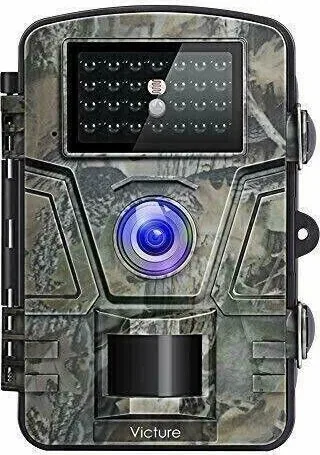
The Victure HC200 is a versatile trail camera built for outdoor use, whether you want to observe wildlife, monitor a hunting area, or add a layer of security around a home, farm, or driveway. Designed with a rugged IP66-rated body, it is made to handle rain, dust, and changing weather while continuing to capture motion with minimal effort from the user. The camera combines automatic triggering, infrared night vision, and simple mode switching, making it approachable even for first-time users.
One of the strongest points highlighted in the Victure HC200 Manual is its straightforward workflow. The camera offers three main modes: OFF, TEST, and ON. TEST mode is especially useful for setup, allowing users to adjust settings, check memory, and confirm the detection area before switching to automatic capture. Once in ON mode, the PIR sensor takes over and reacts quickly to movement within its forward-facing detection zone. With a trigger speed of about 0.5 seconds, the HC200 is designed to catch motion before the subject moves out of frame.
The camera supports photo, video, and combined photo-plus-video recording, with image resolutions up to 12MP and video up to 1080P. A 90-degree PIR angle and detection range of up to 20 meters make it suitable for targeted observation. For night use, 24 infrared LEDs help record activity after dark, while the low-glow design keeps the camera discreet. The result is dependable monitoring without constant supervision.
Setup is simple: insert AA batteries, add a compatible SD card up to 32GB, format the card in-camera, and adjust the key settings before deployment. The manual also explains useful options like time stamp, time switch, time lapse, password protection, and serial numbering. These features help users organize recordings, protect settings, and tailor the camera to different observing schedules.
Notes
- Best results come from mounting the camera at a suitable height and aiming it across, not straight at, likely movement paths.
- Night footage is captured in black and white due to infrared lighting.
- Time lapse mode is ideal for fixed-scene observation, but it disables PIR motion detection.
Overall, the Victure HC200 Manual presents a capable, easy-to-configure trail camera that balances durability, automation, and practical features for outdoor monitoring.
Search for 67,706 Manuals online


Type-in Brand or Model