
Vibro Shaper Vibration Plate Manual
PDF manual · 40 Pages
English



Quick check
Incorrect answer, please try again.
Chat with your Vibro Shaper Vibration Plate manual using AI
Get instant AI answers from your Vibro Shaper Vibration Plate manual
Ask anything about the Vibro Shaper Vibration Plate. Answers come from this manual, with the pages they are based on.
Vibration Plate Maintenance Schedule
Ensure the power switch is OFF and the cable is unplugged from the socket before cleaning.
Use a clean, dry broom or brush to remove dust from the device.
Clean the standing area with a damp cloth.
Clean the remote control with a clean cloth.
If not used for an extended period, store in the box in a cool, dry place and remove batteries from the remote.
Ask a Question
Do you recommend Vibration Plate?
Yes NoFrequently Asked Questions
It is designed to support vibration-based home workouts that can help users train balance, endurance, and muscle activation in a compact space. It offers both manual and preset options for flexible sessions.
Is this answer helpful?
Yes. The package includes resistance bands, a remote control, user instructions, a training plan, and a meal plan. These extras make it easier to start and follow a routine.
Is this answer helpful?
Manual mode lets you choose the workout time and vibration tempo yourself. You can adjust the session from 1 to 10 minutes and select a tempo level that fits your comfort and goals.
Is this answer helpful?
Automatic mode runs preset training programs with fixed time and tempo patterns. It is useful for people who want a guided workout without adjusting settings during the session.
Is this answer helpful?
Yes. It has transport wheels and a handle, so you can tilt and roll it carefully when needed. This makes it practical for home use and storage.
Is this answer helpful?
Use the device on a flat surface, keep at least 100 cm of space around it, and never exceed the 100 kg load limit. Users with medical concerns should consult a doctor before training.
Is this answer helpful?
Advantages and Disadvantages
Advantages

- Dual manual and automatic modes allow flexible training for different experience levels.
- Included resistance bands expand workouts beyond lower-body vibration exercises.
- Remote control and clear displays make everyday operation simple and convenient.
- Compact design with transport wheels makes the unit easier to store and move.
Disadvantages

- Maximum load is limited to 100 kg, which may not suit every user.
- The device requires careful setup and spacing to use safely.
- Some health conditions and pregnancy require medical approval before use.
- Training intensity may feel limited for users seeking high-impact or advanced workouts.
Product Specification
Type
Vibration Plate
Programs
3
Max. User Weight
264.55 lbs
Dimensions
24.61x15.16x4.72 in
Weight
26.46 lbs
Product Description
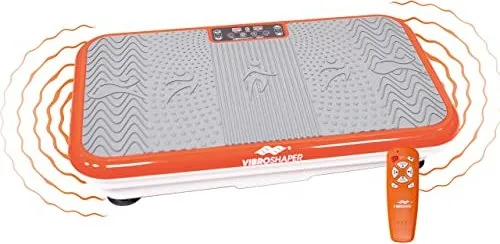
Vibro Shaper Vibration Plate: Compact Training With Big Versatility
The Vibro Shaper Vibration Plate is designed for people who want a simple, space-saving way to add movement to their daily routine. This home fitness machine combines vibration-based training with a user-friendly control panel, a remote control, and resistance bands, making it easy to customize workouts without needing a large exercise setup. The Vibro Shaper Vibration Plate Manual helps users understand how to start safely, choose the right mode, and make the most of each session.
What Makes It Useful
One of the biggest strengths of this vibration plate is its dual operating system. In manual mode, you can adjust both time and tempo to match your comfort level or training goal. In automatic mode, the device offers preset programs that guide the workout for you. This makes it suitable for beginners who want structure as well as more experienced users who prefer control.
The included resistance bands add another layer of training. They can be attached to the back of the platform and used during workouts to activate the arms, shoulders, and upper body while the lower body stays engaged on the vibrating surface. The result is a more complete routine in a small footprint. The remote control also adds convenience, letting you change settings without interrupting your rhythm.
Everyday Fitness Support
The Vibro Shaper is built for walking-style, jogging-style, and running-style positions, which means users can vary foot placement to change training intensity. That makes the platform feel more adaptable than a standard static exerciser. It is also easy to move thanks to transport wheels and a side handle, so storing it after use is straightforward.
This product is clearly aimed at practical home use. It supports short sessions, simple operation, and easy cleanup. The training guidance included with the product encourages gradual progress, stretching before exercise, and careful attention to posture. That makes it a good match for people who want a steady routine rather than a complicated fitness system.
Notes
- Maximum load: 100 kg
- Use only on a flat, stable surface
- Keep at least 100 cm of clear space around the device
- Not suitable for everyone; medical conditions should be checked with a doctor first
- Best results come from consistent use and safe training habits
Search for 67,732 Manuals online


Type-in Brand or Model