
Verbatim External Slimline CD/DVD Writer Manual
PDF manual · 16 Pages
English



Quick check
Incorrect answer, please try again.
Chat with your Verbatim External Slimline CD/DVD Writer manual using AI
Get instant AI answers from your Verbatim External Slimline CD/DVD Writer manual
Ask anything about the Verbatim External Slimline CD/DVD Writer. Answers come from this manual, with the pages they are based on.
Ask a Question
Do you recommend External Slimline CD/DVD Writer?
Yes No
ut_assumenda
5 months ago
Why can't I install the included software on Windows 11, and what do I need to play DVDs?

Manual.ly
5 months ago
The included installation CD uses Flash Player, which is not supported by Windows 11. To install the burning software, you must run the setup from a Windows 7 system or copy files manually via another PC. Additionally, no DVD playback software is included; please use VLC Media Player or similar free applications for viewing DVDs.
gtillman14
6 months ago
Is the included USB cable long enough for external use, and does it support USB 3.0 speeds?

Elena Fischer
6 months ago
Will this external DVD drive work on Windows 11, and do I need extra software to play DVDs?
Manual.ly
6 months ago
The drive is generally recognized by Windows 11 without additional drivers and can read CDs and DVDs after connection. Please note that Windows 11 does not include DVD playback software by default. You can use a compatible media player such as VLC. The included Nero disc may not install directly on Windows 11 because of its older installer format; Nero can be installed separately if needed.
Alena Kiehn
5 months ago
Will this external DVD drive work with Windows 11, and do I need extra software to watch DVDs?
Manual.ly
5 months ago
The drive is generally recognized by Windows 11 without additional drivers and can read CDs and DVDs after connection. However, Windows 11 does not include DVD playback software by default. You can use a compatible player such as VLC Media Player. The included burning software may require a separate installation method on newer Windows versions.
Timmy Lockman
6 months ago
Does this external DVD drive work with Windows 11, and do I need extra software to play DVDs?
Manual.ly
6 months ago
The drive is generally recognized by Windows 11 without additional drivers. However, Windows does not include DVD playback software, so you will need a separate player such as VLC Media Player. The included Nero disc may not install directly on Windows 11 because of its outdated installer; Nero can be installed separately if needed. For reliable operation, connect the drive directly to a powered USB port.
Frequently Asked Questions
It supports common CD and DVD formats, including CD-ROM, CD-R, CD-RW, DVD-R, DVD+R, DVD-RW, DVD+RW, dual-layer DVD media, and M-Disc DVD media. Support for writing depends on the media type and compatible burning software.
Is this answer helpful?
No separate driver is required for supported Windows 7, 8, and 10 systems or compatible Mac OS X systems. After connecting the drive by USB, the operating system should install the required driver automatically.
Is this answer helpful?
Yes. USB 3.2 Gen 1 is backward compatible with USB 2.0. However, transfer speed and overall performance may be reduced when the drive is connected to a USB 2.0 port.
Is this answer helpful?
Most computers provide enough power through the USB data connection. If the computer USB bus cannot supply sufficient power, connect the optional USB power lead first, then connect the data lead.
Is this answer helpful?
Use the operating system's eject or safely remove hardware function before unplugging the cable or turning off the drive. This helps prevent data loss and ensures any active disc operation has finished.
Is this answer helpful?
No. Avoid applying labels to CDs or DVDs. Labels can create imbalance, cause reading or writing errors, damage media, and potentially lead to lost data. Use a solvent-free, non-abrasive marker if labeling is needed.
Is this answer helpful?
Advantages and Disadvantages
Advantages

- Slim portable drive adds CD and DVD access to USB-C computers without an internal optical drive.
- Supports many CD and DVD formats, including rewritable, dual-layer, and M-Disc DVD media.
- Plug-and-play operation on supported Windows and Mac systems requires no separate driver installation.
- USB 3.2 Gen 1 offers better potential performance than USB 2.0 and remains backward compatible.
- Useful for disc playback, software installation, archival access, and creating physical backups.
Disadvantages

- Write performance can be significantly lower when connected through a USB 2.0 port.
- Some computers may need an additional USB power connection if bus power is insufficient.
- Burning software is required to write blank discs and may need to be installed separately.
- The drive must stay level and still during use to help avoid media errors or mechanical damage.
- Disc labels, dust, heat, and improper ejection can cause read, write, or data-loss issues.
Product Specification
Form Factor
5.25" SlimLine (external)
Loading Mechanism
Tray
DVD+R
SL: 8x, DL: 6x
DVD-R
SL: 8x, DL: 6x
DVD+RW
8x
DVD-RW
6x
DVD-ROM
8x
CD-R
24x
CD-RW
24x
CD-ROM
24x
Write Buffer
4 MB
Special Features
M-DISC
Dimensions
5.24 x 0.43 x 5.71 in
Weight
8.36 oz
Product Description
Verbatim External CD/DVD Burner SlimLine, USB-C 3.0 - Read, Download & Print Free
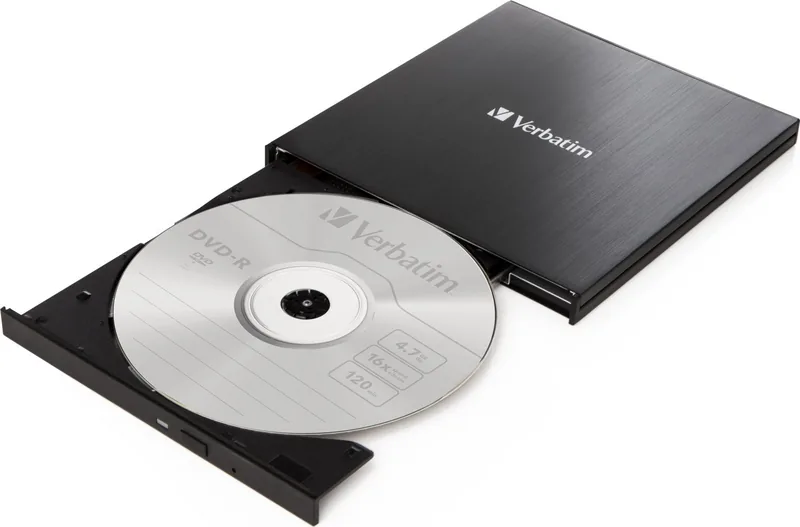
The Verbatim External CD/DVD Burner SlimLine, USB-C 3.0 - Read, Download & Print Free is a compact optical drive for people who still rely on CDs and DVDs for media playback, backups, archives, and software installation. Its slim portable design makes it a practical companion for modern laptops and desktop computers that no longer include a built-in optical drive.
Compact connectivity for everyday disc tasks
Using a USB-C connection, this Verbatim SlimLine drive is designed for convenient plug-and-play use with compatible Windows and Mac systems. No separate driver installation is required on supported operating systems, helping users begin reading discs quickly. USB 3.2 Gen 1 connectivity, commonly associated with USB 3.0 performance, supports faster transfers than USB 2.0 while remaining backward compatible with older USB ports.
The drive supports a broad selection of CD and DVD media formats, including CD-ROM, CD-R, CD-RW, DVD-R, DVD+R, DVD-RW, DVD+RW, dual-layer DVDs, and M-Disc DVD media. This flexibility makes it useful for accessing legacy music collections, viewing DVD content, installing archived applications, or creating physical copies of important files.
Made for portable use with sensible care
Its lightweight slimline form is suited to home offices, study spaces, and travel. For reliable operation, place the burner horizontally on a stable surface and use a cable no longer than one meter. Most computers can provide sufficient power through the data connection, though some setups may require an optional USB power connection.
When writing to a disc, use clean, high-quality media and avoid moving the drive during the process. Disc burning is sensitive to interruptions, so keeping the device steady can help protect data and prevent failed writes. Always eject the drive safely through the operating system before disconnecting it to reduce the risk of data loss.
A useful option for physical media
The Verbatim External CD/DVD Burner SlimLine offers a straightforward way to keep CDs and DVDs useful in a USB-C computing environment. It is particularly appealing for users who value offline backups, physical music and film libraries, or simple disc-based file sharing. Windows users will need compatible burning software to write blank media, while DVD playback software may be needed depending on the system.
Notes
- Keep the tray closed when not in use to limit dust exposure.
- Do not attach labels to discs, as they can cause reading or writing errors.
- Handle discs only by their edges and store them in protective cases.
- Copy and burn only material you own or are authorized to reproduce.
Search for 67,706 Manuals online


Type-in Brand or Model
Ralph Lowe
9 months ago
Will this external DVD drive work with Windows 11, and can I play DVDs right away or do I need extra apps/software?
Manual.ly
9 months ago
Many users report it works immediately on Windows 11 after connecting, without extra drivers. However, the included Nero setup disc may not install on Windows 11 (some users needed to start the disc on an older Windows system to copy the files, or install software separately). For DVD playback, a separate media app is usually needed (for example VLC), since the drive may not include a built-in DVD player. Also note cable/power: some setups fail if the included cable does not provide enough power; if you get issues, try a proper USB connection (or a Y/dual-USB power cable if available).