

Velleman KA01 RGB Shield Manual
PDF manual · 12 Pages
English



Quick check
Incorrect answer, please try again.
Chat with your Velleman KA01 RGB Shield manual using AI
Get instant AI answers from your Velleman KA01 RGB Shield manual
Ask anything about the Velleman KA01 RGB Shield. Answers come from this manual, with the pages they are based on.
Ask a Question
Do you recommend KA01 RGB Shield?
Yes NoFrequently Asked Questions
It is used to control up to three dimmer channels for RGB lighting or three separate single-color channels. It is ideal for LED strips, lighting effects, and Arduino-based control projects.
Is this answer helpful?
The shield is designed for Arduino Uno, Arduino Due, and Arduino Mega. This makes it flexible for a variety of small to medium DIY lighting setups.
Is this answer helpful?
Yes. The shield supports both power from the Arduino board and an external supply. External power is useful when the lighting load needs more current than the board should provide.
Is this answer helpful?
Each channel can handle up to 2A, which is suitable for many low-voltage LED applications. Users should still match the power supply and wiring to the actual load.
Is this answer helpful?
Series resistors limit current through LEDs and help prevent damage. The manual includes formulas and examples to help choose the proper resistor value for different LED voltages and supply levels.
Is this answer helpful?
It is manageable for people with basic soldering experience, but it does require attention to detail. Checking part values, LED polarity, and solder joints is important for a successful build.
Is this answer helpful?
Advantages and Disadvantages
Advantages

- Supports Arduino Uno, Due, and Mega for broad compatibility.
- Can run either from Arduino power or an external supply.
- Provides screw terminals for secure LED strip wiring.
- Includes cascade connectors for expanding a project.
- Good educational value for soldering and circuit assembly.
Disadvantages

- Requires careful assembly and soldering skills.
- Component polarity and resistor values must be checked manually.
- External power planning is needed for heavier LED loads.
- Not a ready-to-use product without building effort.
Product Specification
Platform
Uno, Due, Mega
Format
Enhanced Features, Internet of Things, Robot, Engineering
Manufacturer
various
Function
RGB LED control module
Connectivity
Arduino Shield, PWM
Power supply
12.0-24.0V/2-6A (external)
External connections
8x screw terminal
Wireless
N/A
LAN
N/A
Supported standards
PWM
Special features
Kit
Dimensions (WxD)
2.68x2.09in
Scope of delivery
1x Kit
Product Description
Arduino RGB Shield Kit: A Practical Way to Control Light
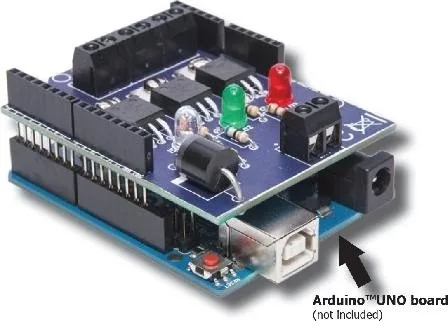
The Arduino RGB Shield Kit Manual introduces a compact and flexible shield designed for lighting projects that need reliable control over three dimmer channels. Whether you want to drive one RGB LED strip or manage three separate single-color channels, this shield gives Arduino users a straightforward hardware foundation for experiments, prototypes, and small custom builds.
What makes it useful
This shield is compatible with several popular boards, including Arduino Uno, Arduino Due, and Arduino Mega, making it easy to adapt to different setups. It includes RGB indicator LEDs, screw terminals for clean strip connections, and cascade connectors for expanding a project with other shields. The option to select either power from the Arduino board or an external supply adds welcome flexibility when the project grows beyond basic LED testing.
Built for practical lighting control
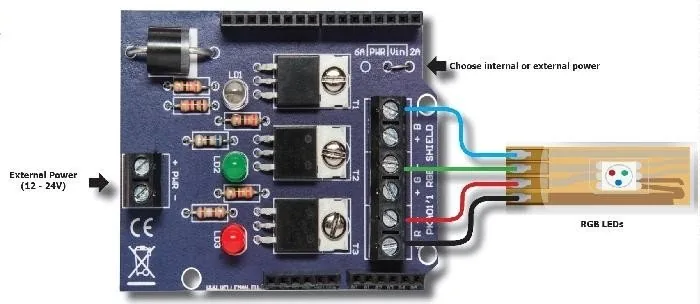
One of the strongest points of the kit is its focus on real-world LED control. Each channel can handle meaningful current, and the design supports up to 2A per channel with a maximum input voltage of 50VDC. That makes it suitable for a wide range of low-voltage lighting tasks, from decorative effects to simple channel-based illumination. The manual also includes a connection diagram and resistor guidance, helping builders calculate the right series resistor for their LEDs and avoid common mistakes.
Assembly and learning value
Like many hands-on Arduino accessories, this kit is not only about the finished result but also about the building process. The assembly approach encourages careful soldering, polarity checks, and component verification before installation. That makes it a useful project for anyone who wants to strengthen soldering skills while learning how LED channels, transistor switching, and power selection work together in a practical circuit.
Notes
- Always verify component values before soldering.
- Check LED polarity carefully.
- Use the correct power source for your lighting load.
- Sample code is available to help start testing quickly.
Overall, the Arduino RGB Shield Kit is a solid choice for makers who want a balance of simplicity, expandability, and hands-on learning. It is especially appealing for users who enjoy building their own lighting controller rather than relying on a finished plug-and-play module.
Search for 67,706 Manuals online


Type-in Brand or Model
Lea Schmidt
10 months ago
Is this electronics kit suitable for programming beginners, and is it easy to solder?
Manual.ly
10 months ago
Yes. This is a beginner-friendly kit designed especially for people starting out with programming and electronics. Reviewers report that it works well and is straightforward to assemble, including being relatively easy to solder. If you are new, take your time with the build steps and follow the provided instructions carefully. A basic, steady soldering setup helps (proper iron temperature, clean soldering tip, and good ventilation). With that, you should be able to complete the assembly comfortably and focus on learning the programming side afterward.