
Velleman HQWS10001 Manual
PDF manual · 82 Pages
English



Quick check
Incorrect answer, please try again.
Chat with your Velleman HQWS10001 manual using AI
Get instant AI answers from your Velleman HQWS10001 manual
Ask anything about the Velleman HQWS10001. Answers come from this manual, with the pages they are based on.
HQWS10001 Maintenance Schedule
Unplug the appliance and let it cool. Wipe all exterior surfaces with a soft cloth dampened with soap and water. Do not immerse in water or use solvents.
Store the appliance and its accessories in a clean and dry area.
Ask a Question
Do you recommend HQWS10001?
Yes NoFrequently Asked Questions
You can power it with the supplied 5 V DC, 1 A adapter or with four 1.5 V C-cell batteries. Batteries are recommended for short portable use; mains power is preferable for continuous operation.
Is this answer helpful?
Yes. The unit has 10 preset slots for both DAB and FM. Save to presets 1–5 by holding the corresponding button, or store presets 6–10 by pressing Shift and holding the same buttons. Note presets are lost if power is removed or batteries taken out.
Is this answer helpful?
DRC (Dynamic Range Compression) evens out audio levels by raising quieter sounds and lowering louder ones. In the DAB menu choose DRC and select Low or High using the tuning/enter dial; an asterisk indicates the current selection.
Is this answer helpful?
Select AUX mode with the mode button, connect a device via a 3.5 mm jack to the rear AUX port, set the source device volume to maximum and adjust final output using the radio’s volume control.
Is this answer helpful?
Go to System → Alarm from the info/menu, then follow the Alarm Setup flow to set time, duration, alert type (Buzz, DAB or FM), repeat options, date and volume. Two alarms can be configured independently.
Is this answer helpful?
Unplug before cleaning, wipe exterior with a soft cloth dampened with mild soapy water, do not immerse, avoid solvents, and store in a dry place. Repairs should be performed by qualified service personnel.
Is this answer helpful?
Fully extend the antenna and perform a Scan or Full Scan in the DAB menu. If issues persist try Manual Tune, prune weak listed stations, or Reset the radio to clear presets and retune.
Is this answer helpful?
Advantages and Disadvantages
Advantages

- DAB and FM reception with automatic time/date set from DAB and 10 presets per band
- Dual-action dials and clear menu with EQ, DRC and alarm functions for flexible audio control
- AUX input for external devices and splash resistance (IPX3) for workshop environments
- Compact, portable design powered by 5 V adapter or 4x C batteries for versatile use
- Customizable backlight and standby timers to preserve battery/mains usage on site
Disadvantages

- IPX3 rating resists splashes but is not fully waterproof for heavy outdoor exposure
- Preset memory is volatile and cleared when batteries are removed or mains disconnected
- Relatively low speaker power (2 x 2.5 W) may be insufficient on very noisy job sites
- Repairs and cable replacements require qualified service personnel, limiting DIY fixes
- Requires manual rescans in new locations for optimal DAB/Fm reception
Product Specification
Operating Mode
Battery Operation, Mains Operation (230V)
Output Power
2x 2.5W
Tuner
FM, DAB
Connections
AUX In (0.14 in)
Special Features
Carrying Handle, Clock, Alarm Function, 10 Presets, Stereo Speakers
Safety
Impact Protection, IPX3
Dimensions (WxHxD)
12.68x4.33x5.35in
Weight
3.09 lb
Scope of Delivery
Power Adapter
Product Description
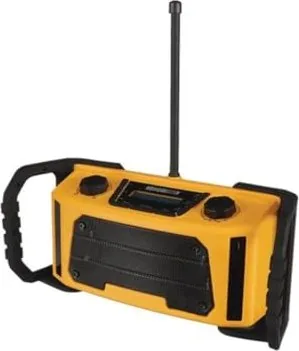
Velleman HQWS10001 construction site radio — robust sound for tough jobs
The Velleman HQWS10001 construction site radio is a sturdy, feature-rich portable radio designed for demanding environments. Powered by a 5 V DC adapter or four C-cell batteries, it delivers dual 2.5 W speakers, DAB and FM reception, and an AUX input for external devices. The unit’s IPX3 splash-resistant rating, extendable antenna and compact dimensions (322 x 110 x 136 mm) make it suitable for workshops, job sites and outdoor tasks where durability and reliable audio matter.
Key features and usability
The HQWS10001 automatically sets time and date from DAB broadcasts and offers quick scanning and manual tuning for both DAB and FM bands. It stores up to 10 presets per band (1–5 and 6–10 via shift), supports dynamic range compression (DRC) to smooth audio levels, and includes a customizable EQ with presets (Normal, Classic, Jazz, Pop, Rock, Speech) plus a My EQ submenu for loudness, treble and bass adjustments.
Controls are straightforward: dual-action rotary dials let you scroll and press to select, while dedicated buttons handle mode switching, scanning, snooze, info/menu and presets. The FM mode provides scan settings (All or Strong stations) and audio options (Stereo allowed or Forced mono). AUX input accepts a 3.5 mm jack for playback from phones or players, with front-panel volume control.
Practical system functions
The system menu consolidates sleep timer, alarm (two independent alarms with duration, alert source, repeat and volume settings), time/date manual setting and auto-update, display backlight timing and intensity, inactive standby timer, language selection (English, Français, Deutsch, Italiano, Español), factory reset and software version display. The backlight offers configurable On Level, Dim level and timeout intervals to preserve battery life on site.
Build and maintenance
Weighing about 1.4 kg and rated IPX3, the radio resists light splashing and is intended for indoor and sheltered outdoor use. Users should follow safety guidance: avoid immersion, keep ventilation clear, use specified accessories, protect power cords and have damaged cables replaced by qualified personnel. Clean with a soft damp cloth and keep the device dry when storing. Repairs are for qualified service technicians only.
Notes
- Presets are lost if the radio is disconnected from mains power or batteries are removed.
- For best DAB reception, fully extend the antenna and perform full scans after relocating the unit.
- Use batteries for portability only; mains power is recommended for continuous operation.
- Visit www.velleman.eu for the latest firmware and support information.
Search for 67,706 Manuals online


Type-in Brand or Model