
VDO Cycle Parts M1.1 WR Manual
PDF manual · 22 Pages
English



Quick check
Incorrect answer, please try again.
Chat with your VDO Cycle Parts M1.1 WR manual using AI
Get instant AI answers from your VDO Cycle Parts M1.1 WR manual
Ask anything about the VDO Cycle Parts M1.1 WR. Answers come from this manual, with the pages they are based on.
Ask a Question
Do you recommend M1.1 WR?
Yes NoFrequently Asked Questions
It tracks current speed, current distance, ride time, current time, and total distance. These are the core metrics shown during and after rides.
Is this answer helpful?
Mount the bracket, sensor, and magnet, insert the computer into the bracket, and test the setup by spinning the front wheel. If speed appears, the system is working.
Is this answer helpful?
Yes. You can switch between km/h and mph in the settings menu, making the computer suitable for different regions and riding preferences.
Is this answer helpful?
Yes. It offers several menu languages, including English, German, French, Italian, Spanish, Dutch, and Polish.
Is this answer helpful?
No. The device keeps your settings and total distance memory when the battery is replaced, so your riding history remains محفوظ? No, use plain answer. Let's revise to no non-English. Need valid English. We'll say: "No. The device keeps your settings and total distance memory when the battery is replaced, so your riding history remains محفوظ" can't. Let's make straightforward. Need not exceed 200 words. Continue all Q/A.
Is this answer helpful?
Wheel circumference affects the accuracy of speed and distance readings. If it is set correctly, the computer can measure your ride much more precisely.
Is this answer helpful?
Hold the BIKE button until the reset message appears, then keep holding it to clear trip distance and ride time. Total distance is not erased.
Is this answer helpful?
Advantages and Disadvantages
Advantages

- Simple two-button control makes operation quick and beginner-friendly.
- Clear three-line display keeps speed and function data easy to read.
- Accurate tracking improves when the wheel circumference is set correctly.
- Battery replacement is easy, and stored settings are kept in memory.
Disadvantages

- Setup requires careful sensor and magnet alignment for reliable speed readings.
- No advanced training metrics beyond the core cycling basics are included.
- The display and feature set are functional, but fairly minimal.
- Trip and total data management may feel too simple for data-heavy riders.
Product Specification
Display
monochrome
Connectivity
wired
Navigation
no
Power supply
Battery
Special features
User-replaceable battery
Product Description
VDO Cycle Parts M1.1 WR: A Practical Companion for Everyday Riding
The VDO Cycle Parts M1.1 WR Manual introduces a compact cycle computer designed for riders who want clear ride data without unnecessary complexity. Built around a simple two-button system, the M1.1 WR focuses on the essentials: current speed, trip distance, ride time, clock, and total distance. For cyclists who value dependable feedback on every outing, this model delivers a balanced mix of convenience and useful riding insight.
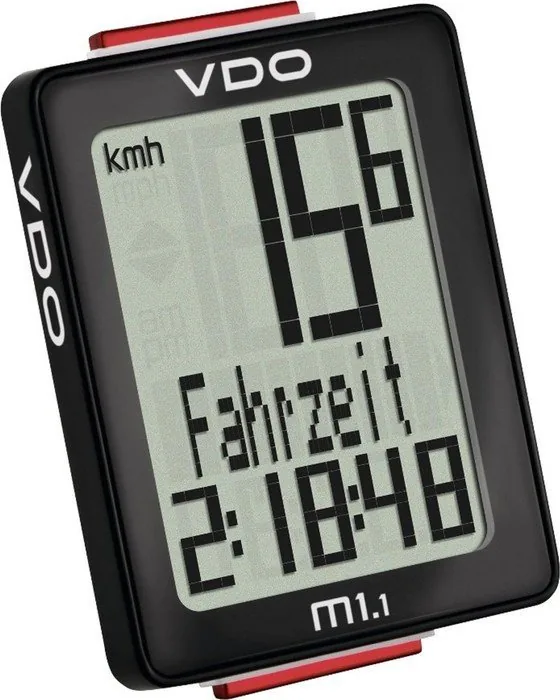
One of the strongest impressions this device leaves is its readability. The display is divided into three clear zones, making it easy to follow speed at a glance while the selected function and value appear below. That design is especially helpful when riding in changing light or when you want quick updates without distracting from the road. The interface also supports both km/h and mph, plus 12-hour or 24-hour time formats, which makes the computer adaptable to different preferences and regions.
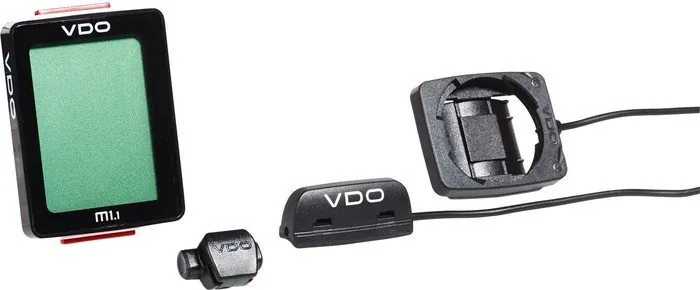
Setup is straightforward, though it rewards careful installation. The sensor, magnet, and handlebar bracket are designed to work together in a secure twist-click system. Once mounted correctly, the unit automatically wakes from sleep mode when you start riding again, so you do not have to think about switching it on mid-ride. That kind of automation is small but valuable, especially for commuters and regular weekend cyclists.
Another standout feature is the customizable wheel circumference setting. By entering the correct wheel size, you improve the accuracy of both speed and distance measurements. The M1.1 WR also allows you to preserve total mileage, even after changing the battery, which is useful if you like to track long-term riding progress across seasons. The low-battery warning, battery memory, and easy replacement process add to its practical appeal.
Beyond the basics, this cycle computer feels like a trustworthy daily rider’s tool. It is not overloaded with advanced training metrics, but that is part of its charm. Instead, it offers a clean, focused experience that helps you stay informed about your ride in a simple and dependable way. For cyclists who want a no-fuss device with solid core performance, the VDO M1.1 WR is a smart choice.
Notes
- Best results come from correct sensor alignment and wheel circumference setup.
- Trip data can be reset without affecting total distance.
- Battery changes do not erase stored settings or mileage.
Search for 67,706 Manuals online


Type-in Brand or Model