
V7 UCDDS-1E Manual
PDF manual · 22 Pages
English



Quick check
Incorrect answer, please try again.
Chat with your V7 UCDDS-1E manual using AI
Get instant AI answers from your V7 UCDDS-1E manual
Ask anything about the V7 UCDDS-1E. Answers come from this manual, with the pages they are based on.
Ask a Question
Do you recommend UCDDS-1E?
Yes NoFrequently Asked Questions
The dock connects compatible USB-C or USB 3.0 computers to USB peripherals, Ethernet, headphones, microphones, HDMI displays, and DisplayPort displays.
Is this answer helpful?
Yes. It supports two monitors simultaneously through its HDMI and DisplayPort outputs. Users can select extended desktop, mirrored display, or a primary external display configuration.
Is this answer helpful?
The HDMI output supports up to 3840 x 2160. The DisplayPort output supports up to 5120 x 2880. Results depend on the host computer, drivers, monitor capabilities, and cable quality.
Is this answer helpful?
Yes. DisplayLink software is recommended for video functionality. Install the suitable driver before connecting the dock, and check for updated drivers when needed.
Is this answer helpful?
Listed support includes Windows 7 SP1 or later, Windows 8, Windows 10, and macOS 10.9 or later. Compatibility may vary with newer operating systems and current DisplayLink drivers.
Is this answer helpful?
Yes. Its RJ45 port supports 10/100/1000 Ethernet, allowing a compatible computer to connect to a wired local network or internet connection.
Is this answer helpful?
Advantages and Disadvantages
Advantages

- Connects displays, USB devices, Ethernet, audio, and peripherals through one USB-C or USB 3.0 host connection.
- Provides HDMI and DisplayPort outputs for flexible dual-monitor configurations.
- Supports high resolutions up to 3840 x 2160 over HDMI and 5120 x 2880 over DisplayPort.
- Includes four USB 3.0 Type-A ports, USB-C connectivity, Gigabit Ethernet, and 2.1-channel audio.
- Includes power adapter plus USB-C to USB-C and USB-A to USB-C host cables.
Disadvantages

- Video functions require DisplayLink driver installation and may need updates for best compatibility.
- Supported operating systems are older Windows and macOS versions listed by the manufacturer.
- Actual resolution and multi-display performance depend on the host system and connected displays.
- The 5V, 4A power supply is intended for the dock and does not indicate high-watt laptop charging.
- Some display features and applications may behave differently in extended or mirrored mode.
Product Specification
Type
LAN adapter, USB hub, video adapter
Form factor
1x external wired
Host connection
1x USB-C 3.0 (port, 5 Gb/s, max. 65 W), 1x USB-C 3.0 (plug via cable, 5 Gb/s)
Ports
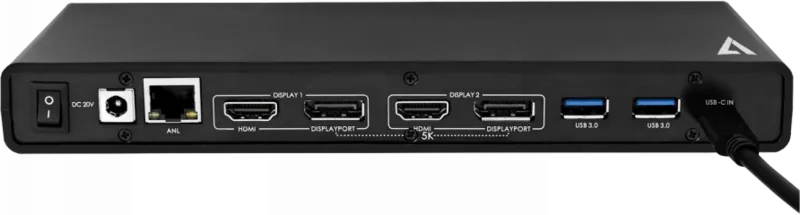
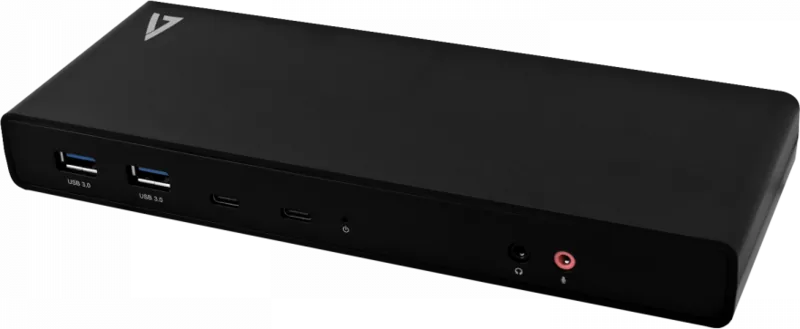
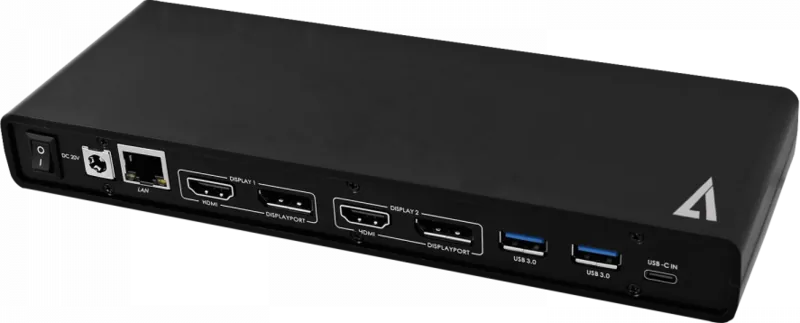
1x RJ-45, 2x USB-C 3.0 (port), 4x USB-A 3.0 (port), 2x HDMI (port), 2x DisplayPort 1.4 (port), 2x audio jack (port, 3.5 mm)
Data transfer
1x RJ-45 (10/100/1000Base-T), 2x USB-C 3.0 (port, 5 Gb/s), 4x USB-A 3.0 (port), 5 Gb/s9 2x HDMI (port, max. 3840x2160), 1x DisplayPort 1.4 (port, max. 2x 4096x2160 or 1x 5120x2880@60Hz), 2x audio jack (port, 3.5 mm)
Power supply
Power is not supplied via host connection, power input (1x barrel plug, 20 V), external power adapter required and included (1x barrel plug, 5 V/4 A/20 W)
Chipset
DisplayLink (video adapter)
Dimensions
8.86x0.98x3.35 in (WxHxD)
Weight
12.77 oz
Case color
black
Compatibility
universal
Special features
Security lock (Kensington Security Slot), mechanical on/off switch
USB notation
Link
Product Description
V7 UCDDS-1E USB-C Dual Docking Station, USB-C 3.0 [Plug] - Read, Download & Print Free
The V7 UCDDS-1E USB-C Dual Docking Station is built for users who need to turn a compatible laptop or desktop into a more capable workstation. Through a single USB-C or USB 3.0 connection, it adds practical access to displays, wired networking, audio equipment, and everyday USB accessories. Its compact profile also makes it a useful choice for home offices, shared desks, and workspaces where cable management matters.
Flexible connectivity for everyday work
The dock provides four USB 3.0 Type-A ports for peripherals such as keyboards, mice, external drives, and other accessories. A USB-C port adds support for modern devices, while Gigabit Ethernet offers a stable wired network alternative to Wi-Fi. Front-mounted headphone and microphone jacks make it easy to connect audio gear for meetings, calls, and media playback.
On the display side, the V7 UCDDS-1E includes both HDMI and DisplayPort outputs. This arrangement supports a dual-monitor workspace and lets users choose the connection that best matches their monitor or projector. HDMI supports resolutions up to 3840 x 2160, while DisplayPort can reach up to 5120 x 2880 under supported conditions. The dock can be configured for extended displays, mirrored screens, or a primary external monitor.
Designed for multi-screen productivity
An extended desktop can help organize applications across multiple displays, keeping communication tools, reference material, and active projects visible at once. Mirror mode is useful when presenting content to another screen, while the primary-display option can help users tailor their desk layout to their workflow. Windows users can also access display choices with the Windows + P shortcut.
The docking station supports compatible Windows 7 SP1 or later, Windows 8, Windows 10, and macOS 10.9 or later systems. DisplayLink software is used for video functionality, so installing the appropriate driver before connecting the dock is recommended. The included USB-C to USB-C cable and USB-A to USB-C cable provide flexibility for compatible host computers.
Practical desk expansion in one unit
With 2.1-channel audio, BC 1.2 charging support, a power switch, and an included AC adapter, this dock combines several desktop essentials in one streamlined device. It measures 255 x 85 x 25 mm and weighs 362 g, giving it a substantial yet space-conscious design. Whether used for focused productivity or a cleaner desktop setup, the V7 UCDDS-1E delivers broad expansion through one host connection.
Notes
- Install the latest DisplayLink driver for the best experience.
- Actual display capability depends on the host computer, operating system, cables, and connected monitors.
- Use the supplied power adapter and keep the unit away from moisture.
Search for 67,706 Manuals online


Type-in Brand or Model