Manual.ly Logo

V7 Professional Wireless Laser Presenter Manual

0.0 · 0 Ratings

PDF manual · 2 Pages

English

M: qwen/qwen3.5-flash-20260224
page

/ 2

Loading...
8f5343394ec30383dfb4da5f086df9d3cd47 page 1
Welcome.
Thanks for choosing this wireless laser presenter. It gives you remote control of your onscreen
presentations with a range of up to 35 feet, perfect for a large conference room. This presenter
supports the most common presentation functions including Slide/Page Up, Slide/Page Down, Start
& Exit Slideshow, and Screen Black. It allows you to control your presentation with one touch comfort
in the palm of your hand, and move around freely. The wireless presenter is also equipped with a high
performance red laser beam to be used as a pointer. It comes with a USB receiver which can also be
used as a USB ash drive to store and transport your presentation.
Please read this User Guide rst for the proper use of this product and keep it for future reference.
Care and Maintenance
• For cleaning, use a soft moist cloth
• Avoid using solvents or abrasive substances
Important safety and health information
•Caution: Laser radiation – do not stare into beam
• Max output: < 1 mW
•Laser Wave Length: 532 NM
• Working Voltage : 2.4-3.0V
• Class II Laser Product
Package contents:
• Wireless 2.4GHz Laser Presenter • USB Receiver with built-in microSD reader
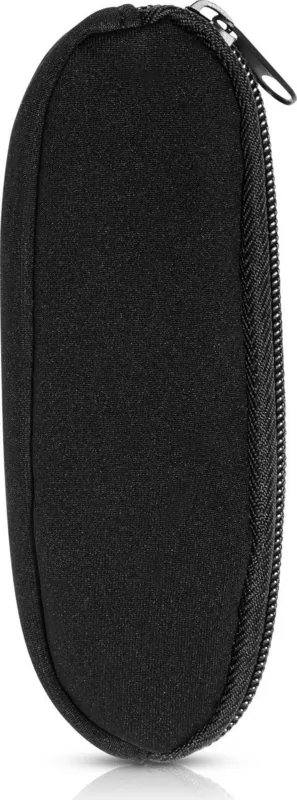
• Presenter case • User Manual • AAA Battery x 2
Minimum System Requirements:
• Windows® 98SE/2000/ME/XP/Vista/7/8 or Higher
Product Features:
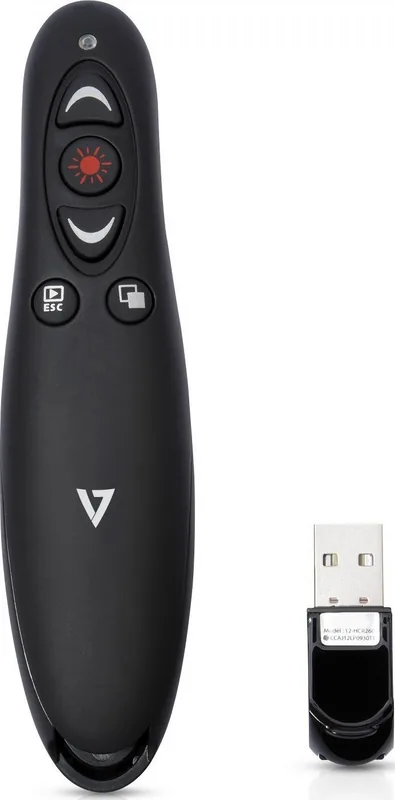
Laser pointer beam
Slide/Page Up
Slide/Page Down
Start & Exit
slideshow
Screen black-out
USB receiver with
built-in microSD
card reader
(plug’n’play 2.4Ghz connection)
Getting Started
Step 1: Inserting the battery
Open the battery cover and insert 2 x AAA batteries (included).
Step 2: Connecting the receiver
Connect the USB connector of the receiver into a USB port on you computer.
Step 3: Conrm connection
System operating system will detect the USB receiver and will automatically install required drivers.
You will see the conrmation in the system tray that the new USB device is ready for use.
Step 4: Open the Powerpoint le and test the key functions
Troubleshooting / FAQ
Question/Issue Possible cause How to resolve
Do I need to install software? No, this is a plug and
play device
Do I need to link ID before rst use? No need
Is it possible to use 2 or more of this Yes
product in a room at the same time?
Remote control malfunction Interfered by other RF signal
Laser pointer and remote Batteries in wrong direction
both malfunction or low battery power
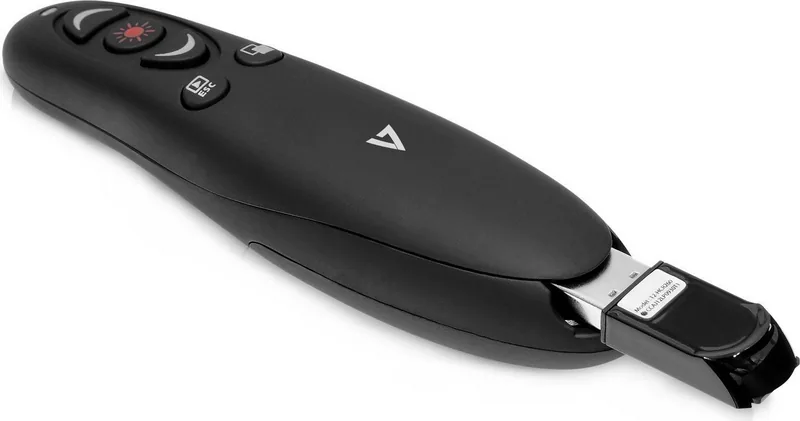
Note: When the receiver is plugged into the presenter, the power and the 2.4Ghz wireless
connection is automatically shut o.
USB receiver is also a Micro SD card reader that converts the USB receiver into a USB Flash
drive, supports up to 32GB of microSD memory card
Safety Notice:
This product complies with FCC, RoHS, WEEE and CE rules.
This product has no serviceable parts.
Specications:
Operating Frequency: 2.4 GHz
Remote range: Up to10 meters
Power: AAA battery
Output power: Under 1mW
Size (Length x Height x Width): 13.3x.3.2x2.8cm
Weight: 37g
WP1000-24G
2.4GHz Wireless Presenter
User Guide
Willkommen.
Vielen Dank, dass Sie sich für diesen Wireless Laser Presenter entschieden haben. Mit ihm können Sie
Ihre Bildschirmpräsentationen fernbedienen. Mit einer Reichweite von bis zu 10 Metern ist er ideal für
große Konferenzräume. Der Presenter unterstützt die gebräuchlichsten Präsentationsfunktionen wie
Folie/Seite auf, Folie/Seite ab, Präsentation starten & beenden und Bildschirm schwarz. Mit ihm
können Sie Ihre Präsentation bequem aus Ihrer Hand heraus per Knopfdruck bedienen. Gleichzeitig
haben Sie volle Bewegungsfreiheit. Der Wireless Presenter besitzt außerdem einen hochwertigen
roten Laser, der sich als Pointer verwenden lässt. Der mitgelieferte USB-Empfänger kann mit einer
MicroSD-Karte auch als USB-Speicherstick verwendet werden, auf dem Sie Ihre Präsentation
speichern und transportieren können.
Bitte lesen Sie sich diese Gebrauchsanweisung vor der Verwendung des Produkts aufmerksam durch
und bewahren Sie sie sorgfältig auf.
Pege und Wartung
• Zur Reinigung ein feuchtes weiches Tuch verwenden.
• Keine Lösungs- oder Scheuermittel verwenden
Wichtige Sicherheits- und Gesundheitshinweise
•Achtung: Laserstrahlung – nicht in den Strahl blicken
•Max. Leistung: < 1 mW
• Laserwellenlänge: 532 nm
•Betriebsspannung : 2,4-3,0 V
•Laserprodukt der Klasse II
Lieferumfang:
• 2,4-GHz- Wireless-Laser-Presenter • USB-Empfänger mit integriertem MicroSD-Kartenleser
• Transportetui • Gebrauchsanweisung • 2 AAA-Batterien
Mindestsystemanforderungen:
• Windows® 98SE/2000/ME/XP/Vista/7/8 oder höher
Produktfunktionen:
Laserpointer
Folie/Seite auf
Folie/Seite ab
Präsentation
starten &
beenden
Bildschirm schwarz
USB-Empfänger mit
integriertem
MicroSD-Kartenleser
(Plug’n’Play, 2,4-GHz-Verbindung)
Erste Schritte
Schritt 1: Batterien einsetzen
Batteriefach önen und die 2 AAA-Batterien
(im Lieferumfang enthalten) einsetzen.
Schritt 2: Empfänger anschließen
USB-Stecker des Empfängers in einen USB-Anschluss Ihres Computers stecken.
Schritt 3: Verbindung bestätigen
Das Betriebssystem erkennt den USB-Empfänger und installiert automatisch die nötigen Treiber.
Das Betriebssystem bestätigt, dass das neue USB-Gerät zur Verwendung bereit ist.
Schritt 4: Powerpoint-Datei önen und wichtigste Funktionen testen
Problemlösung/FAQ
Frage: Mögliche Ursache: Lösung:
Muss ich Software installieren?
Ist es möglich, zwei oder mehr dieser Ja
Geräte gleichzeitig im selben
Raum zu nutzen?
Betriebsstörung der Fernsteuerung Störung durch anderes
RF-Signal
Betriebsstörung von Laserpointer
und Fernsteuerung
Hinweis:
Wenn der Empfänger in den Presenter eingesteckt wird, werden die Stromversorgung und
die 2,4-GHz-Funkverbindung automatisch abgeschaltet.
Der USB-Empfänger ist gleichzeitig ein MicroSD-Kartenleser, so dass der USB-Empfänger
auch als USB-Speicherstick genutzt werden kann. Es werden MicroSD-Speicherkarten bis
32 GB unterstützt.
Sicherheitshinweis:
Dieses Produkt entspricht den FCC-, RoHS-, WEEE- und CE-Vorschriften.
Dieses Produkt enthält keine zu wartenden Teile.
Technische Daten:
Betriebsfrequenz: 2,4 GHz
Reichweite: bis zu 10 Meter.
Strom: AAA-Batterie
Leistung: weniger als 1 mW
Größe (Länge x Höhe x Breite) : 13,3 x 3,2 x 2,8 cm
Gewicht: 37 g
WP1000-24G
Professioneller kabelloser
Presenter mit microSD-Kartenleser
Gebrauchsanweisung
Batterien mit falscher
Polarität eingesetzt oder
niedriger Batteriestand
Nein, dies ist ein
Plug-and-Play-Gerät.
Bienvenue.
Merci d’avoir choisi ce dispositif de présentation laser sans l. Il procure un contrôle à distance de vos
présentations à l’écran avec une portée allant jusqu’à environ 10 mètres (35 pieds), ce qui est parfait
pour une salle de conférence. Cet appareil ore les fonctions de présentation les plus communes y
compris Diapositive/Page Avant, Diapositive/Page Arrière, Débuter et Arrêter le diaporama et Fermer
l’écran. Il vous permet de contrôler votre présentation d’un simple toucher confortable au creux de
votre main et de vous déplacer librement. Le dispositif de présentation sans l est également équipé
d’un pointeur laser rouge de haute performance. Un récepteur USB, pouvant aussi servir de clé USB
avec une carte Micro SD pour entreposer et transporter votre présentation, est fourni.
Veuillez d’abord lire le Guide de l’utilisateur pour utiliser ce produit correctement puis conserver le
pour des références futures.
Entretien
• Pour nettoyer, utiliser un linge doux et humide
• Éviter d’utiliser des solvants ou d’autres substances abrasives
Informations importantes sur la santé et la sécurité
• Avertissement : Rayonnement laser – ne pas xer le faisceau
• Sortie max. : < 1 MW
• Longueur d’onde du laser : 532 nm
• Tension en circuit fermé : 2,4 – 3,0 V
• Produit laser de classe II
Contenu:
• Dispositif de présentation laser sans l 2,4 GHz • Récepteur USB avec lecteur MicroSD intégré
• Étui de transport • Manuel d’instructions • 2 piles AAA
Conguration minimale requise :
• WindowsMD 98SE/2000/ME/XP/Vista/7/8 ou plus récent
Caractéristiques:
Pointeur laser
Diapositive/Page Avant
Diapositive/Page Arrière
Débuter et
Arrêter le
diaporama
Fermer l’écran
Récepteur USB avec lecteur
de carte MicroSD intégré
(Connexion 2,4 GHz prête à l’emploi)
Installation
Étape 1 : Insérer la pile
Ouvrir le couvercle de la pile et insérer deux piles AAA (incluses).
Étape 2 : Connecter le récepteur
Brancher le connecteur USB du récepteur dans un port USB de votre ordinateur.
Étape 3 : Conrmer la connexion
Le système d’exploitation détectera le récepteur USB et installera automatiquement les pilotes requis.
Le système d’exploitation conrmera lorsque le nouvel appareil USB sera prêt à être utilisé.
Étape 4 : Ouvrir un chier PowerPoint et essayer les fonctions de base
Assistance/FAQ
Question : Causes possibles : Solutions :
Est-ce que je dois installer un logiciel?
Est-il possible d’utiliser deux ou plus Oui
de ces appareils à la fois dans
la même salle?
Défectuosité de la télécommande
Défectuosité du pointeur laser et
de la télécommande
Note :
Lorsque le récepteur est branché dans le dispositif de présentation, l’alimentation et la
connexion sans l 2,4 GHz sont automatiquement coupées.
Le récepteur USB sert également de lecteur de carte MicroSD, ce qui le convertit en clé USB
prenant en charge des cartes mémoire MicroSD allant jusqu’à 32 Go.
Avis de sécurité:
Ce produit est conforme aux règlements du FCC, du RoHS, du DEEE et du CE.
Ce produit ne contient aucun élément modiable.
Spécications :
Fréquence de fonctionnement : 2,4 GHz
Portée : Jusqu’à 10 m/35 pi
Puissance : Pile AAA
Puissance de sortie : Moins de 1 MW
Taille (longueur x hauteur x largeur) : 13,3 cm x 3,2 cm x 2,8 cm
Poids : 37 g
WP1000-24G
Dispositif de présentation
professionnel sans l avec
lecteur de carte MicroSD
Guide de l’utilisateur
Piles mal installées ou piles
faibles
Interférences causées par
d’autres signaux RF
Non, cet appareil est prêt à
l’emploi Pas besoin

Chat with your V7 Professional Wireless Laser Presenter manual using AI

Get instant AI answers from your V7 Professional Wireless Laser Presenter manual

Ask anything about the V7 Professional Wireless Laser Presenter. Answers come from this manual, with the pages they are based on.

Ask a Question

0/1000

Do you recommend Professional Wireless Laser Presenter?

Yes No

Frequently Asked Questions

A

No, this is a plug and play device. You do not need to manually install drivers or software. The system operating system will detect the USB receiver and automatically install any required drivers for it.

Is this answer helpful?

A

Yes, it is possible to use two or more of these products in the same room at the same time. However, be aware that malfunction could occur if there is significant interference from other RF signals or if devices are too close together.

Is this answer helpful?

A

Yes, the USB receiver includes a built-in microSD card reader. It can convert into a USB Flash drive to support up to 32GB of microSD memory card capacity for transporting files.

Is this answer helpful?

A

The device is compatible with Windows systems including Windows 98SE/2000/ME/XP/Vista/7/8 or higher. It connects via a standard USB port using a 2.4 GHz wireless frequency for operation.

Is this answer helpful?

A

First, insert the included 2 AAA batteries into the presenter. Next, connect the USB connector of the receiver into an available USB port on your computer. The system will confirm the connection automatically.

Is this answer helpful?

A

Yes, it is a Class II Laser Product with output less than 1 mW. However, caution is advised. Do not stare directly into the laser beam to avoid eye injury. It is safe for pointing at screens only.

Is this answer helpful?

A

When the receiver is plugged into the presenter, the power supply and the 2.4 GHz wireless connection are automatically shut off. You must remove the receiver to use the wireless functions.

Is this answer helpful?

M: qwen/qwen3.5-flash-20260224

Advantages and Disadvantages

Advantages

  • Plug and play operation without software installation
  • USB receiver functions as a MicroSD card reader for storage
  • Long wireless range of up to 35 feet for large rooms
  • Compact and lightweight design for easy portability
  • Screen black-out function to focus audience attention
VS

Disadvantages

  • Limited compatibility primarily listed for Windows systems
  • Laser function deactivates when receiver is plugged in
  • Range may decrease with significant RF interference
  • Battery performance depends on external AAA usage
  • No explicit mention of Mac OS support in documentation
M: qwen/qwen3.5-flash-20260224

Product Specification

Feature

Laser pointer (red), Presentation remote

Buttons

6

Connectivity

Wireless (2.4GHz)

Power Source

2x AAA

Dimensions (WxHxD)

1.26x1.10x5.24in

M: qwen/qwen3.5-flash-20260224

Product Description

Elevate Your Presentation Experience

Welcome to a new era of confidence in public speaking. The V7 Professional Wireless Red Laser Presenter is designed for professionals who demand control and clarity during their presentations. Whether you are addressing a corporate boardroom or a large conference hall, this tool ensures you maintain command over your slides without being tethered to a computer. It empowers you to engage your audience while moving freely around the room without interruption.

Key Features and Connectivity

This presenter offers an impressive wireless range of up to 35 feet, allowing you to step away from the podium. Its ergonomic design fits comfortably in the palm of your hand, ensuring a firm grip and ease of operation. The device comes equipped with a high-performance red laser pointer with a wavelength of 532 NM. This beam helps highlight specific data points on your screen effectively. You gain total control over essential functions like navigating to the next slide, going back to the previous one, starting the slideshow, or blacking out the screen completely to refocus attention on your voice and body language.

Versatile USB Receiver

One of the standout features of this unit is the dual-purpose USB receiver. While it connects wirelessly to your computer to control presentations using a 2.4 GHz frequency, it also functions as a MicroSD card reader. This allows you to store your presentation files directly on the receiver up to 32GB for easy transport. Installation is straightforward as the system operates on a true plug and play basis. There is no need to install additional drivers or software on your Windows operating system. Simply insert the USB receiver into a compatible USB port, and the operating system detects the device automatically. You will see a confirmation in the system tray indicating readiness.

Safety and Physical Specs

Safety is paramount when using lasers. This device is classified as a Class II Laser Product with an output of less than 1 mW at 532 NM. Users should never stare directly into the beam during operation to protect their eyes. For maintenance, cleaning should be done with a soft moist cloth only. Avoid using harsh solvents. The package includes two AAA batteries, a protective case, and a user manual for future reference. It weighs only 37 grams and measures roughly 13.3 cm in length. Be aware that when the receiver is plugged into the presenter, the wireless connection and power shut off automatically. This ensures efficient power management during transit or storage.

This tool is compatible with Windows systems ranging from 98SE upwards. It is built for longevity and reliability, helping you deliver seamless presentations without technical glitches. If issues arise, check battery orientation or other RF signals. It is an essential tool for educators, corporate trainers, and speakers seeking professional results.

M: qwen/qwen3.5-flash-20260224

© Copyright 2026 Manual.ly