
V7 MW150BT Manual
PDF manual · 1 Pages
English


Quick check
Incorrect answer, please try again.
Chat with your V7 MW150BT manual using AI
Get instant AI answers from your V7 MW150BT manual
Ask anything about the V7 MW150BT. Answers come from this manual, with the pages they are based on.
Ask a Question
Do you recommend MW150BT?
Yes NoFrequently Asked Questions
Yes, it integrates well with Chromebook environments, but Google LLC is not responsible for operation.
Is this answer helpful?
Usually minutes using on-screen instructions for Bluetooth wireless connection completion.
Is this answer helpful?
No, it uses Bluetooth for direct connection to reduce clutter.
Is this answer helpful?
It serves as a comprehensive guide for troubleshooting and safety requirements.
Is this answer helpful?
Yes, the compact design fits in bags easily for frequent travelers.
Is this answer helpful?
English, German, French, Spanish, and Italian guides are included.
Is this answer helpful?
Yes, standard Bluetooth protocols apply for most operating systems.
Is this answer helpful?
Advantages and Disadvantages
Advantages

- Compact portable design fits easily in bags
- Robust Bluetooth wireless technology included
- Supports multiple language installation guides
- Compatible with Chromebook environments
- Easy setup with on-screen instructions
Disadvantages

- Black color option is the only variant available
- Requires reading manual for troubleshooting
- No USB dongle provided for connection
- Google disclaimer regarding safety exists
- Battery life depends on usage frequency
Product Specification
Compatibility
Both hands (left hand, right hand)
Buttons
3 (total), 2 (main), 1 (scroller click)
Scroll Wheel
1x 2-way
Sensor
Red LED/IR
Resolution
1200 dpi, reducible to 1000 dpi
Lighting
N/A
Connectivity
Wireless (Bluetooth 5.2)
Power Source
2x AAA
Dimensions (WxHxD)
2.28 x 1.57 x 3.98 in
Approximate Volume
3.72 cu in (estimated shape)
Weight
0.20 lbs
Color
Solid color, black, logo
Features
Reduced click noise
Product Description
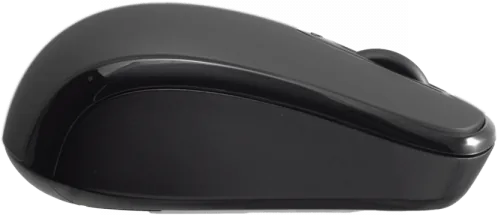
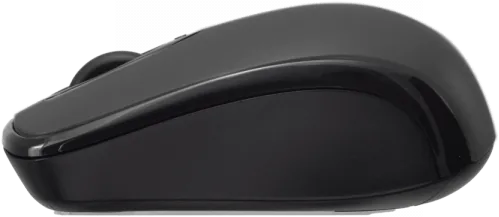
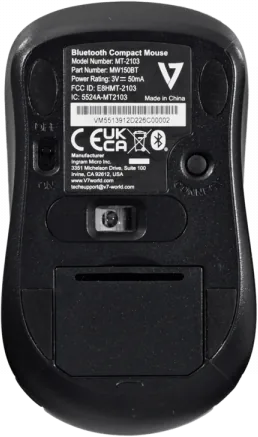
Discover the V7 Bluetooth Compact Mouse black
In today's fast-paced digital environment, productivity hinges on the reliability of your peripherals. The V7 Bluetooth Compact Mouse black stands out as a sleek solution designed for modern professionals and casual users alike. Its compact form factor fits effortlessly into bags and pockets, making it the ideal companion for frequent travelers and remote workers who demand mobility without sacrificing performance. This device is engineered to streamline your workflow while maintaining a clean desktop setup.
When setting up your new device, the process is designed for simplicity across different regions. You will be guided through the initial steps using clear instructions visible on your screen. This seamless pairing process ensures that you spend less time configuring and more time creating. The device utilizes robust Bluetooth technology to maintain a stable connection across various operating systems. Unlike wireless options that require dongles, this mouse connects directly to your computer via Bluetooth, reducing clutter and potential points of failure. The installation supports multiple languages, ensuring users from different backgrounds can follow along without confusion.
Compatibility and Usage
Many users integrate their tools with Google Chromebook environments. It is important to note that Google LLC owns the trademarks associated with Chromebook hardware and badges. Google is not liable for the operation of this product or its compliance with safety requirements. However, the integration remains smooth for most standard tasks. Users should refer to the Bluetooth Manual for detailed troubleshooting if connection issues arise during setup. This manual serves as a comprehensive guide to maximize the lifespan and performance of the unit. Understanding the manual helps resolve quick installation hurdles effectively.
Global Accessibility and Design
The product packaging often includes guides in English, German, French, Spanish, and Italian. This indicates a commitment to global accessibility and support for international markets. The matte black finish provides a professional aesthetic that suits any workspace. It avoids fingerprints better than glossy alternatives while maintaining a lightweight build. The ergonomic shape reduces fatigue during extended use sessions. Whether you are coding, writing reports, or browsing the web, the precision tracking supports accuracy.
Why Choose V7 Bluetooth
Selecting the right peripheral makes all the difference. The V7 Bluetooth Compact Mouse black offers a balance of portability and power. You can carry it everywhere without the weight of extra cables. The battery life is optimized for daily commute sessions. You do not need to search for drivers frequently with this setup. It is a top choice for tech enthusiasts everywhere.
Critical Maintenance Notes
Always ensure your device firmware is updated before pairing. Check battery levels frequently to avoid unexpected pauses. Refer to the quick installation guide for specific safety protocols. Clean the sensor regularly to maintain optimal tracking performance. This attention to detail ensures longevity. Compliance with safety requirements is key.
Search for 67,706 Manuals online


Type-in Brand or Model